
Analytics Database: From Definition to Evaluation Criteria

An analytics database stores and processes data for read-heavy analytical workloads, including BI dashboards, recurring reports, forecasting, and complex SQL analysis. It differs from a transactional database because it optimizes scans, joins, aggregations, and concurrency rather than short inserts and updates.
Data teams use analytics databases when operational systems or general-purpose databases cannot maintain query performance under analytical workloads. Common workloads include business intelligence, financial reporting, customer analytics, operational analytics, embedded analytics, and real-time analytics.
Many analytics databases use columnar storage, compression, parallel execution, and query optimization to reduce latency across large datasets. They help teams maintain query performance as data volume, user concurrency, and reporting complexity increase.

Try Exasol Personal for Free
Run real workloads at full Exasol performance.
What Is an Analytics Database?
An analytical system supports decision-oriented queries over historical, operational, or aggregated data. Its purpose is to help teams examine patterns, compare performance, and run calculations across large result sets.
This category sits on the analytical side of database types, often described as OLAP. Transactional systems, or OLTP systems, handle operational records such as orders, payments, account changes, and inventory updates. Analytical systems serve a different query pattern: fewer writes, larger scans, more joins, and more aggregation.
The terms analytic database, analytical database, and analytics DB usually refer to the same category. The wording changes by vendor, analyst, or documentation style, but the underlying workload focus remains analytical query processing.
Why Teams Use Analytics Databases
Reporting problems often appear as slow dashboards, long-running SQL queries, overloaded production systems, or inconsistent performance during peak usage. These symptoms usually point to a workload mismatch: transactional or general-purpose systems are handling analytical queries they were not designed to run.
An analytics database separates read-heavy analysis from transaction processing. This separation protects operational systems from expensive scans and gives analysts a system designed for joins, aggregations, and concurrent BI access.
Common use cases include recurring reports, executive dashboards, financial analysis, customer segmentation, operational monitoring, and embedded analytics. These workloads need predictable query performance because users often run similar analyses across growing data volumes.
A shared analytical layer gives BI tools, notebooks, applications, and reporting workflows a consistent query endpoint. This reduces extract-based workflows and gives data teams one system to tune, govern, and monitor for analytical access.
How Analytics Databases Work
Analytics databases process read-heavy workloads by reducing the amount of data each query scans and distributing execution across available compute resources. Analytical database architecture combines storage design, query optimization, parallel processing, and workload controls to reduce scan time and manage concurrency.
Production analytics environments rarely run one query pattern. The database layer has to support dashboards, reports, applications, and exploratory SQL with predictable concurrency, governed access, and integration into the existing data stack.
Florian Wenzel, VP of Product, Exasol
Columnar storage
Columnar storage organizes data by column rather than by row. Analytical queries often need a subset of columns across many rows, so columnar layouts reduce unnecessary reads. Storing similar values together also improves compression efficiency.
For example, a revenue dashboard may query date, region, product category, and transaction value without reading every field in the transaction table. A columnar engine can scan only the columns needed for the aggregation.
Parallel execution
Parallel execution splits query work across CPU cores, nodes, or partitions. This model helps the database process scans, joins, and aggregations across large datasets without relying on a single execution thread.
MPP architectures use this pattern across a distributed cluster. Each node processes part of the workload, and the system combines partial results into the final query output.
Query optimization
A query optimizer determines how the system should execute SQL. It can choose join order, access paths, filter placement, and aggregation strategy based on table statistics and available resources.
For analytical workloads, optimization matters because small execution-plan changes can increase memory use, I/O, and runtime for large scans and multi-table joins.
Workload management
Workload management controls how compute, memory, and concurrency are allocated across users and queries. It helps prevent one expensive dashboard, report, or ad hoc query from consuming resources needed by other workloads.
Teams use workload controls to separate interactive BI queries from batch jobs, scheduled reports, and exploratory analysis. This lets architects reserve resources for interactive users while scheduled jobs continue in controlled queues.
Analytics Database vs. Transactional Database
Analytics databases and transactional databases support different workload patterns. Analytical systems process read-heavy queries across large datasets. Transactional systems process frequent writes, updates, deletes, and point lookups for operational applications.
| Area | Analytics Database | Transactional Database |
|---|---|---|
| Primary workload | Analytical queries, reporting, BI, forecasting | Inserts, updates, deletes, and point lookups |
| Query pattern | Large scans, joins, aggregations, and filters | Short transactions against specific records |
| Optimization goal | Reduce query latency under analytical workloads | Maintain transaction speed and consistency |
| Common architecture | Columnar storage, compression, and parallel execution | Row-based storage and transaction logging |
| Typical users | Analysts, BI teams, data engineers, and applications | Application users, operations teams, and services |
| Common use cases | Dashboards, financial reporting, customer analytics, and embedded analytics | Orders, payments, account updates, inventory changes, and bookings |
A transactional database can support reporting when query volume, data size, and concurrency remain low. Performance problems appear when analytical queries compete with operational transactions for CPU, memory, I/O, or locks.
An analytics database separates these workloads. Data teams can run complex SQL, recurring reports, and BI dashboards without adding expensive scans to production systems.
For a broader comparison of operational and analytical systems, see our guide to data warehouse vs database.
Analytics Database vs. Data Warehouse vs. Data Lakehouse
Analytics databases, data warehouses, and data lakehouses all support analytical workloads, but they play different roles in a data architecture. The difference is not only where data sits. It is also how teams store, process, govern, and query that data.
| Concept | Main Role | Best Fit |
|---|---|---|
| Analytics database | Processes analytical queries with low-latency execution | BI, reporting, complex SQL analysis, and embedded analytics |
| Data warehouse | Stores modeled, governed data for enterprise reporting | Structured reporting, compliance, and shared business metrics |
| Data lake | Stores raw or semi-structured data at scale | Data exploration, machine learning inputs, and flexible storage |
| Data lakehouse | Combines lake storage with warehouse-style management | Mixed structured and semi-structured analytics |
| Transactional database | Processes operational transactions | Orders, payments, account changes, inventory, and bookings |
Data warehouses store curated, structured data for BI and reporting. Data lakes store raw, semi-structured, or unstructured data for flexible storage, machine learning, streaming, and exploration. The distinction between a data lake vs. data warehouse affects where analytical data is prepared, governed, and queried.
A data warehouse often acts as the central repository for structured analytical data. An analytics database focuses on query execution for analytical workloads, especially where teams need faster dashboards, complex SQL, or higher concurrency.
A lakehouse can support broader data storage and processing patterns. Teams may still use a dedicated analytical engine when BI tools, embedded analytics, or user-facing reports require lower query latency than the warehouse or lakehouse can provide.
Try Exasol Personal for Free
Run real workloads at full Exasol performance.
Common Analytics Database Use Cases
Analytics databases support use cases that depend on large scans, joins, aggregations, and recurring analysis. These use cases often connect to BI tools, reporting systems, data applications, or analyst workflows.
Business intelligence and reporting
BI teams use analytics databases for dashboards, scheduled reports, KPI tracking, and executive reporting. These queries often repeat throughout the day and need stable response times under concurrent access.
Spread Group increased reporting speed by 164× with Exasol and reduced annual costs by six figures.
Customer analytics and personalization
Customer analytics includes segmentation, cohort analysis, lifetime value modeling, targeted campaigns, and personalization inputs. These queries often join behavioral, transactional, and demographic data across multiple sources.
Monsoon Accessorize reduced report runtimes from 18 hours to minutes. The same implementation supported customer segmentation, targeted campaigns, real-time inventory tracking, and personalized customer experiences.
Operational analytics
Operational analytics tracks business processes such as inventory, logistics, supply chain, service performance, and manufacturing output. Teams use these analyses to detect bottlenecks, monitor trends, and compare performance across regions or business units.
Apotek 1 uses Exasol for promotional campaign analysis, inventory management, stockout monitoring, and analytics across more than 450 pharmacies. The company achieved 10–100× faster query performance for complex analysis.
Healthcare analytics
Healthcare analytics supports reporting, operational monitoring, quality analysis, and patient-care decision support. These use cases often involve large data volumes, protected health information, access controls, audit requirements, and time-sensitive reporting.
Piedmont Healthcare used Exasol to analyze 1.5 trillion data points and reported a 10–1,000× performance improvement over SQL Server workloads. The organization also reduced a single-table data mart refresh from six hours to six minutes.
Embedded analytics
Embedded analytics delivers reports, dashboards, or metrics inside internal applications or customer-facing products. These use cases need predictable latency because application users expect interactive response times.
A SaaS platform, for example, may expose customer-facing dashboards that query usage, revenue, or operational metrics from an analytical backend.
Real-time and near-real-time analytics
Real-time and near-real-time analytics process recent data with low delay. Common use cases include live dashboards, operational monitoring, IoT analytics, fraud detection, and event-driven personalization.
bank99 reduced daily data load time from six hours to less than 10 minutes, supporting real-time reporting and faster data availability.
Real-Time Analytics Databases
A real-time analytics database processes recent data with low delay so teams can query current operational conditions. The system must ingest, process, and expose data quickly enough for time-sensitive decisions.
Real-time analytics differs from batch analytics in latency requirements. Batch analytics may refresh data hourly, daily, or after scheduled pipeline runs. Real-time and near-real-time systems reduce that delay for use cases such as live dashboards, fraud detection, operational monitoring, IoT analytics, and personalization.
Architecture depends on the data source and latency target. A real-time setup may combine event streams, change data capture, streaming ingestion, and an analytical engine that supports concurrent reads. Change data capture can feed lower-latency analytical systems by converting committed database changes into event streams for downstream processing. Teams still need governance, workload controls, and query optimization because low-latency data does not remove analytical complexity.
Real-time processing is not required for every analytical workload. Scheduled reporting, monthly financial analysis, and historical trend analysis often work well with batch or near-real-time pipelines. Teams should use real-time architecture when delayed data creates operational risk, missed revenue, or poor user experience.
What Makes a Good Analytics Database?
A good analytics database matches the analytical workload, operating model, and governance requirements it needs to support. Architects should evaluate query patterns, data volume, latency, concurrency, workload controls, integration points, security, and operational effort before selecting a platform.
Analytical query performance
Analytical workloads often include large scans, multi-table joins, aggregations, and filters. The database needs an execution model that can process these queries without pushing excessive load onto operational systems.
Performance should be evaluated under realistic data size, concurrency, and query complexity. Single-query benchmarks do not always reflect production BI, embedded analytics, or AI-assisted analytics workflows.
Scalability and concurrency
Analytics platforms need to handle growing data volumes and concurrent users. Database scalability affects how the system maintains query performance as data size, user concurrency, and workload complexity increase. A dashboard used by 10 analysts creates a different load profile than a customer-facing reporting feature used by thousands of users.
Concurrency should be evaluated with realistic query mixes. Production environments often combine dashboards, scheduled reports, ad hoc SQL, embedded analytics, AI applications, and application-driven requests.
Workload management
Workload management controls how compute, memory, and concurrency are allocated across users, teams, and query types. It helps prevent one expensive query, dashboard, AI application, or batch job from consuming resources needed by interactive workloads.
Architects should evaluate queueing, prioritization, resource groups, query limits, and monitoring. These controls help teams separate BI dashboards, scheduled jobs, exploratory analysis, AI-assisted analytics workflows, and application workloads without creating separate database environments for each pattern.
SQL compatibility
SQL compatibility matters because analysts, data engineers, BI tools, semantic layers, and AI-assisted analytics workflows often depend on SQL access. Strong SQL support reduces migration friction and helps teams reuse existing skills, models, and reporting workflows.
SQL support also affects integration with downstream analytics tools. BI platforms, modeling layers, reporting workflows, and natural-language analytics interfaces usually expect reliable SQL behavior across joins, aggregations, filters, and window functions.
Integration with the data stack
The database should connect to the tools already used for ingestion, modeling, orchestration, BI, AI-assisted workflows, and governance. Common integration points include ETL and ELT tools, BI platforms, notebooks, data catalogs, orchestration tools, semantic layers, and cloud storage.
Integration matters because analytics databases rarely operate as isolated systems. They usually sit between data sources, transformation pipelines, semantic layers, dashboards, applications, AI-assisted interfaces, and governance processes.
Security, governance, and sovereignty
Analytics databases need access controls, role management, auditability, and data protection features. These controls help teams expose analytical data to more users, tools, and AI systems without losing control over permissions, compliance, and operational risk.
Data sovereignty affects where analytical data can be stored, processed, accessed, and audited across cloud, hybrid, or regulated environments. Teams need to control where data runs, which infrastructure processes it, and how governance policies apply across environments.
Operational fit
The platform should fit the team’s operating model. Architects should evaluate administration effort, monitoring, scaling behavior, backup and recovery processes, upgrade paths, and support requirements.
Operational fit matters because analytical systems become shared infrastructure. A platform that is difficult to govern, tune, or integrate can slow delivery even when query performance is strong.
Faster to production for analytics and AI workloads
Analytics and AI workloads often move from prototype to production through multiple systems, teams, and governance checks. A good analytics database should support repeatable deployment patterns, integration with existing tools, workload controls, monitoring, and governance checks.
Faster to production does not only mean faster development. It means teams can validate, operationalize, govern, and scale analytical or AI-assisted workloads without redesigning the data architecture for each new use case.
Try Exasol Personal for Free
Run real workloads at full Exasol performance.
How to Evaluate Analytics Database Software
Analytics database software should be evaluated against the workload it will run in production. A platform that performs well for isolated queries may behave differently under concurrent dashboards, scheduled jobs, embedded analytics, and AI-assisted analytics workflows.
Start with the query profile. Review the largest tables, common joins, aggregation patterns, refresh frequency, concurrency requirements, and latency targets. This gives architects a baseline for testing performance under realistic conditions.
Evaluate how the platform fits the existing data stack. The database should integrate with ingestion pipelines, transformation tools, orchestration systems, BI platforms, semantic layers, notebooks, data catalogs, and governance processes.
Governance requirements shape deployment, access, audit, and operational controls. Teams need to assess access controls, auditability, deployment options, backup and recovery processes, workload isolation, and data sovereignty requirements before choosing a platform.
| Evaluation Area | What to Assess |
|---|---|
| Query performance | Joins, aggregations, filters, scans, and window functions under realistic data volumes |
| Concurrency | Dashboards, scheduled jobs, embedded analytics, ad hoc SQL, and AI-assisted workflows running at the same time |
| Workload management | Queueing, prioritization, query limits, resource groups, and monitoring |
| SQL compatibility | Support for BI tools, semantic layers, existing models, and analyst workflows |
| Data stack integration | Fit with ingestion, transformation, orchestration, cataloging, and governance tools |
| Sovereignty and governance | Control over data location, access policies, auditability, and regulated environments |
| Operational fit | Administration effort, deployment model, monitoring, scaling behavior, upgrades, and support |
| Faster to production | Support for repeatable deployment patterns, integration, monitoring, workload controls, and governance checks |
A proof of concept should test production-like conditions, not only vendor-provided sample queries. Use representative data, real BI dashboards, concurrent users, and the slowest recurring reports. The proof of concept should show whether the platform meets performance, governance, and operational requirements under the same workload conditions. Teams can also review Exasol performance testing for an example of open benchmark methodology, including raw query timings, benchmark configuration, hardware details, and setup files.
Analytics Database Architecture
Analytics database architecture connects data sources, ingestion processes, analytical storage, query execution, and downstream consumption layers. The design depends on latency targets, data volume, governance requirements, workload concurrency, and the tools that need query access.
A typical database architecture includes five layers:
| Layer | Role |
|---|---|
| Data sources | Operational databases, SaaS applications, event streams, files, and external systems |
| Ingestion | Batch pipelines, streaming ingestion, change data capture, ETL, or ELT |
| Analytics database | Storage, processing, query optimization, concurrency controls, and SQL execution |
| Consumption layer | BI tools, semantic layers, notebooks, applications, and AI-assisted analytics workflows |
| Governance layer | Access controls, audit logs, data lineage, workload policies, and deployment controls |
Data usually enters the analytical environment through batch, streaming, or change data capture pipelines. Batch pipelines work for scheduled reporting and historical analysis. Streaming and change data capture support lower-latency use cases where teams need to query recent operational data. In architectures that use a medallion pipeline, upstream data contracts and transformation rules help prepare analytics-ready data before it reaches the analytics database.
The analytics database stores and processes data for query-heavy access. Columnar storage, compression, parallel execution, and workload controls help the system handle large scans, joins, aggregations, and concurrent users.
The consumption layer exposes analytical data to people, tools, and applications. BI dashboards, reporting workflows, notebooks, semantic layers, and AI-assisted interfaces all depend on consistent query access and governed data definitions.
Governance spans the full architecture. Teams need to control who can access data, where processing occurs, which workloads receive priority, and how analytical activity is audited.
Data mesh principles can also influence analytical architecture when teams decentralize ownership while keeping shared governance and platform controls.
Analytics Database Examples
Analytics databases can take several architectural forms. The right type depends on query latency, data volume, deployment model, workload concurrency, and governance requirements.
Columnar analytics databases
Columnar analytics databases store data by column rather than by row. This design works well for analytical queries that scan a limited set of columns across many records, such as revenue by region, customer retention by cohort, or inventory by location.
MPP databases
Massively parallel processing databases distribute query execution across multiple nodes or cores. Each node processes part of the workload, and the system combines partial results into a final result set.
MPP architecture fits analytical workloads with large scans, complex joins, and high concurrency. It also helps teams scale query processing without relying on one server to handle every operation.
Cloud analytics databases
Cloud analytics databases run analytical workloads on cloud infrastructure. Teams use them for elastic capacity, managed operations, or integration with cloud storage and data services.
Cloud deployment does not remove architecture decisions. Teams still need to evaluate data sovereignty, workload isolation, governance, performance under concurrency, and cost behavior.
Real-time analytics databases
Real-time analytics databases process recent data with low delay. They support use cases such as live dashboards, fraud detection, operational monitoring, IoT analytics, and event-driven personalization.
These systems often combine streaming ingestion, change data capture, and an analytical query engine. The architecture depends on latency requirements and how much transformation must happen before users query the data.
Embedded analytics databases
Embedded analytics databases support reporting or analytics inside applications. They need predictable query latency because application users expect interactive response times.
This type of workload often creates higher concurrency than internal BI. Architects should test embedded analytics with realistic user volumes, query patterns, and access controls.
When to Use an Analytics Database
Use an analytics database when analytical queries exceed the performance, concurrency, or governance limits of the current architecture. These requirements appear in reporting systems, BI tools, embedded applications, and recurring analytical workflows.
Use this type of system when teams need to:
- Run complex SQL queries across large datasets
- Support dashboards with predictable response times
- Serve many concurrent BI users or application users
- Separate reporting workloads from transactional systems
- Analyze historical and recent operational data
- Reduce long-running report refreshes
- Support embedded analytics or customer-facing reporting
- Apply consistent governance to analytical access
These requirements often appear together. For example, a BI team may need faster dashboard response times while data engineers need to reduce load on production databases. A dedicated analytical system gives both teams a shared query layer designed for read-heavy access.
AI-assisted analytics workflows need an analytics database when they require governed access to structured data with consistent permissions, lineage, and query controls. The database layer needs to support those controls before teams expose analytical data to AI applications, embedded analytics, or customer-facing workflows.
When an Analytics Database May Not Be the Right Fit
An analytics database is not required for every data workload. Some systems need transaction integrity, low-latency writes, or simple lookup performance more than analytical query speed.
A transactional database is usually the better fit for applications that handle orders, payments, account updates, bookings, or inventory changes. These systems depend on consistent writes, transaction isolation, and point lookups against current records.
A key-value store or document database may fit better when the application needs simple access patterns, flexible document structures, or millisecond lookups by key. These systems are not designed to replace analytical engines, but they can support operational workloads with different requirements.
Teams may also avoid a dedicated analytical database when datasets are small, concurrency is low, or scheduled reports already meet latency requirements. Adding a specialized system creates operational overhead, so the performance or governance requirement should justify the architecture.
Why Exasol for Analytics Databases?
Exasol focuses on analytical workloads that require SQL execution, controlled deployment, and consistent performance under concurrency. It supports BI, reporting, embedded analytics, and AI-assisted analytics workflows that depend on governed data access.
Sovereignty for analytical data
Analytics workloads often involve regulated, sensitive, or business-critical data. Exasol’s sovereignty centers on control over deployment, access, and governance across analytical environments.
This matters when teams operate across cloud, hybrid, or controlled infrastructure. Data sovereignty (and AI) affects storage location, processing location, auditability, and access control.
Concurrency for BI, applications, and AI-assisted analytics
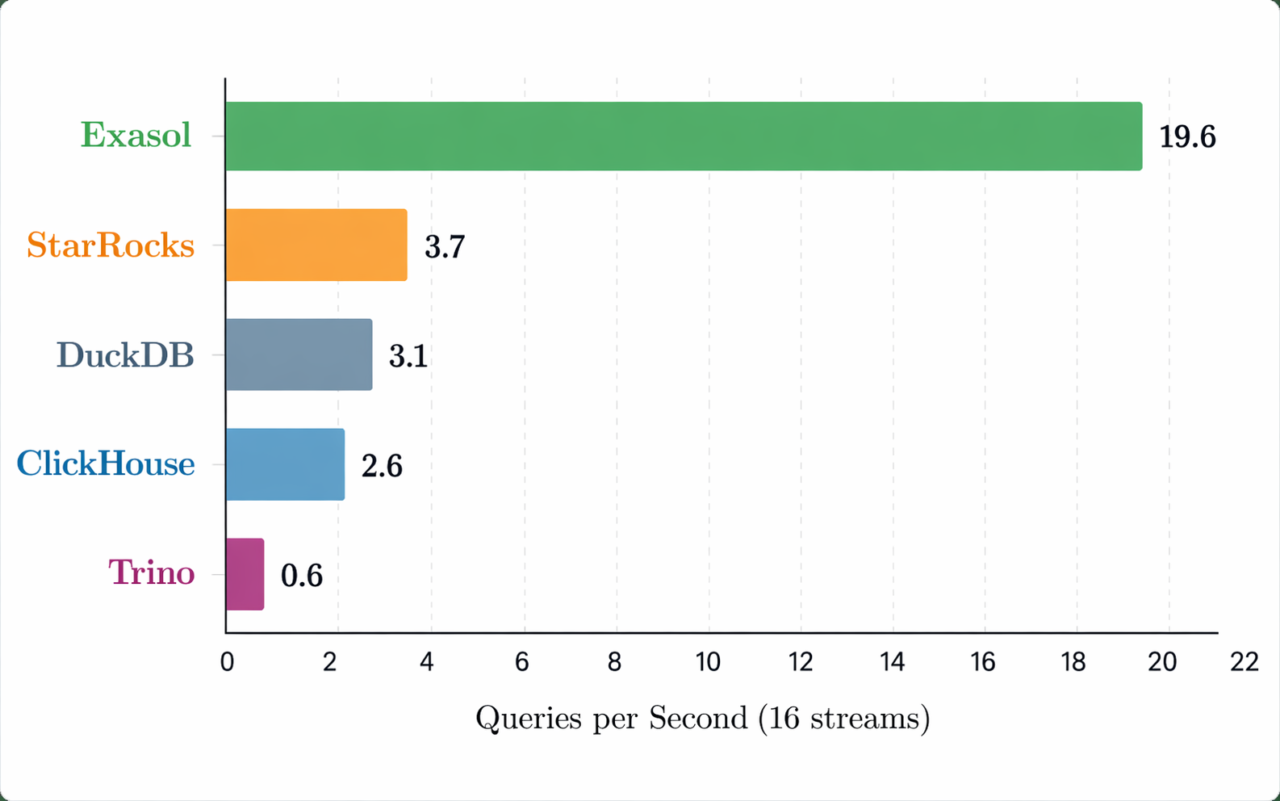
Analytical systems need to support many users and workloads at the same time. Common production requirements (dashboards, scheduled reports, ad hoc SQL, embedded analytics, and AI-assisted workflows) often compete for resources.
Concurrency matters because analytical systems rarely serve one query pattern. Architects should evaluate whether one analytical layer can support mixed query patterns before creating separate environments for each workload.
Faster to production for analytics and AI workloads
Analytics and AI workloads need more than prototype performance. Teams must operationalize data pipelines, govern access, monitor usage, and connect the database to existing BI, application, and data engineering tools.
Fit within analytical database architecture
Exasol can act as the analytical execution layer for teams that need SQL access, governed data usage, and performance under concurrent analytical workloads. It can support reporting, embedded analytics, and analytical workloads that depend on controlled data access.
Teams should evaluate Exasol against their query profiles, data volumes, governance model, deployment requirements, and production workload mix. That evaluation should include representative dashboards, concurrent users, operational controls, and integration with the existing data stack.
An analytics database is a database system designed for read-heavy analytical queries. It supports workloads such as BI reporting, dashboards, forecasting, customer analysis, financial analysis, and complex SQL queries over large datasets.
The four common types of data analytics are descriptive, diagnostic, predictive, and prescriptive analytics.
Descriptive analytics explains what happened.
Diagnostic analytics examines why it happened.
Predictive analytics estimates what may happen next.
Prescriptive analytics recommends what action to take.
Analytics databases support these methods by processing historical, operational, and aggregated data for analysis.
The best database for analytics depends on workload requirements. Architects should evaluate query complexity, data volume, concurrency, latency, SQL compatibility, integration requirements, governance, sovereignty, and operational fit.
A proof of concept should use representative data, real dashboards, concurrent users, and recurring reports. Isolated benchmark queries do not always reflect production BI, embedded analytics, or AI-assisted analytics workflows.
An analytical database can be a columnar database, MPP database, cloud analytics database, real-time analytics database, or embedded analytics database. These systems process read-heavy workloads such as dashboards, reports, aggregations, joins, and large-scale SQL analysis.
Exasol is an example of an analytical database platform used for SQL-based analytics, BI reporting, and analytical workloads that require governed access and concurrency.
Analytics DB is a shortened form of analytics database. Technical teams may use the abbreviation when referring to the database layer that supports reporting, BI, embedded analytics, or analytical applications.
Database analytics refers to the process of analyzing data stored in or delivered through database systems. It often involves SQL queries, aggregations, joins, dashboards, reports, and analytical models.
An analytics database optimizes read-heavy queries, large scans, joins, aggregations, and concurrent analytical access. A transactional database optimizes inserts, updates, deletes, point lookups, and transaction consistency for operational applications.
No. A data warehouse stores modeled, governed data for enterprise reporting. An analytics database focuses on analytical query execution and may serve as the processing layer for BI, reporting, embedded analytics, or other analytical workloads.
A real-time analytics database processes recent data with low delay. It supports use cases such as live dashboards, operational monitoring, fraud detection, IoT analytics, and event-driven personalization.
Teams should evaluate query performance, concurrency, workload management, SQL compatibility, data stack integration, governance, sovereignty, operational fit, and production deployment requirements. The proof of concept should use representative data, real dashboards, concurrent users, and recurring reports.