
Database for AI Workloads: What It Is and When to Use One

A database for AI workloads provides the data and query layer that AI agents, applications, and data teams use to access and analyze enterprise data.
SQL often remains central to this role. It allows systems to filter, join, aggregate, and transform structured data before passing results to a model, application, or user. AI agents can use defined database interfaces to retrieve information or execute operations permitted for the connection.
The supported AI capabilities depend on the database and its integrations. Some databases can perform feature preparation, model training, or inference through SQL functions, embedded runtimes, or integrated model services. Others prepare and retrieve data while external platforms handle model execution.
A database for AI workloads can support part of an AI architecture without managing the entire AI lifecycle. Model development, workflow orchestration, and specialized retrieval may remain in separate systems.

Try Exasol Personal for Free
Run real workloads at full Exasol performance.
Why AI Workloads Change Database Requirements
AI workloads can increase query volume, concurrency, and variability. An AI agent may run several related queries, use earlier results to refine its next step, and retrieve additional detail before producing an answer. One user request can generate multiple database interactions.
Those interactions may overlap across agents, applications, and users. The database must process concurrent analytical queries while maintaining the required response times for dashboards, reports, and other shared workloads.
Agents that generate SQL need current information about schemas, tables, columns, data types, and relationships. This metadata reduces the risk of queries that reference nonexistent objects or use incorrect joins. Database access controls restrict unauthorized operations.
AI systems should use the database’s existing identity and access controls. Where auditing is required, teams also need logs of the queries and operations executed through agents or connected applications.
Latency requirements vary by workload. Interactive analytics, personalization, and operational scoring may require fast responses. For workloads that repeatedly access active datasets, an in-memory database can reduce disk I/O and lower query latency. Batch feature preparation and model development can usually tolerate longer processing times.
Teams may also separate agent-generated queries from reporting, data loading, and other shared workloads. Resource limits, workload groups, or dedicated capacity can reduce contention as query volume changes.
Common AI Database Workloads
Common AI workloads for analytical databases include text-to-SQL, feature engineering, model scoring, anomaly detection, text analytics, document intelligence, and AI-assisted BI. Depending on its capabilities, the database may execute SQL, transform model inputs, run scoring functions, or return data to an external AI service.
AI Agents and Text-to-SQL
AI agents and BI copilots can translate natural-language questions into SQL and query structured business data. The connected system reads schema metadata, while the database executes SQL under the configured identity’s permissions. One way to provide this database context is through Model Context Protocol (MCP). It lets an agent use defined tools to inspect current metadata and execute permitted queries instead of relying on a static schema description.
Physical table and column names often differ from business terminology. Semantic definitions, database instructions, and verified queries can define metrics, relationships, and approved query patterns.
Feature Engineering
Feature engineering transforms raw data into inputs that a machine learning model can use. SQL can calculate aggregates, rolling windows, ratios, lag values, and historical behavior from existing data.
Some databases run Python or R, expose built-in machine learning functions, or create models through SQL. In other architectures, the database prepares feature data for a separate machine learning platform.
Model Scoring and Real-Time Predictions
Model scoring applies a trained model to new data. Examples include churn probability, fraud risk, demand forecasts, customer scores, and recommendation rankings.
Scoring can run through SQL functions, an embedded runtime, or an external model endpoint. Some applications score new transactions or user requests as they arrive, supporting use cases such as personalization and fraud checks. When predictions combine recent activity with historical records, a real-time analytics database can provide the query layer for both.
Anomaly Detection
Anomaly detection identifies values or patterns that differ from an expected baseline. Teams apply it to transactions, system metrics, manufacturing data, and time series.
Depending on its capabilities, the database can calculate statistical baselines, execute a supported model, or prepare data for an external detection service. Results can feed fraud reviews, quality checks, or operational alerts.
Text Analytics
Text analytics extracts structured information from reviews, support tickets, survey responses, and documents. Common tasks include classification, sentiment analysis, entity extraction, and topic modeling.
Built-in functions or integrated models can process text and store the output alongside customer, product, or transaction data. Teams can then compare text results with measures such as sales, retention, product usage, or support volume.
Document Intelligence
Document intelligence converts unstructured files, such as invoices, contracts, and statements of work, into structured data. AI models extract fields from each document. The database can store the results and compare them with existing enterprise records.
The workflow can assign confidence scores, approve high-confidence matches, and route exceptions for human review. Source references and lineage records can allow teams to trace extracted values back to the original document for auditing and regulatory checks.
Try Exasol Personal for Free
Run real workloads at full Exasol performance.
AI-Assisted BI and Reporting
AI-assisted BI lets users ask data questions in natural language and refine their analysis through follow-up requests. The assistant interprets the request, while the database queries data the user is authorized to access.
This pattern can support dashboard exploration, ad hoc analysis, and draft reporting. Answer quality depends on source data, metadata, business definitions, semantic models, and controls used to generate and validate SQL. Permissions determine which data and operations each user or agent connection can access.
Database for AI Workloads vs Vector Database
Vector search and analytical SQL support different primary data access patterns. A vector database is optimized to store, index, and query embeddings for similarity search. An analytical database typically uses SQL to filter, join, aggregate, and analyze enterprise data.
Vector search supports semantic search, similar-item discovery, and retrieval-augmented generation. It compares embeddings to find similar documents, images, products, or other items.
Analytical databases support AI workloads that require joins, aggregations, historical analysis, business rules, and controlled data access. Depending on the available functions and integrations, these workloads can include feature preparation, customer scoring, fraud analysis, demand forecasting, and AI-assisted reporting.
Some AI systems combine vector retrieval with analytical SQL. A vector search can retrieve relevant documents, while analytical SQL calculates metrics or checks structured records. An agent or application then combines the results.
These capabilities can exist in the same database. Some analytical and transactional databases provide vector data types, indexes, and similarity-search functions alongside SQL. A workload involving embeddings does not always require a separate vector database.
Use vector search when semantic similarity is the primary access pattern. Use analytical SQL when the workload requires joins, aggregations, historical analysis, and controlled access to enterprise data. Combine both access patterns when the workflow requires semantic retrieval and structured analysis.
Database for AI Workloads vs Traditional Analytics Database
An existing analytics database can serve both BI and AI workloads. The difference is usually in how queries are generated, submitted, and repeated.
Established analytics workloads include dashboards, scheduled reports, and ad hoc SQL. Analysts or developers typically define the queries, metrics, and reporting logic in advance.
AI agents and applications can introduce more programmatic database access. They may generate SQL, refine queries based on earlier results, and issue several requests during one interaction. In multi-user systems, queries from several agents and applications may run concurrently.
| Area | Established analytics workloads | AI-driven analytics workloads |
|---|---|---|
| Query initiation | Scheduled, dashboard-driven, or analyst-initiated | Generated by an agent or application |
| Interaction pattern | Predefined or individually submitted | Iterative, multi-step, and potentially concurrent |
| Query context | BI models, documented metrics, and predefined queries | Schema metadata, semantic definitions, tool descriptions, and approved examples |
| Access control | User and application identities mapped to database roles or privileges | User, service, or application identities used by the agent connection |
| Database output | Query results consumed by reports, dashboards, or analysts | Query results or prepared data returned to an agent, model, or application |
Both workload types use SQL, joins, aggregations, historical data, and business rules. An AI system may generate and execute these operations without a person authoring each query.
Reliable agent-generated SQL depends on current metadata, defined database interfaces, and appropriate query monitoring. Interactive, multi-user agents may also place additional pressure on query concurrency and latency.
An existing analytical database can support AI workloads when the surrounding architecture provides suitable performance, access controls, metadata, and application interfaces. Adding an AI agent or model does not, by itself, require a separate database.
Core Capabilities to Evaluate
Evaluate seven areas: SQL and analytical functions, extensibility, performance and concurrency, security, governance and auditability, deployment control, and tool integration.
SQL and Analytical Query Support
Check whether the database supports the required joins, aggregations, window functions, filters, and data transformations. An OLAP database is designed for analytical queries that scan, filter, join, and aggregate data across large or historical datasets. For text-to-SQL, confirm that the agent integration can retrieve current schemas, tables, columns, data types, and relationships.
Text-to-SQL also depends on the context and controls surrounding query generation. The agent layer may use semantic definitions, verified query examples, and validation rules before executing generated SQL.
Extensibility and Model Integration
Custom scoring, text processing, or business logic may require capabilities beyond built-in SQL functions. Where supported, user-defined functions, stored procedures, external functions, and embedded runtimes can execute custom logic.
Determine where feature preparation, scoring, and text processing will run. Depending on its capabilities, the database can execute logic locally, invoke a model-serving endpoint, or prepare data for another platform.
Performance and Concurrency
Test latency, throughput, queueing, and resource contention under the expected mix of agent queries, dashboards, reports, and data loads. Use representative data volumes, query complexity, and simultaneous users or agents.
Security and Access Control
Use defined user, service, or application identities for database access. Apply the database’s configured access controls so each identity can reach only authorized data and operations.
Review credential storage, identity delegation, role or privilege mapping, and whether the connection permits write operations. Apply least-privilege access, including read-only connections, to analytical assistants that only retrieve or analyze data.
Governance and Auditability
Where auditing is required, teams need records of which identity accessed data and which queries or operations ran. Query logs and audit records support investigation, compliance reviews, and troubleshooting. For broader AI governance, the NIST AI Risk Management Framework provides a structure for governing, mapping, measuring, and managing AI risks.
Document data definitions, ownership, lineage, and approved access policies. Ownership and access policies define which datasets an agent may use. Data definitions and lineage help teams interpret the results.
Deployment and Data Control
Assess the required deployment location, control model, and data movement. The database may need to run on-premises, in a private cloud, in a public cloud, or across several environments.
Document where data is stored and processed, and which external services receive it. These choices affect data residency, cross-border transfers, latency, network dependencies, and responsibility for operating the system.
Try Exasol Personal for Free
Run real workloads at full Exasol performance.
Integration with AI and Analytics Tools
Confirm compatibility with query-generation tools, model-serving systems, workflow orchestrators, BI platforms, and agent interfaces.
Assess SQL drivers, APIs, BI connectors, authentication, metadata access, error handling, result formats, and controls for generated queries.
A Common Architecture Pattern for AI Workloads
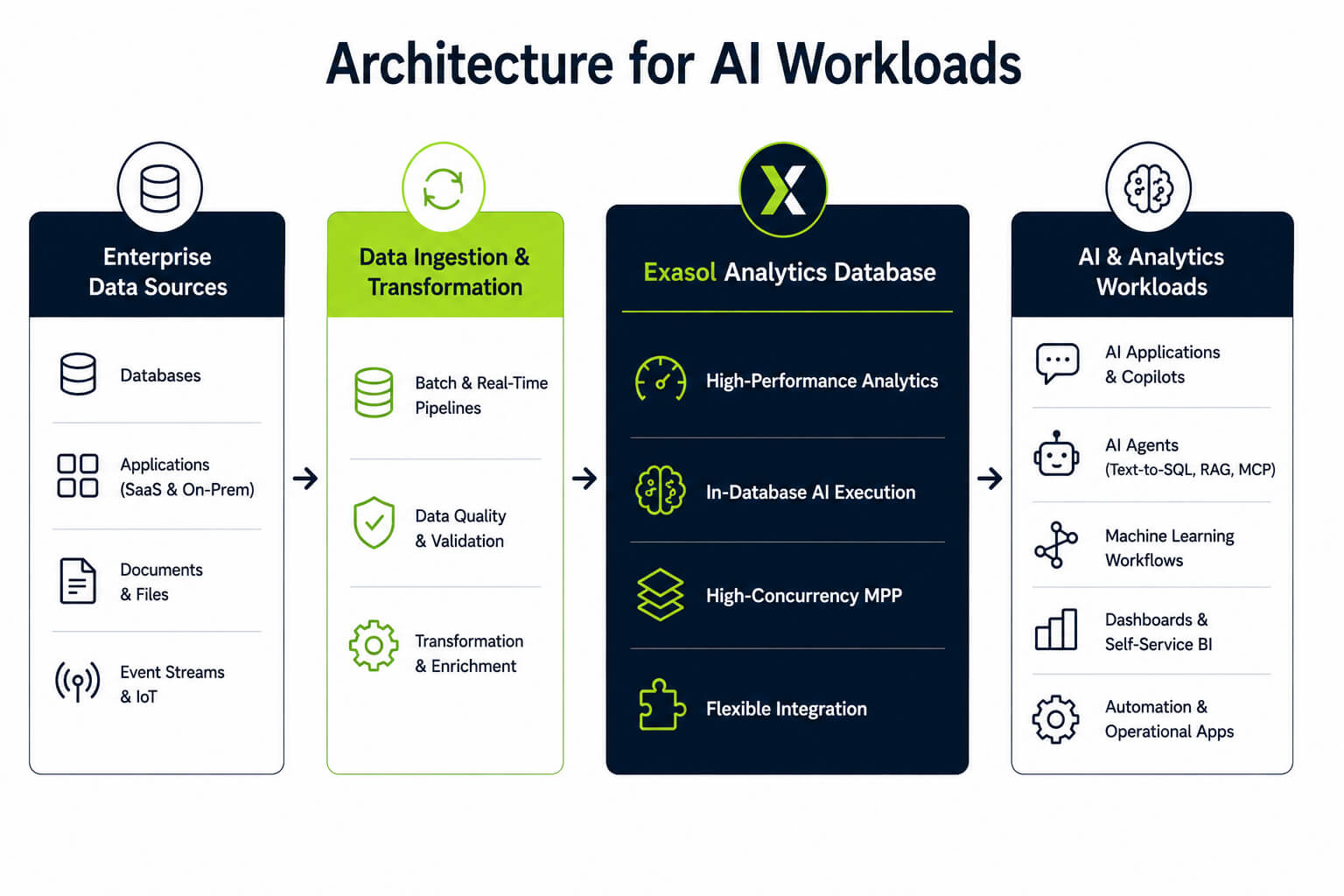
A simplified architecture for AI workloads has four functional layers: enterprise data sources, data ingestion and transformation, an analytical database, and consuming tools or applications. Data pipelines ingest or synchronize data from operational databases, business applications, files, and event streams.
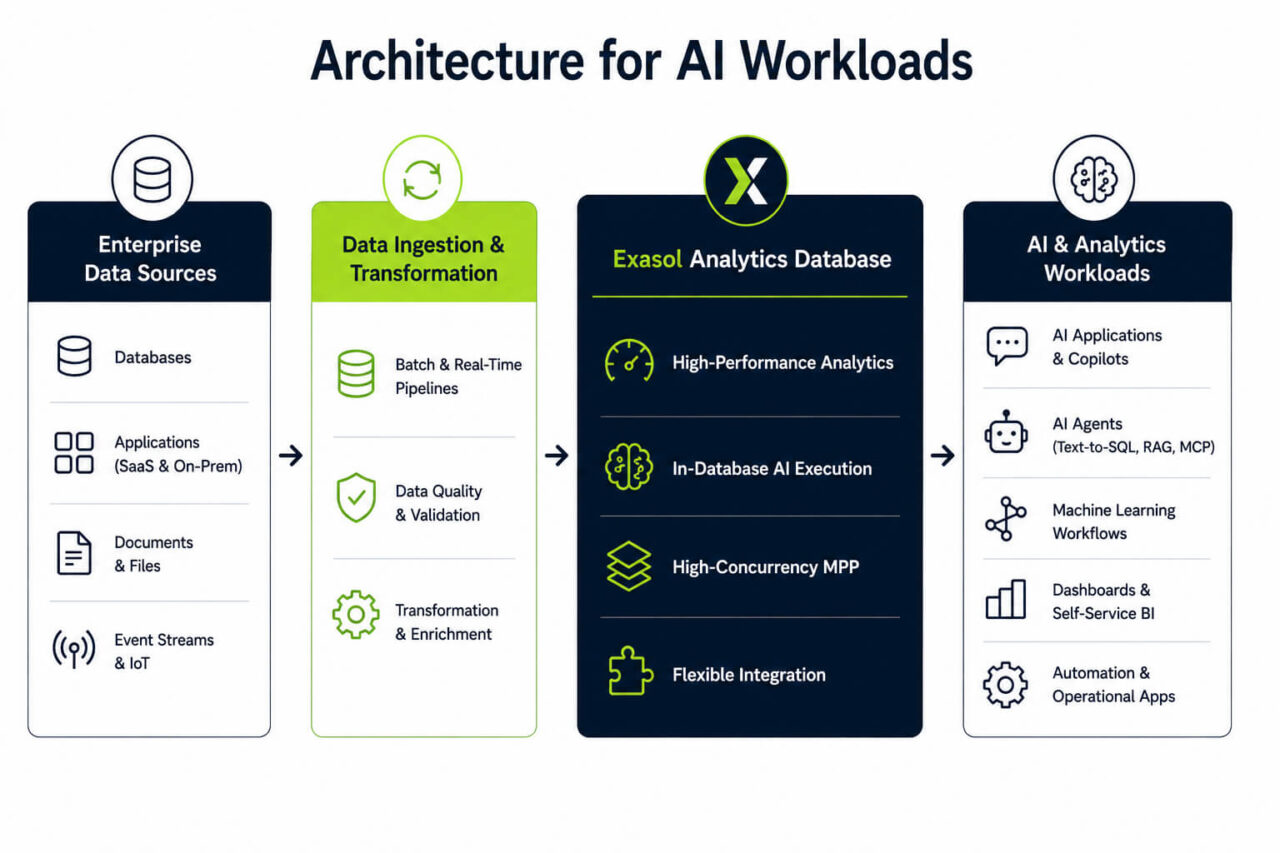
The analytical database stores and processes business data under defined access and governance controls. BI tools use it for dashboards and reports. Agent integrations can expose schema metadata and query tools, while the database executes requests under the connection’s permissions.
Machine learning workflows can use data from the analytical database for feature preparation, training, and scoring. Whether these steps run in the database or an external platform depends on the available functions and integrations.
Database access should use a defined user, service, or application identity. Configured access controls limit the available data and operations. Query histories and audit logs can record activity where required.
Semantic definitions and metadata can help agents interpret schemas, relationships, and business measures. Model serving, workflow orchestration, and vector retrieval may run in separate systems. The analytical database provides structured data and query access to these systems.
How to Choose a Database for AI Workloads
Choose a database by defining its role, mapping the workload, testing representative demand, and verifying access, deployment, and integration requirements.
Define the Database’s Role
List the operations that will run in the database. These may include analytical SQL, feature preparation, scoring, text processing, or supplying data to external models and applications.
Document where model training, inference, workflow orchestration, and vector retrieval will run. This separates database requirements from capabilities provided by connected systems.
Map the Workload
Document the data sources, formats, volumes, update frequencies, and latency requirements. Identify whether the workload requires joins, aggregations, historical analysis, semantic retrieval, or recently updated operational data.
Estimate the number of database interactions generated by each request. Include follow-up queries, requests from concurrent agents, and any dashboards, reports, or data loads sharing the system.
Test Representative Demand
Use realistic data volumes, query complexity, integrations, UDFs, and model endpoints. Test the expected number of simultaneous agents, applications, and users.
Measure latency, throughput, queueing, and resource contention. Test how the complete integration handles errors, timeouts, and retries.
Verify Access, Deployment, and Integration
Confirm which user, service, or application identity each connection uses. Check the permitted data, operations, and write access.
Verify that the required query histories, audit records, metadata, lineage, and business definitions are available and retained for the necessary period. Confirm that the deployment model meets the organization’s infrastructure, data-residency, security, and regulatory requirements.
Test SQL drivers, APIs, BI connectors, agent interfaces, authentication, metadata retrieval, error handling, and result formats before production use.
Database Selection Checklist
Before choosing a database for AI workloads, confirm:
- Workload: Which analytical and AI-related operations will run in the database?
- Data: Which sources, formats, volumes, and update frequencies must it support?
- Queries: Does the workload require joins, aggregations, historical analysis, or generated SQL?
- Concurrency: How many agents, applications, and users may query the system at once?
- Performance: What latency and throughput does the workload require?
- Extensibility: Does it require built-in functions, UDFs, embedded Python or R, or external model endpoints?
- Security: Which identities, permissions, and write restrictions apply?
- Governance: Are the required metadata, lineage, query histories, audit records, and retention periods available?
- Deployment: Where must the database and data processing run?
- Integration: Can it connect with the required AI, BI, model-serving, and orchestration tools?
How Exasol Supports AI Workloads
Exasol supports AI workloads that combine analytical SQL with enterprise data, in-database execution, and concurrent access from agents, applications, and users. Python, R, Java, and Lua UDFs allow teams to run custom data science and machine learning logic close to the data.
Exasol’s MCP Server gives AI agents access to database metadata and permitted SQL operations through defined tools. Its massively parallel architecture supports analytical workloads where multiple agents, BI tools, and applications query data concurrently.
See how Exasol AI supports high-performance analytics, in-database AI execution, MCP connectivity, and agent workflows for building AI applications where enterprise data already lives.