

SQL Schema Explained: Examples, Structure, and Design

What Is a SQL Schema?
A SQL schema describes the structure of a relational database, including its tables, columns, data types, keys, and constraints. The term also refers to a named container for database objects.
A schema as the structure of a database
In database design, a schema specifies how data is organized and how related records connect.
For example, an e-commerce schema might define customers, orders, and order_items tables. Primary keys identify individual records within each table. Foreign keys define references from orders to customers and from order items to orders.
This structural definition is distinct from the records themselves. Adding an order changes the stored data. Adding a column to the orders table changes the database schema. SQL data definition language (DDL) statements, such as CREATE TABLE and ALTER TABLE, create and modify these structures.
A schema as a named container for database objects
In systems that support schema namespaces, a schema groups named objects, such as tables and views. A namespace provides a naming context, allowing objects in different schemas to share a name.
For example, sales.orders identifies the orders table in the sales schema. An archive schema could contain a separate archive.orders table within the same database.
In this context, creating a schema establishes a container. Table definitions specify the columns, data types, and constraints of the tables placed inside it. The relationship between schemas, databases, and users varies by database system.
Valid relationships don’t guarantee accurate reports. An order with three line items produces three rows when joined to those items. Counting those rows as orders overstates the order count. Schema reviews should therefore check both what each row represents and how reporting queries count or aggregate those records.
Dirk Beerbohm, Global Partner Solution Architect, Exasol
What Is the Difference Between a Schema, a Database, and a Table?
A database holds an organized collection of data and the objects used to manage it. A table organizes records into rows and columns. A schema describes the database’s structure or provides a namespace for its objects, depending on the context.
| Concept | Role | E-commerce example |
|---|---|---|
| Database | Holds the application’s data and database objects. | An Exasol database containing customer and order information. |
| Schema as a structural definition | Specifies tables, columns, data types, keys, constraints, and relationships. | The definitions connecting customers, orders, and order_items. |
| Schema as a namespace | Groups named objects in systems that support this organization. | A sales schema containing customers and orders tables. |
| Table | Holds records in rows, with named columns defining their attributes. | An orders table with order_id, customer_id, and order_date columns. |
For example, an application connected to an Exasol database could query sales.orders using a schema-qualified name. The database contains the sales schema, which contains the orders table. The table’s columns and constraints form part of its structural definition.
This database–schema–table hierarchy is system-specific. MySQL uses schema and database interchangeably: CREATE SCHEMA is a synonym for CREATE DATABASE. In MySQL, a schema isn’t a separate namespace within a database.

Try Exasol Personal for Free
Run real workloads at full Exasol performance.
How Do Schemas Differ Across SQL Database Systems?
SQL database systems differ in how schemas relate to databases, users, and ownership. These differences affect how you organize objects, reference tables, and manage ownership and access.
| Database system | Meaning of schema | Ownership and naming |
|---|---|---|
| Exasol | A container for database objects within a database. | A new schema belongs to the user who creates it. Ownership can be transferred to another user or role. A user can create multiple schemas. |
| SQL Server | A named container that groups objects within a database. | Schemas are separate from database users. A user or role can own multiple schemas, and multiple users can access a schema through permissions. |
| PostgreSQL | A namespace containing tables and other named objects within a database. | A schema has an owning role. Its name can differ from its owner’s name, and access depends on granted privileges. |
| MySQL | A synonym for database. | CREATE SCHEMA and CREATE DATABASE perform the same operation. A schema doesn’t form an additional organizational level inside a database. |
| Oracle Database | A collection of objects owned by a database user. | The schema shares its owner’s username. For example, sales.orders identifies the orders table in the sales schema, owned by the sales user. |
Schema ownership and access also serve different purposes. A user may have permission to query a table without owning its schema. When organizing application objects, consider both their naming structure and the permissions required to use them.
The worked example below uses Exasol SQL. Its CREATE SCHEMA statement creates the schema that will contain the example tables.
SQL Schema Example: Customers, Orders, and Order Items
An e-commerce SQL schema can connect customers, their orders, and the items within each order. This example uses three tables in an Exasol schema named sales. It shows how table definitions, primary keys, and foreign keys work together. The script creates empty tables; it doesn’t insert sample records.
Understand the schema diagram
Each order belongs to one customer, and each order item belongs to one order. A customer can have multiple orders, and an order can have multiple items.
The diagram also allows customers without orders and orders without items. The table constraints below enforce references to existing parent records, but they don’t require a parent record to have children.
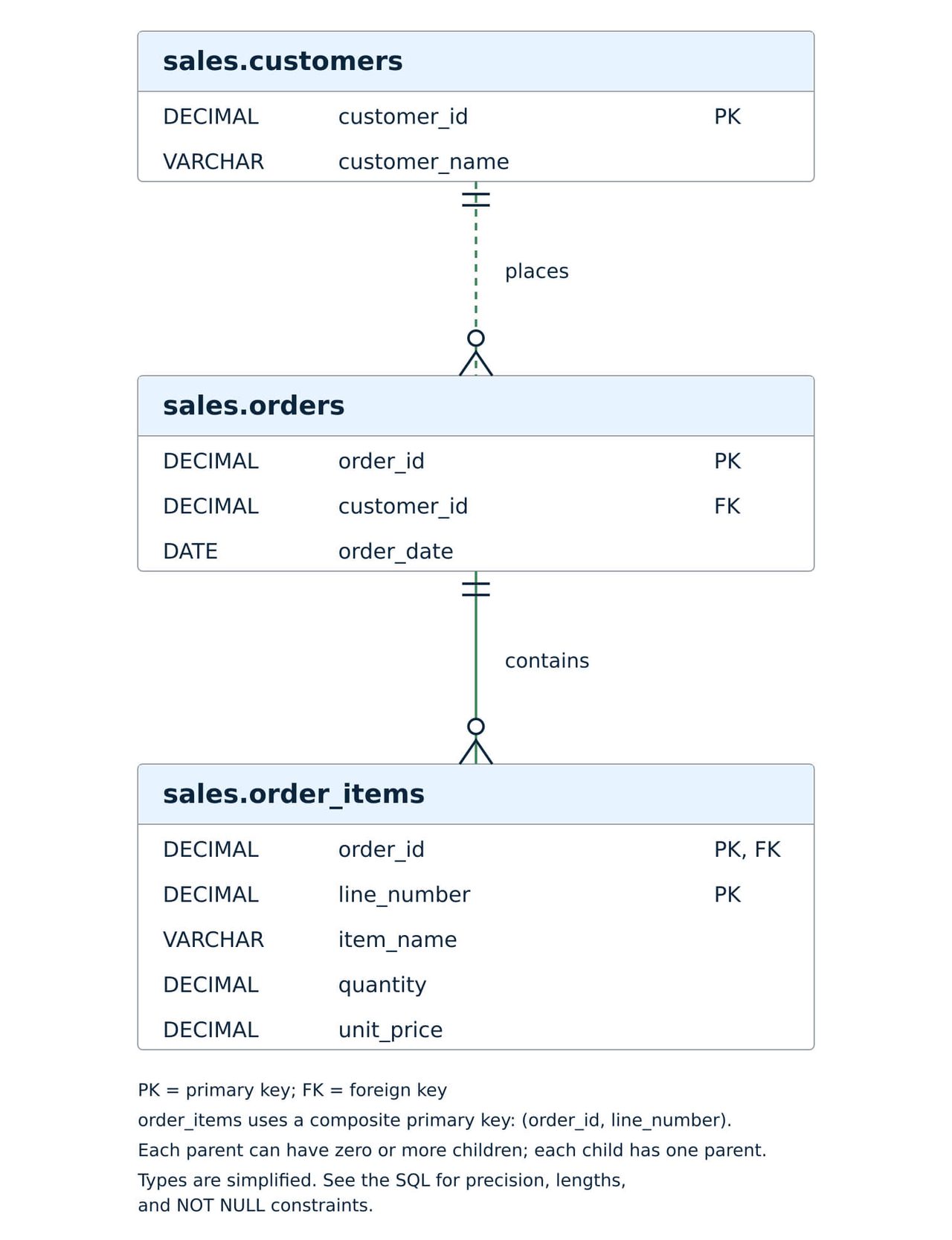
All three tables belong to the sales schema. PK marks a primary-key column, and FK marks a foreign-key column. In order_items, order_id and line_number together form the primary key.
Read the SQL table definitions
Run this example in a new session connected to a development database where the sales schema doesn’t already exist. Use an account with CREATE SCHEMA and CREATE TABLE privileges.
Before adapting this example for production, test it with representative data and validate the table definitions, constraint states, and query results.
The script sets the session’s default constraint state to ENABLE before creating the tables. This setting applies to subsequently created constraints whose state isn’t explicitly specified. It doesn’t change existing constraints.
CREATE SCHEMA sales;

ALTER SESSION SET CONSTRAINT_STATE_DEFAULT = 'ENABLE';

CREATE TABLE sales.customers (
    customer_id   DECIMAL(18, 0) NOT NULL,
    customer_name VARCHAR(200) NOT NULL,
    CONSTRAINT pk_customers
        PRIMARY KEY (customer_id)
);

CREATE TABLE sales.orders (
    order_id    DECIMAL(18, 0) NOT NULL,
    customer_id DECIMAL(18, 0) NOT NULL,
    order_date  DATE NOT NULL,
    CONSTRAINT pk_orders
        PRIMARY KEY (order_id),
    CONSTRAINT fk_orders_customers
        FOREIGN KEY (customer_id)
        REFERENCES sales.customers (customer_id)
);

CREATE TABLE sales.order_items (
    order_id    DECIMAL(18, 0) NOT NULL,
    line_number DECIMAL(10, 0) NOT NULL,
    item_name   VARCHAR(200) NOT NULL,
    quantity    DECIMAL(10, 0) NOT NULL,
    unit_price  DECIMAL(12, 2) NOT NULL,
    CONSTRAINT pk_order_items
        PRIMARY KEY (order_id, line_number),
    CONSTRAINT fk_order_items_orders
        FOREIGN KEY (order_id)
        REFERENCES sales.orders (order_id)
);

COMMIT;
The table names include the schema name, making each object’s location explicit. The script creates customers before orders, then order_items, so each referenced table exists before its foreign key is defined.
Understand primary keys, foreign keys, and constraints
The primary keys identify records at different levels. customer_id identifies a customer, and order_id identifies an order. The combination of order_id and line_number identifies an individual line within an order.
For example, different orders can each contain line number 1. Two items within the same order can’t share that line number because their combined primary-key values would match.
The foreign keys connect the tables:
- orders.customer_id references customers.customer_id.
- order_items.order_id references orders.order_id.
With these constraints enabled, an order must reference an existing customer, and an order item must reference an existing order. The NOT NULL constraints reject SQL NULL values in the required columns.
These rules don’t validate every business requirement. For example, the definitions don’t prevent negative quantities or prices. If quantities must be positive or prices must be nonnegative, validate those requirements in the application or data-loading process.
Exasol’s constraint documentation explains primary keys, foreign keys, and the difference between enabled and disabled constraints.
How Do You Create a SQL Schema?
In Exasol, use CREATE SCHEMA to create a named container, then use CREATE TABLE to define its tables, columns, and constraints. After creating the objects, query the system tables to check table names and constraint states.
Create the schema and its tables
Run the complete script in the preceding example once, following the prerequisites stated there. If you’ve already completed it, go directly to verification.
Exasol assigns the new schema to the current user and makes it the current schema. The CREATE SCHEMA documentation explains these behaviors and the required privilege.
Verify the tables and constraints
After completing the example, run these queries as the user who created and still owns its tables.
First, list the tables in the sales schema:
SELECT
    TABLE_SCHEMA,
    TABLE_NAME
FROM EXA_USER_TABLES
WHERE TABLE_SCHEMA = 'SALES'
ORDER BY TABLE_NAME;
EXA_USER_TABLES describes tables owned by the current user. After a successful run of the preceding script, this query should list CUSTOMERS, ORDER_ITEMS, and ORDERS.
The filter uses ‘SALES’ because Exasol stores unquoted identifiers in uppercase, including the names written in lowercase in the example.
Next, inspect the primary and foreign keys:
SELECT
    CONSTRAINT_TABLE,
    CONSTRAINT_NAME,
    CONSTRAINT_TYPE,
    CONSTRAINT_ENABLED
FROM EXA_USER_CONSTRAINTS
WHERE CONSTRAINT_SCHEMA = 'SALES'
  AND CONSTRAINT_TYPE IN ('PRIMARY KEY', 'FOREIGN KEY')
ORDER BY CONSTRAINT_TABLE, CONSTRAINT_NAME;
EXA_USER_CONSTRAINTS reports constraints on tables owned by the current user. Its CONSTRAINT_ENABLED column indicates whether Exasol checks each constraint.
For the completed example, expect three primary keys and two foreign keys, all enabled. These queries check table names and key constraint states. They don’t inspect column definitions, test data loading, or validate every business rule.
How Do You Design a SQL Schema?
Design a SQL schema by defining what each row represents, identifying relationships, and choosing data types and constraints. Then review how the tables handle updates and answer the queries your application or reports need.
Define the requirements and relationships
Start with the meaning of a record in each table. In the preceding example, customers stores one row per customer, orders stores one row per order, and order_items stores one row per order line.
An order line can represent several units of the same item through its quantity column. Its identity comes from the combination of order_id and line_number.
Document which relationships are required and which can be empty. The example requires every order to reference a customer, but it allows a customer to have no orders. If your application requires every completed order to contain an item, the foreign keys alone don’t enforce that rule.
Choose data types, keys, and constraints
Choose types that match the values you need to store. The example uses DATE for order_date, VARCHAR for names, and DECIMAL for identifiers, quantities, and prices.
The unit_price definition, DECIMAL(12, 2), allows 12 total digits, with two digits after the decimal point. Confirm that this precision and scale fit your pricing requirements. The quantity definition uses a scale of zero; fractional quantities would require a different definition.
Exasol’s data type documentation explains the supported types and their limits.
Choose primary keys that identify records at the intended level. In Exasol, foreign-key columns must have the same data types as the primary-key columns they reference. Verify that the constraints you rely on are enabled.
Apply naming conventions and normalization
Use consistent names for the same concept across tables. The example uses customer_id in both customers and orders, making the relationship easier to follow.
Normalization organizes tables around data dependencies to reduce redundancy and update inconsistencies. Storing customer_name in customers avoids maintaining a separate copy of the customer’s current name in every order.
Keep order lines in their own table instead of adding columns such as item_1, item_2, and item_3 to orders. Additional lines then require additional rows without changing the table definition.
When evaluating normalization vs denormalization, distinguish current attributes from historical facts before removing repeated values. If unit_price represents the price agreed for an order line, preserve it when the current product price changes. Document this meaning and make update logic preserve historical values.
Review the design against expected queries
Check the design against questions such as how many orders each customer placed and what each order’s items cost. Use representative records, including customers without orders and orders containing multiple lines.
Check the level at which each query counts or aggregates records. Joining orders to order_items on order_id produces three rows for an order with three lines. Counting those rows as orders would overstate the order count.
Also test values at the boundaries of your chosen data types and records that should violate enabled constraints. These checks help reveal mismatches between the table definitions and the requirements before you load production data.
Try Exasol Personal for Free
Run real workloads at full Exasol performance.
How Do You Manage Changes to a SQL Schema?
Manage SQL schema changes through versioned migrations: scripts that move a database from one defined structure to another. Review their dependencies, test them against existing data, and verify the result after deployment.
Record changes and their dependencies
Store migration scripts in version control and record which migrations each environment has applied. Once a migration has reached production, make subsequent corrections through a new migration to preserve the deployment history.
Before changing a column, identify the queries, views, and data-loading processes that reference it. For example, renaming order_items.unit_price requires reviewing calculations that use that column, including quantity multiplied by unit_price.
Test changes against existing data
Run the migration in a test environment that matches the starting schema version. Include representative existing records so the test covers the transition from the old structure.
If you reduce the precision of unit_price, check whether existing prices fit the new definition without losing required information. If you change a key column’s type, review the corresponding foreign-key columns because Exasol requires their types to match.
Recheck the affected queries and constraint states after applying the migration. A statement completing successfully doesn’t establish that every dependent report still returns the intended result.
Plan deployment and recovery
Coordinate schema changes with the applications and data pipelines that use the affected objects. If old and new application versions must run together, consider introducing the new structure first. Remove the old structure only after dependent code has migrated.
Before deployment, check the client’s autocommit setting and define the transaction boundaries. When autocommit is enabled in the Exasol client, each successfully completed statement is committed automatically. ROLLBACK can’t undo a change that has already been committed.
Exasol’s transaction-management documentation explains commit, rollback, and autocommit behavior.
For changes that remove or overwrite data, establish how you would recover that data before deployment. After deployment, confirm the resulting schema, verify affected queries, and record the migration outcome.
A table stores records in rows and columns. A schema can describe the structure of related tables, including their columns, keys, and constraints. In systems that support schema namespaces, it can also mean a named container for tables and other database objects.
In Exasol, use CREATE SCHEMA followed by an unused schema name, such as CREATE SCHEMA sales;. Your account needs the CREATE SCHEMA privilege. Then use CREATE TABLE statements to define tables inside that schema, including their columns and constraints. Test the example in a development database and verify the resulting definitions.
The sales schema in this article contains customers, orders, and order_items tables. Each order references a customer, and each order item references an order. The combination of order_id and line_number identifies each order item. Together, the table definitions specify the columns, data types, keys, and relationships.
A database holds organized data, while a schema can describe its structure or identify a namespace within it. In Exasol, a database can contain multiple named schemas, each containing tables and other objects. Terminology varies by system: MySQL uses CREATE SCHEMA as a synonym for CREATE DATABASE.
“Four types of schema” needs a named classification to be meaningful. Database design commonly distinguishes conceptual, logical, and physical schemas, which describe different levels of design detail. Star and snowflake schemas are dimensional modeling patterns, rather than additional levels in that classification.
Schema categories depend on the database system and the meaning of “schema.” Exasol distinguishes physical schemas containing standard database objects from virtual schemas that expose external data through virtual tables. These product-specific categories differ from the conceptual, logical, and physical levels used to describe database designs.