

Database Schema: How Tables, Keys, and Relationships Work Together

A database schema defines how data is structured, related, and constrained within a database. In a relational database, it specifies tables, columns, data types, keys, and integrity constraints. These definitions describe the database’s structure separately from the records stored within it.
A relational schema makes data relationships and integrity rules explicit, helping teams interpret the database’s structure. For example, an order can reference a customer through a foreign key defined in the schema.
Some database systems also use “schema” for a namespace that organizes tables, views, and other objects. This namespace meaning differs from the broader structural definition and depends on the database management system.
What Does a Database Schema Contain?
A relational database schema specifies tables, columns, data types, keys, and integrity constraints. Depending on the database management system, schema definitions can also include objects such as views and sequences.
Schemas also apply outside relational databases, although their structure and enforcement differ between systems. Some document databases support validation rules for selected fields while allowing other fields to vary.
Tables, attributes, and data types
A table definition specifies its name, columns, and the data types assigned to those columns. Each column represents an attribute, such as a customer identifier, order date, or product price.
Data types determine how the database represents values and which operations it supports for them. An order date might use DATE, while a price might use DECIMAL with defined precision and scale.
The table’s meaning also matters: an orders table and an order_items table represent different levels of detail. In this example, each row in orders represents an order, while each row in order_items represents a line item within that order.
Keys, relationships, and constraints
A primary key uses one or more non-null columns to identify each row uniquely. A composite primary key contains multiple columns; their combined values must be unique.
A foreign key references a primary key or another eligible unique key in a referenced table. For example, a customer identifier in orders can reference the corresponding identifier in customers. Matching column names alone don’t establish or enforce a foreign key relationship between tables.
Constraints such as NOT NULL, UNIQUE, and CHECK define additional rules for permitted data. An order item’s quantity might require both a non-null value and a check that it exceeds zero. These rules express specific integrity requirements; they don’t establish that every stored value is factually accurate.

Try Exasol Personal for Free
Run real workloads at full Exasol performance.
Database Schema Example: Customers, Orders, and Products
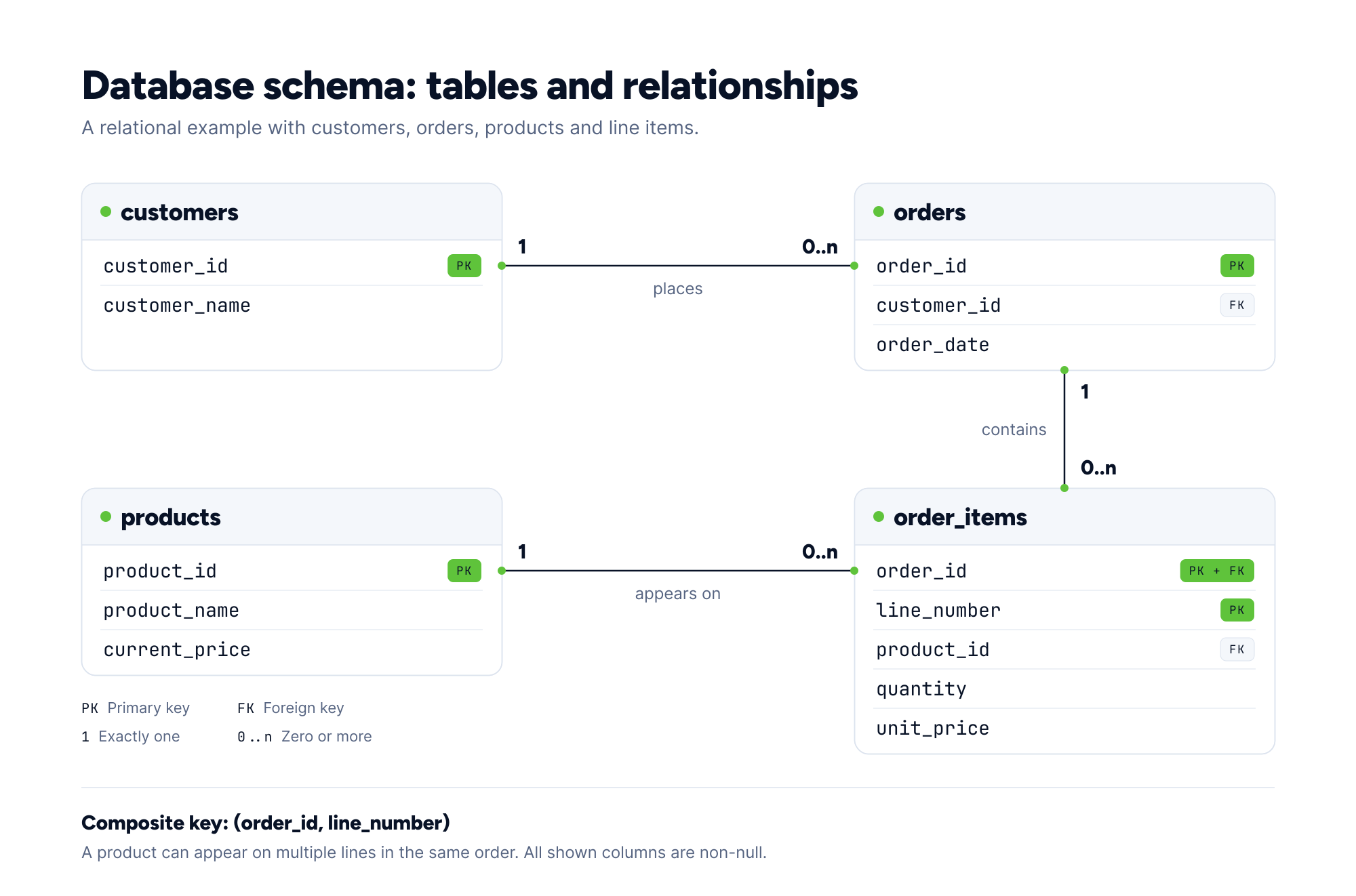
This relational database schema connects four tables: customers, orders, products, and order_items. The example assumes all prices use the same currency and the database enforces the declared keys and constraints.
| Table | What each row represents | Primary key | Other columns |
|---|---|---|---|
| customers | A customer | customer_id | customer_name |
| orders | An order placed by a customer | order_id | customer_id, order_date |
| products | A product in the catalog | product_id | product_name, current_price |
| order_items | A line item within an order | (order_id, line_number) | product_id, quantity, unit_price |
In this example, identifiers, line numbers, and quantities use integer types, while names use character strings. Order dates use DATE, and prices use DECIMAL(12,2). All listed columns require non-null values.
How the tables connect
Three foreign keys establish the relationships between these tables:
- orders.customer_id references customers.customer_id.
- order_items.order_id references orders.order_id.
- order_items.product_id references products.product_id.
A customer can have multiple orders, and each order belongs to exactly one customer in this design. Each order item belongs to one order and references one product.
Orders and products have a many-to-many relationship. An order can contain multiple products, and a product can appear in multiple orders. The order_items table represents that relationship through separate one-to-many relationships with orders and products.
The composite primary key (order_id, line_number) makes each line number unique within its order. This composite key allows the same product to appear on multiple lines within one order.
What the schema captures and enforces
Check constraints require line_number and quantity to exceed zero and both price fields to be nonnegative. Combined with the non-null requirements, these rules exclude missing quantities, nonpositive quantities, and negative prices.
Foreign keys require each order item to reference an existing order and product. They don’t require an order to contain any items; enforcing that requirement needs additional logic.
products.current_price records the current catalog price, while order_items.unit_price records the price agreed for that line item. Keeping these values separate lets an order retain its recorded price when the catalog price changes.
Conceptual, Logical, and Physical Database Schemas
Database schemas can be described at conceptual, logical, and physical levels, moving from business meaning to implementation details. Terminology varies across modeling methods and tools, but the distinction helps separate business requirements from database-specific decisions.
Conceptual schema
A conceptual schema identifies the business entities, their relationships, and the rules the database must represent. It establishes what the data means before specifying implementation details.
In the order-processing example, customers place orders, and orders can contain line items referring to products. Each line item records a quantity and an agreed price. These statements describe business concepts without choosing column types, indexes, or storage settings.
Logical schema
A logical schema defines structures and integrity rules for a chosen data model without specifying a database product. For a relational database, this includes tables, attributes, keys, relationships, and constraints.
In the running example, the logical schema defines customers, orders, products, and order_items. It identifies each order item through the combination of its order identifier and line number. The foreign-key relationships connect these tables, and quantities must be positive whole numbers. Keys and constraints belong in logical design; physical design specifies their implementation in the chosen database system.
Physical schema
A physical schema specifies how the logical design is implemented in a particular database management system. It includes concrete database definitions and relevant storage or access structures, such as indexes and partitions where supported.
For the order-processing example, implementation decisions include the exact integer types, character-column lengths, and decimal precision and scale. The team also translates the logical integrity rules into supported primary-key, foreign-key, non-null, and check constraints.
Physical design then considers how the database will access and store those records. A system supporting user-defined indexes might use an index on orders.customer_id for customer-order lookups. The appropriate choice depends on the workload and the database system.
Test Real Analytical Workloads with Exasol Personal
Unlimited data. Full analytics performance.
Database Schema vs. Database, Data Model, and Architecture
A database holds organized data, while its schema defines the structure and rules governing that data. Adding an order changes the stored data while leaving the table definitions intact. Adding a column or changing a constraint changes the schema.
| Concept | What it describes | Example |
|---|---|---|
| Database | An organized collection of data managed as a unit | The stored customer, order, and product records |
| Database schema | The structural definitions and integrity rules for a particular database | The tables, columns, keys, and constraints in the order-processing example |
| Table | A structure that organizes relational data into rows and columns | order_items, with one row per line item |
| Database model | General rules for organizing data, relationships, and permitted operations | The relational model |
| Data model (design representation) | A representation of a domain’s entities, attributes, and relationships | An entity-relationship model of customers, orders, and products |
| Database architecture | The organization and interaction of database-system components | How query processing, transaction management, and storage work together |
A database model supplies general structural rules that many different schemas can follow. Two databases can use the relational model while defining entirely different tables and relationships.
In technical references, “data model” can also refer to a general model, such as the relational model. When it describes a particular design, a data model can document the same structures and rules captured in a schema.
Database architecture addresses how system components process queries, manage transactions, and access storage. A schema specifies the data structures and relationships those components manage.
Some database systems also use “schema” to mean a namespace containing named database objects. The relationship between a database and its schema namespaces depends on the product.
Which Design Decisions Shape a Database Schema?
Schema design determines what each row represents, how records relate, and which values the database accepts. The following decisions apply broader database design principles to the order-processing example.
Define row meaning and uniqueness
Decide whether an order item represents a product within an order or an individually numbered line. Choosing (order_id, product_id) as the primary key would limit each product to one line per order. The existing (order_id, line_number) key allows separate lines for the same product, including lines with different unit prices.
In my experience, schema problems often start with assumptions about what a record represents. A team might assume each product appears only once in an order, then need separate lines for different prices. I recommend testing those assumptions against realistic business scenarios before choosing keys and constraints.
Dirk Beerbohm, Global Partner Solution Architect, Exasol
Control duplication without losing history
Keeping a customer’s current name in customers lets multiple orders reference the same current value. Duplicating the current name across orders requires updating each copy when the name changes.
Historical values require different treatment because they describe facts at a particular point in time. If orders must preserve the delivery address used at purchase, record that address as an order-specific fact. A later change to the customer’s current address shouldn’t overwrite that historical value.
These distinctions matter when evaluating normalization and denormalization: repeated current values and historical facts have different maintenance requirements.
Specify what happens to related records
Define what happens to dependent records when a referenced record changes or is deleted. Where supported, foreign-key actions can block a deletion or propagate it to related rows.
With cascading deletion configured, removing an order also removes its line items. Use this behavior only when the application permits deleting the order and its items together. Applying the same cascading behavior to a product would remove its matching historical order items. Choose deletion rules according to which records must remain available.
Evaluate query work and update costs
Test frequent joins, filters, and updates using representative data volumes. Evaluate the schema against both retrieval requirements and the work needed to maintain consistent records.
For example, storing an order subtotal can avoid recalculating it from line items on every read. However, inserting, changing, or removing a line item may require updating that stored subtotal. Specify when and how line-item changes update the subtotal, including how concurrent updates are handled.
How Are Database Schemas Documented and Changed?
Document a database schema through relationship diagrams, a data dictionary, and a versioned record of changes. Keep these materials aligned with the deployed structure and the business rules it represents.
Document structure and business meaning
A data dictionary should explain table purpose, column meanings, data types, nullability, keys, constraints, and units of measurement. Pair it with relationship diagrams so readers can connect individual definitions to the wider schema.
Document the reasons behind design choices, including rules the database doesn’t enforce. For order_items, explain why the key includes a line number and when an application may delete a line. Record which team maintains these definitions so questions and proposed changes reach the appropriate owners.
Manage changes and their dependencies
A schema migration changes a database’s structure and may transform existing data to match. Keep migration scripts in version control and record which changes each environment has applied.
Before changing a column, identify dependent application queries, views, reports, and data pipelines. Test the change against representative data, including existing values that might violate a new constraint.
Supporting fractional quantities requires changing quantity from an integer to a type that supports fractional values. Validation rules, calculations, and downstream consumers may also assume whole numbers. Updating the column type alone doesn’t address those dependencies.
Coordinate database and application releases so each deployed application version can work with the schema it encounters. Assess whether the specific operation requires locks, validation scans, or data rewriting in the chosen database system.
Before changes that remove or transform data, define how the team would recover from a failed deployment. Reversing a structural change doesn’t necessarily restore discarded values. After deployment, verify schema definitions, migrated data, and affected application behavior, then update the documentation.
Try Exasol Personal for Free
Run real workloads at full Exasol performance.
Frequently Asked Questions
A retail database schema can define customers, orders, products, and order_items tables, including their columns, keys, and constraints. Each order references a customer, while each order item references its order and a product. The schema specifies these structures and relationships separately from the customer details and purchase records stored in the database.
Four types of schemas’ is ambiguous without a named classification. Database design commonly distinguishes three levels: conceptual, logical, and physical, which describe increasingly detailed representations of the design. Star and snowflake schemas are dimensional design patterns used in data warehousing, rather than additional levels in that classification.
A star schema is a dimensional design pattern with a central fact table connected directly to dimension tables. For example, a sales fact table can record quantities and sales amounts, with dimensions describing products, customers, and dates. This structure supports analysis such as sales by product category or month. For detailed examples and comparisons, see our guide to data warehouse schemas.