
Row vs. Column Databases: How Row-Oriented and Columnar Storage Differ

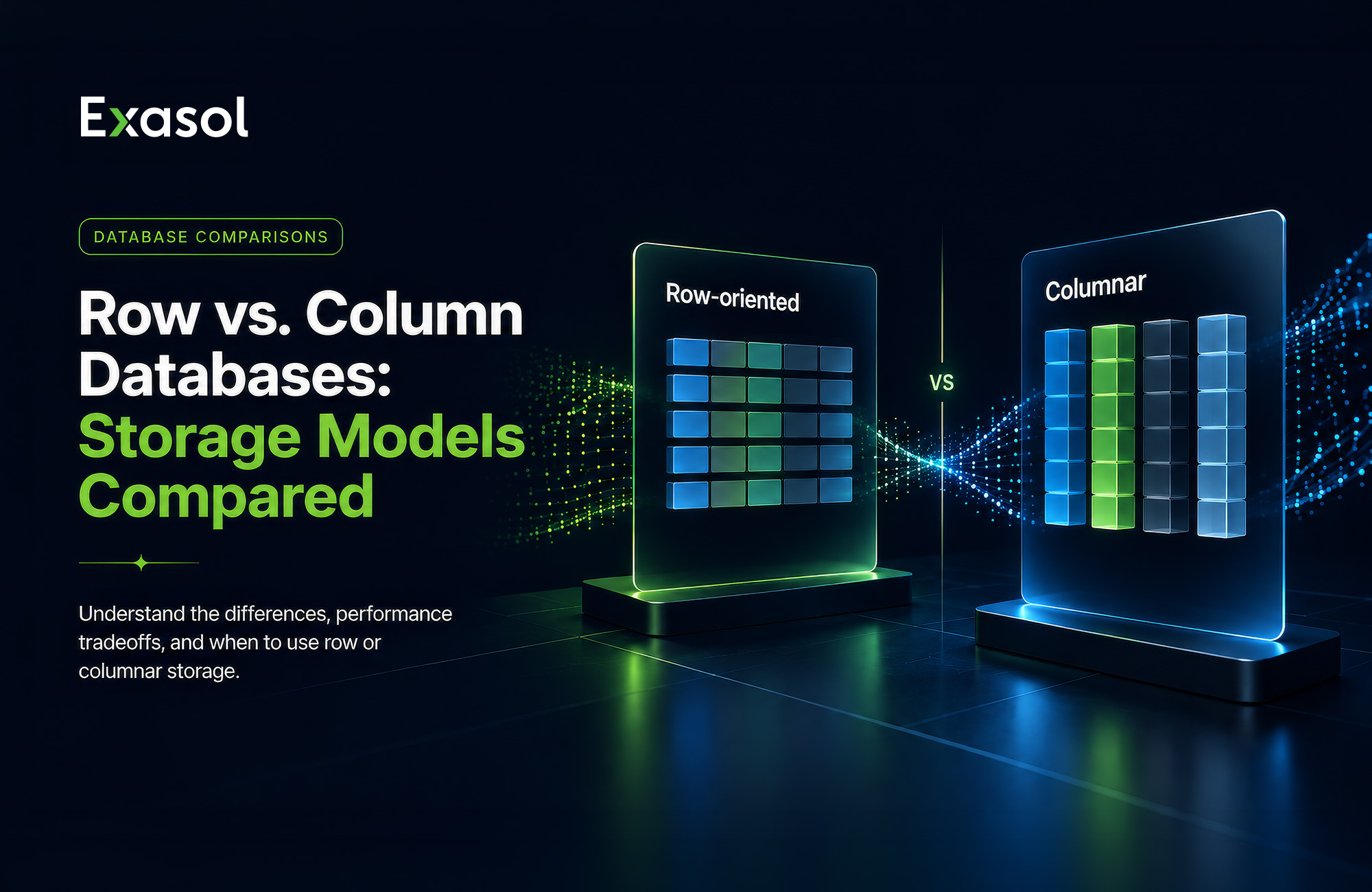
Row vs. column databases organize data differently, and that storage choice influences which workloads they handle efficiently. Row-oriented databases store complete records together, which generally suits point lookups, frequent updates, and transactional workloads. Columnar databases store values from the same column together, which generally suits analytical scans, aggregations, and OLAP workloads.
Choose a storage model based on how applications read, write, and query data, alongside concurrency, data volume, and deployment requirements. This article compares row and column storage, explains the main performance tradeoffs, shows SQL workload examples, and outlines criteria for evaluating columnar databases for analytics.
Columnar Database vs Row Database
The key difference between a columnar database and a row database is how each organizes data physically. A row-oriented database stores the fields of each record together. A columnar database stores values from the same column together across many records.
This layout influences which data a query reads, how the system can compress values, and which workload patterns it may suit. Both storage approaches can be used with relational tables, and many database systems provide SQL interfaces. Actual performance also depends on query execution, indexing, partitioning, memory, hardware, and concurrency.
| Criterion | Row-oriented database (MySQL, Postgres) | Columnar database (Exasol, Snowflake, DuckDB) |
|---|---|---|
| Data layout | Stores complete records together | Stores values from the same column together |
| Typical read pattern | Reads many fields from a small number of records | Reads a small number of fields from many records |
| Point lookups | Often suits record-level retrieval | Depends on the database engine and storage layout |
| Analytical scans | May read fields that the query does not need | Can focus reads on selected columns |
| Compression | May offer fewer opportunities for column-level compression because different fields are stored together | Often benefits from similar values within each column |
| Record updates | Often suits frequent row-level changes | Depends on the implementation and update pattern |
| Common workload fit | Transactional processing and operational applications | Analytics, reporting, and large-scale aggregations |
These are common workload tendencies, not fixed limitations. Row-oriented databases can run analytical queries, and columnar databases can support point lookups and other query types. The storage layout influences how much data the system reads and how it accesses that data.

Try Exasol Personal for Free
Run real workloads at full Exasol performance.
Columnar storage vs row storage
Columnar storage and row storage differ in which values they store together physically. Consider a sales table with columns for sale_id, customer_id, region, sale_date, and revenue. Row storage generally places the fields for one sale together within the record. Columnar storage groups values from each column together across many records.
That difference affects how queries access data. A query that selects only region and revenue from millions of sales may read those columns without reading every other column, depending on the engine and execution strategy. A row-oriented system may read wider records because the requested fields are stored alongside other fields. Indexes, materialized views, partitioning, and query execution can change how much data the system reads.
Columnar layouts often support compression because values in the same column share a data type and may contain repeated patterns. Row-oriented systems can also use compression, although their compression behavior depends on the engine, page structure, and values stored in each field.
Write behavior is another consideration. Row-oriented systems often suit frequent record-level inserts and updates. Columnar databases often suit batch loads and append-heavy analytical workloads, although update support varies by implementation.
Storage format is separate from the data model. The next section explains how a relational database can use either row storage or columnar storage.
What happens when a query reads only a few columns?
A query that needs only a few columns may reduce data access in a columnar database. For example, this query calculates total revenue by region without requesting every field in the sales table:
SELECT region, SUM(revenue) AS total_revenue
FROM sales
WHERE sale_date >= DATE '2026-01-01'
GROUP BY region;
A columnar system may read region, revenue, and sale_date while skipping unrelated columns such as customer_id, depending on its execution strategy. This behavior is often called column pruning. The database engine, execution plan, partitioning, available access paths, and storage format influence which data the system actually reads.
A row-oriented database generally stores the requested fields alongside the other fields in each record. The system may therefore read wider records or use an index or another access path to limit the data it retrieves. The exact behavior depends on the database engine, query plan, and available storage structures.
This access pattern helps explain why columnar storage often suits analytical queries that scan many records while selecting a small number of columns. Queries that retrieve complete records or support transactional applications often follow a different access pattern, especially when they apply frequent row-level changes.
How row-oriented and column-oriented databases handle updates
Many row-oriented and column-oriented databases support INSERT, UPDATE, and DELETE operations. The difference lies in how the database physically applies those operations. In a row-oriented system, the fields for one record are generally stored together, so a change to that record can often be handled as a row-level operation. Index maintenance, transaction logging, concurrency, and transaction design also affect the total cost.
Columnar systems can use different mechanisms for changing existing data. Depending on the database engine, an update may rewrite affected storage blocks, create a new data version, mark rows for later processing, or trigger a merge or compaction process. Update behavior therefore depends on the storage design, data volume, update frequency, batch size, and concurrency requirements.
Frequent individual inserts and updates often align with row-oriented workloads. Batch ingestion, append-heavy processing, and periodic transformations often align with columnar analytical workloads. Mixed workloads should be tested with representative data volumes, query patterns, and write rates on the target database.
Where both systems provide SQL interfaces, the statements may look similar across the two storage models. The database engine and storage configuration determine much of the physical work required to execute them.
What are the main advantages of columnar databases over traditional row-based databases?
Columnar databases often suit analytical workloads, or OLAP, because they store values from the same column together. Traditional row-oriented databases often suit transactional workloads, or OLTP, where applications read and update complete records. The storage layout affects how much data queries read, how the system uses memory, and how efficiently it processes analytical operations.
The main advantages include:
- Reduced data access: Queries that use only a few columns may read fewer data blocks instead of retrieving complete records. This can reduce disk I/O and the amount of data loaded into memory.
- Compression: Values within a column often share a data type and may contain repeated patterns. Column-oriented storage can therefore support compression schemes suited to that column’s data.
- Efficient scans and aggregations: Analytical queries commonly scan many records while selecting a limited set of columns for operations such as
SUM(),AVG(), andGROUP BY. - Column-oriented processing: Some analytical engines process columns in vectors or blocks, which can reduce the cost of processing large data sets.
- Support for large analytical datasets: Reading fewer columns, compressing data, and processing values in batches can help analytical systems handle large data volumes. Actual scalability depends on the engine architecture, partitioning, distribution, hardware, and concurrency.
These advantages depend on the workload and database implementation. Frequent individual inserts, updates, deletes, and point lookups may suit row-oriented storage more closely, while columnar systems often suit scan-heavy analytical workloads.
How Should You Choose Between Row-oriented And Columnar Storage?
Choose between row-oriented and columnar storage by matching the physical layout to the workload the database handles most often. Row-oriented storage often suits transactional workloads that read or update complete records. Columnar storage often suits analytical workloads that scan many records while using a limited number of columns.
The choice depends on more than query speed. Evaluate how applications read and write data, how many users or processes query the database concurrently, how data volumes will grow, and which deployment and governance requirements apply.
Use these questions to guide the decision:
- Does the workload retrieve complete records or selected columns?
- Does it perform frequent individual updates or large batch loads?
- Does it run point lookups, analytical scans, or both?
- How many concurrent users and queries must the system support?
- How much data must the system process and retain?
- Which SQL interfaces, BI tools, integrations, and deployment models must it support?
No storage model fits every workload. The following sections compare OLTP and OLAP patterns, query and write behavior, concurrency, and the relationship between storage format and data model.
Workload pattern: OLTP versus OLAP
OLTP workloads handle frequent transactions, point lookups, and record-level inserts or updates. Applications typically read or change a small number of complete records at a time. Row-oriented storage often suits this pattern because the fields for each record are stored together.
An OLAP database analyzes large data volumes through scans, joins, filters, and aggregations. Queries often use a limited set of columns across many records. Columnar storage often suits this pattern because the database may focus reads on the columns required for the query.
These are workload tendencies rather than fixed rules. A database may support both transactional and analytical queries, although one storage layout may suit its dominant workload more closely. Teams should evaluate mixed workloads using representative query patterns, write frequencies, data volumes, and concurrency levels.
Query patterns, writes, and concurrency
Compare how the workload reads and changes data before choosing a storage model. Point lookups that retrieve complete records and frequent individual updates often align with row-oriented storage. Analytical queries that scan many records, use a limited set of columns, and calculate aggregates often align with columnar storage.
Write behavior also matters. Frequent individual inserts, updates, and deletes may require different handling in columnar and row-oriented systems. Batch ingestion, append-heavy loads, and scheduled transformations often align with columnar analytical workloads, although behavior depends on the database engine and storage design.
Concurrency adds another selection criterion. For high-concurrency BI, consider how many transactions, analytical queries, dashboard queries, or data pipelines may run at the same time. Storage format alone does not determine concurrency performance. Query scheduling, workload management, available data-access structures, partitioning, memory allocation, transaction design, and hardware also influence how a system behaves under concurrent demand.
Evaluate the target database with representative data volumes, query patterns, write rates, and concurrency levels. A TPC-H benchmark, for example, measures decision-support queries and concurrent data modifications, but it cannot represent every mixed production workload.
Relational vs columnar database
Relational and columnar describe different aspects used to classify database types. Relational refers to a data model that organizes information into tables and represents relationships between them. Columnar refers to a physical storage format that groups values from the same column together.
A relational database can use row-oriented storage or columnar storage. Many columnar database systems expose relational tables and SQL interfaces. The two terms therefore describe separate design choices rather than direct alternatives.
Consider a sales database with separate customer, product, and transaction tables. The relational model defines the tables and represents how their data relates through keys and joins. The storage format determines whether each record is stored together or values from each column are stored together across many records.
When evaluating a database, ask two separate questions:
- How should the data be modeled and related?
- How should the data be stored for the dominant workload?
This distinction helps teams evaluate “relational” and “columnar” as separate design dimensions. A database can combine a relational data model with columnar storage for analytical queries, depending on the database engine.
A wide-column database is different from a columnar database. Wide-column systems group flexible columns by row key or column family, while columnar analytical systems physically store values from the same attribute together.
Deployment and data-model considerations
Storage choice forms part of the broader database architecture. Evaluate where the database will run, how teams will administer it, and which governance requirements apply. Cloud, on-premises, and hybrid deployments can involve different requirements for data residency, network access, security, backup, recovery, and monitoring.
The data model also affects the decision. Consider table relationships, normalization and denormalization, join patterns, table width, data growth, and how BI tools access the data. A relational schema can use row-oriented or columnar storage, although the database engine influences which SQL features, indexing methods, partitioning options, and workloads it supports efficiently.
Integration requirements also matter. Review compatibility with existing SQL tools, data pipelines, reporting platforms, authentication systems, and operational processes. A storage model that fits the query pattern may still create implementation challenges if it conflicts with the surrounding data architecture.
Choose the storage approach by evaluating workload behavior, data-model requirements, database scalability, deployment constraints, and operational ownership together. Test the shortlisted option with representative data, queries, writes, and concurrency before making a production decision.
Try Exasol Personal for Free
Run real workloads at full Exasol performance.
Recommending Some Popular Columnar Database Systems for Data Analytics
The right columnar database depends on your workload, deployment model, data volume, concurrency requirements, and existing data stack. The systems below address different analytical workloads and operating models. This table organizes them by workload instead of ranking them by popularity.
| Database system | Suitable for | Key selection consideration |
|---|---|---|
| Exasol | Enterprise analytical workloads and BI concurrency | Supports read-heavy analytical workloads, including dashboards, recurring reports, complex SQL, and embedded analytics. |
| ClickHouse | General-purpose OLAP and real-time analytics | A column-oriented SQL database management system available as open-source software and a cloud offering. |
| DuckDB | Embedded and local analytics | An in-process SQL OLAP database that can query local files and cloud data directly. |
| Snowflake | Managed cloud data warehousing | Virtual warehouses provide compute resources, while multi-cluster warehouses help manage changing concurrency requirements. |
| Google BigQuery | Serverless cloud analytics | A fully managed, serverless analytics platform with separate storage and compute layers. |
| Amazon Redshift | AWS-based analytical warehousing | Columnar storage reduces the data that analytical queries need to read from disk. |
| Apache Druid | Real-time dashboards and event analytics | Designed for event-oriented data, real-time ingestion, fast aggregations, and highly concurrent analytical applications. |
| Apache Pinot | User-facing real-time analytics | An open-source distributed OLAP database designed for fresh data, interactive dashboards, and high-concurrency queries. |
| Apache Doris | Mixed analytical and point-query workloads | Its high-concurrency point-query path applies to specific primary-key lookup patterns and table configurations. |
| Databricks SQL | Lakehouse analytics | A cloud data warehouse built on lakehouse architecture that runs SQL workloads directly on data lake storage. |
| QuestDB | Time-series and telemetry analytics | A column-oriented, time-partitioned database designed for high-throughput ingestion and time-series queries. |
Which one should you choose?
For broad OLAP workloads: Compare systems such as ClickHouse and Exasol using representative queries, data volumes, concurrency levels, and deployment requirements.
For managed cloud data warehousing: Compare Snowflake, Google BigQuery, and Amazon Redshift based on cloud environment, compute model, integrations, and workload requirements.
For embedded or local analytics: Consider DuckDB when the database needs to run in-process or query files directly.
For real-time dashboards and event analytics: Evaluate Apache Druid and Apache Pinot when fresh event data, low-latency aggregations, or highly concurrent queries are central requirements.
For lakehouse analytics: Consider Databricks SQL when analytical SQL workloads operate within a lakehouse architecture.
For time-series data: Evaluate QuestDB when ingestion rates, time-based partitioning, and time-series query support are primary requirements.
For mixed OLAP and point-query workloads: Review Apache Doris only when its documented table and query conditions match the access pattern.
For enterprise BI and complex analytical SQL: Include Exasol when dashboard performance under concurrent analytical workloads, deployment control, and SQL workload support are important selection criteria.
Before choosing a system, test representative queries and data volumes. Include analytical reads, aggregations, concurrent users, ingestion, updates, integrations, governance, and operational requirements in the evaluation. The appropriate system depends on the workload and operating requirements.
How Exasol Fits
Exasol combines a relational data model with columnar storage for online analytical processing (OLAP) workloads. It executes SQL across large analytical datasets and supports business intelligence (BI), reporting, embedded analytics, and AI-assisted workflows.
Columnar SQL execution
Exasol processes analytical scans, joins, aggregations, and filters across many rows. Its columnar storage organizes values by column, which helps analytical queries read the fields they need without scanning every field in a row.
This storage design suits read-heavy analytical queries such as recurring reports, forecasting, customer analysis, and financial analysis.
Concurrent access across workloads
Evaluate Exasol with BI dashboards, scheduled reports, ad hoc SQL, applications, and embedded analytics that reflect the intended workload. Use representative concurrent workloads to assess whether Exasol meets the required performance targets.
Exasol’s published five-database test can inform an initial concurrency evaluation; validate the result with the intended workload.
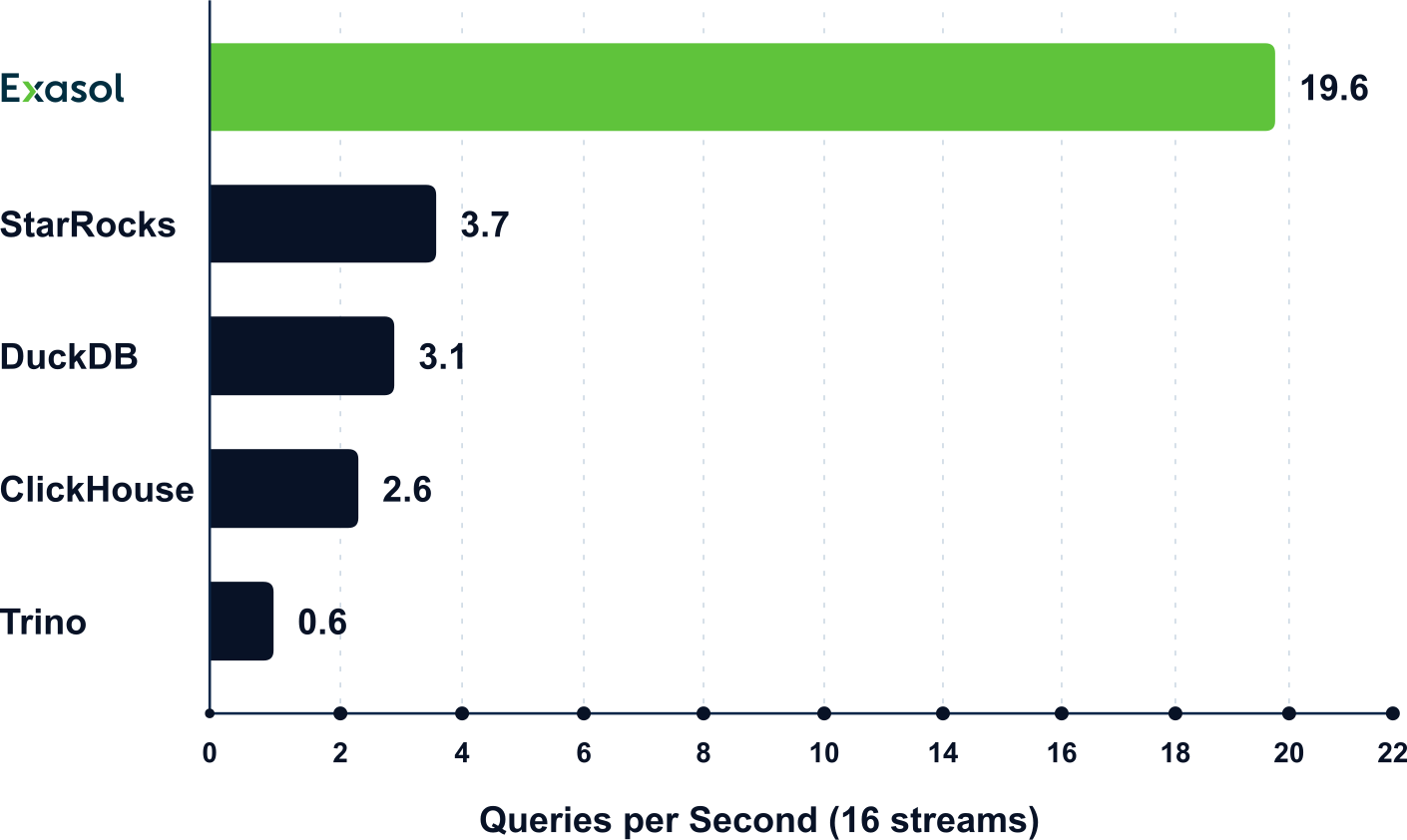
Test Exasol with the reporting, dashboard, embedded analytics, and concurrent-query patterns the intended deployment must support.
Controlled deployment and governed access
Evaluate deployment options, access controls, auditability, and workload controls against the organization’s governance requirements. Teams can apply deployment, access, auditability, and workload-control requirements to the analytical environment.
Assess deployment options against the organization’s cloud, hybrid, or controlled-infrastructure requirements.
From prototype to production
Place Exasol in the architecture only after verifying compatibility with the required data pipelines, BI tools, applications, and operating processes. This supports the transition from an analytical prototype to a production environment with recurring queries, concurrent users, governance requirements, and operational controls.
Validate the fit with representative data, real dashboards, query profiles, concurrent users, and recurring reports. This test helps determine whether Exasol meets the technical and operational requirements of the intended workload.
Try Exasol Personal for Free
Run real workloads at full Exasol performance.