

Keep Your Text-to-SQL Agent’s Data Private with Exasol MCP Server and Local LLMs

A text-to-SQL agent built on a hosted LLM moves two payloads across the wire per question. The first request carries your schema which includes table names, columns, types, often a few sample rows which are packed into the system prompt or a tool definition. The second carries the database’s response back, so the model can phrase the answer in natural language. Both land in your provider’s infrastructure before the user sees anything.
Whether they’re logged, retained, or used to train a future model depends on the provider’s terms, the SKU, the region, and whichever SDK defaults you didn’t override. For regulated data, that uncertainty is the failure mode. The bytes shouldn’t have been across the wire at all. People often conflate three separate things: whether data merely transits third-party infrastructure en route to the model, whether it gets retained/logged (for abuse monitoring, debugging, etc.), and whether it’s actually used to train future models.
By default, your inputs and outputs on commercial API traffic aren’t used to train future models, and retention typically runs around 30 days unless you negotiate zero data retention for eligible endpoints. None of that touches transit, though: your data still leaves your infrastructure to reach the model. For strict residency or no-egress rules, that’s the disqualifier, however trustworthy the provider.
The fix is architectural: keep both the model and the data inside your environment. Exasol’s MCP server connects directly to your database and exposes only the schema context and query interface the model needs. Queries never have to transit third-party infrastructure, eliminating the primary concern for teams working with sensitive data. The companion repo reproduces this setup so you can verify every claim below.
Where text-to-SQL can actually leak
Both the schema provided to the model and the rows returned by the database can leak information. The request carrying the schema is the leak most teams underestimate. It usually contains the CREATE TABLE for any table the model might access, including column names, data types, constraints, primary and foreign keys. Some implementations may push further: row counts per table, distinct value samples, even three or five example rows to help the model write better predicates.
Schema in regulated environments is itself sensitive metadata. For example, tables called PATIENT_DIAGNOSES and CLAIM_ADJUDICATIONS, with the columns you’d expect them to have, are exactly what a discovery request would ask for.
The tool response carrying the query result is the obvious one. Whatever the SELECT returned lands in that message in plain text for the model to summarize. PII, account numbers, transaction histories, lab results, sitting in the request body of a call to a third party, encoded as JSON.
Even when teams adopt MCP (Model Context Protocol) to replace ad-hoc tool wiring with a standard protocol, the leak doesn’t automatically close. MCP standardises how tools and context get exposed to an agent. It doesn’t decide where the agent runs. Plug an MCP server into a cloud desktop client and your rows still cross the perimeter, just through a tidier interface.
The component you have to replace isn’t the database, the protocol, or the prompt engineering, but the the model host.
Secure isn’t the same as sovereign
Security in the form of encryption in transit and access control is table stakes. They protect data from people who shouldn’t see it. They don’t change who gets to see it under the rules of the system. Encryption keeps outsiders out; it doesn’t remove the provider, its subprocessors, or its infrastructure from the loop.
Sovereignty is a different property. It’s about which parties are authorized to touch the data in the first place, and where execution and governance physically live. A workload is sovereign when its operator can document every machine that processed it, the jurisdiction of each, and the controls in force.
This distinction matters in three places for enterprise buyers:
- Residency law: Data leaving a jurisdiction during inference is still data leaving the jurisdiction.
- No-egress rules: Some environments are network-isolated by design. Policies typically make no distinction between application code and an LLM.
- Auditability: A provider’s retention behavior is a contractual commitment. An architectural approach reduces reliance on those commitments by keeping data processing under your control.
The case for running the model locally isn’t distrust of any provider. It’s that many organizations need stronger control over where data is processed, how it is governed, and which systems can access it.
The architecture of a sovereign text-to-SQL agent
Exasol serves as both the database and the analytical execution engine. The data lives here, SQL runs here, and nothing gets exported to feed the model.
In front of it sits the Exasol MCP Server, a governed gateway that exposes schema metadata, table and UDF descriptions, and a tightly scoped query-execution tool over the Model Context Protocol. The gateway is what lets the model reason against real structure instead of guessing column names.
Ollama runs a tool-calling model locally and exposes an OpenAI-style chat API. The Exasol MCP Server speaks MCP. You need a client between them to translate. ollmcp runs locally and does exactly this, prompting for confirmation before each tool call.
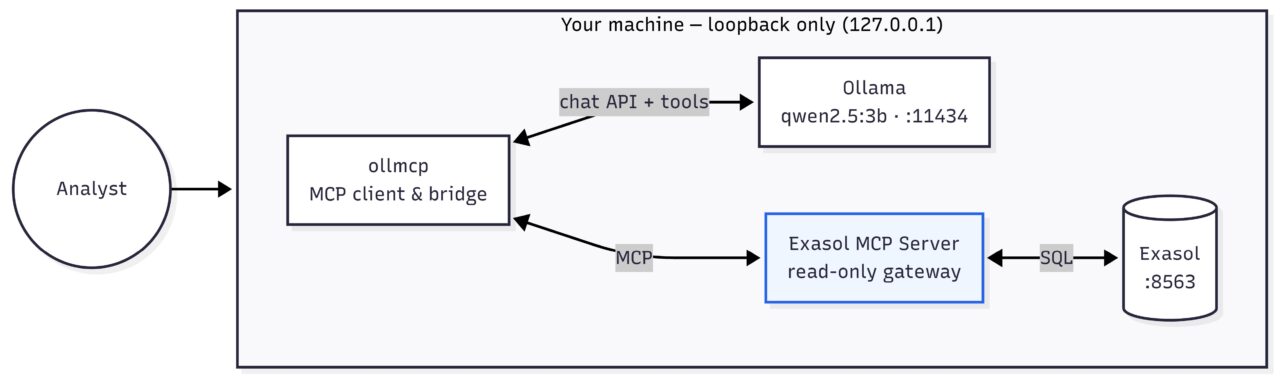
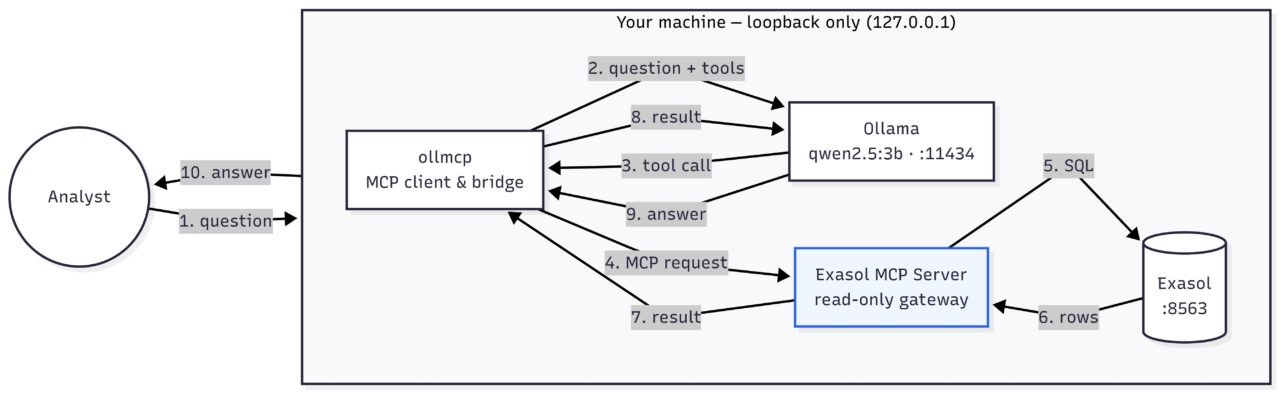
The loop runs entirely on loopback. A question goes to Ollama, the model emits a tool call, the client forwards it to the MCP server, SQL runs against Exasol, rows return, and Ollama phrases the answer.
Wiring it up
Getting this running takes only a handful of steps:
Local Exasol comes from Exasol Personal, Exasol’s free single-user edition. It runs here as exasol/nano, a ~135MB single-node build for dev, embedded, and CI use. The container needs roughly 30–60 seconds after docker compose up before it accepts connections.
The MCP server itself is config-gated. Both read and write are disabled by default, and the read tool has to be turned on explicitly:
{
  "enable_read_query": true,
  "enable_write_query": false
}
That second line carries more weight than it looks. With enable_write_query set to false, the server does not simply refuse write calls. It never registers a write tool to begin with, and the read tool rejects anything that isn’t a SELECT. A confused or adversarially steered model has no write path to find because none exists in the tool catalog.
Exasol publishes two MCP servers, both sovereignty-first: the official exasol/mcp-server exposes schema and query capabilities through a small set of MCP tools, while the experimental exasol-labs-text2sql-mcp-server wraps that same access in a governed pipeline (relevance checks, vector-store lookup of past queries, pre-execution SQL validation, audit trail). This post uses the official server for the leaner shape.
On the model side, Ollama runs qwen2.5:3b which is tool-calling-tuned, and small enough that anyone reading this can pull and run it locally. Ollmcp provides the bridge. On connect, it reports
Successfully connected to exasol with 23 tool(s) and 21 resource(s)/template(s)
Then asks for confirmation before each tool call.
Here’s an example run:
Query: How many customers do we have?

Response: You have 5 customers in your bank.
Three things worth noticing:
- The model didn’t need to be told the table name or column structure. It discovered them through the metadata tools the MCP Server exposed.
- The SQL the model wrote is the same SQL a human would have written, which means the answer is auditable. You can read what ran.
- The loop closed without any external service in the chain. The model’s reasoning, the SQL, the rows, and the rendered sentence all stayed on the same machine.
What stays local and what to watch
Schema, query results, prompts, and reasoning never touch an external API. That’s the win.
- Keep a person in the loop where it matters. Text-to-SQL accuracy that looks fine on public benchmarks drops sharply on real enterprise schemas. Frontier models lose 70-90% execution accuracy on benchmarks like Beaver and Spider 2.0. The cause isn’t model size; but the schema ambiguity, domain terms that aren’t in the schema, and schema evolution. The pattern that scales is tiered. Novel queries get reviewed once, then promoted to a library of approved patterns the model converges on. Human attention concentrates on the edges, not every query.
- Latency is the trade. With CPU-only on a 4-core laptop setup, prompt eval runs around 17 tokens/sec and generation around 5. Cold start is 50–60 seconds. Warm round trips are 12–25. A GPU changes those numbers substantially.
- Read-only is a feature, not a limitation. An answering tool, not an action tool, is the right blast radius for an experiment moving toward production. Keep it that way until you have a reason not to.
Why this is the sovereign-analytics pattern, not a workaround
This is what Exasol is built for. The database, the SQL engine, and the governance all live wherever you put them, on-prem, in your own cloud, or in a hybrid setup. The 2026.1 release is where that shows up in the product. . The data stays in Exasol. The reasoning happens on a machine you own. The governance is something you can show an auditor without reading anyone’s privacy policy first.
This scales beyond The pattern is a local model reasoning over MCP tools against a database you control. Text-to-SQL is one useful thing you can build this way.
Conclusion
The leak is the model host, not the database, the protocol, or the prompt. When you replace the model host, conversational analytics on sensitive data can continue running fully inside your perimeter.
The path is short. Spin up Exasol Personal, point the MCP Server at it, connect a local model, and you have the loop this post described.
Sovereignty isn’t a constraint on enterprise AI. It’s what makes enterprise AI deployable in the places it actually has to work. Sovereignty isn’t a constraint on enterprise AI. It’s what makes enterprise AI deployable in the places it has to work.