

Exasol Virtual Schemas: The Key to Flexible Deployments

Introduction
The concept of Virtual Schemas in an Exasol database is one of the most undervalued features. Virtual Schemas allow „read“ access to other databases for integrating the data in your data analysis. Remember that Exasol needs to have control over the data it wants to analyze, either having the data in main memory (RAM), on a persistent storage device – or – by a linked remote source for read-only purposes: A.k.a. “Virtual Schemas”. Several scenarios are good reasons to consider them.
Firstly, data must remain within a specific region or organization for various reasons, such as compliance requirements or government mandates. This data is still available under certain rules for users outside of this region. An example of such a case is a corporation with international subsidiaries in various countries, each with its own unique set of legal regulations.
Secondly, your organization has database systems, whether transactional or analytical, from which you need data on a non-regular basis. In such cases, it does not make sense to store the data in the Exasol database, as the requirements for this data do not entirely support your use case. However, you also could use a Virtual Schema to download or import data from such a source database system if you intend to use this data without any further processing or transformation, or intend to do the transformation in a data staging area within the Exasol database.
Because Exasol Virtual Schemas support multiple database systems as sources, including the Exasol database itself, they are essential for implementing a hybrid deployment of Exasol in both cloud and on-premises environments.
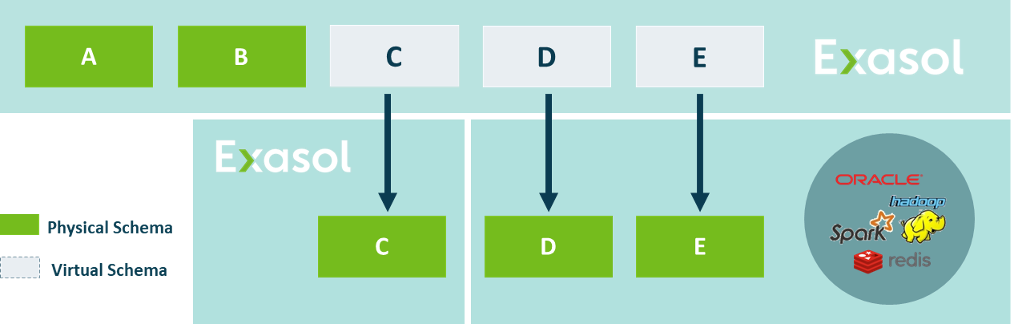
Supported Databases
A wide range of database types is supported, including relational databases for both transactional and analytical workloads, as well as NoSQL databases, a search engine, and document files from hyperscalers. As a fallback for non-listed databases, a generic JDBC adapter is provided, which can be used as a starting point. Below is a list outlining a few examples of the different source types:
- Relational Databases: Exasol, DB2, Oracle, Redshift, Snowflake, Databricks
- NoSQL Databases: DynamoDB
- Search Engine: Elastic Search
- Document Files: AWS S3, Azure Blob Storage document files (Parquet, csv, json)
For a full list of supported databases, please refer to the following webpage:
https://github.com/exasol/virtual-schemas/blob/main/doc/user_guide/dialects.md
Installation
Before you can access a source database and present it as a so-called virtual schema in the Exasol database, you have to deploy the relevant resources. For the JDBC based implementations, it involves the JDBC driver for the particular source system. All implementations come with a specific „Virtual Schema Adapter“ script. The resources can be uploaded to the so-called BucketFS of the Exasol database by a „curl“ command from the command line, or via the AdminUI user interface. After uploading the required files, a so-called „Adapter“ must be created in the Exasol database.
The Virtual Schema Adapter plays a crucial role, as it reads metadata from the source database and retrieves object information, including tables, columns, and data types. It also defines the logic for mapping a source data type to the respective Exasol data type. It also pushes down an appropriate query to the source database, attempting to relocate (push down) as much query logic (filters and certain functions) as possible to the user database, with the goal of minimizing the amount of data to be loaded into the Exasol database. All required installation steps are outlined on the following webpage: https://docs.exasol.com/db/latest/database_concepts/virtual_schema/user_guide.htm
Querying the Virtual Schema
Working with the Virtual Schema is not different from querying a normal table on your Exasol database. You have to use a fully qualified table name, which includes the name of the Virtual Schema as follows:
SELECT
	item
FROM
	VIRTUAL_SCHEMA_NAME.TABLE_NAME
WHERE
	item LIKE “Z%“
Tracking changes
As outlined in the first article of this series, virtual schema management is a task on its own. Especially manual mapping and schema drift can be a tricky and time consuming task, though we don’t even load the data.
How does Exasol Virtual Schema handle this?
For JDBC based sources, just run
ALTER VIRTUAL SCHEMA MY_SOURCE_SCHEMA REFRESH;That’s it! Metadata is automatically updated by deriving it on the fly from the source.
For file based sources, Exasol provides a dedicated document mapping language, (EDML). For JSON files, you have to explicitly define the mapping, whereas for CSV and Parquet files, you can benefit from automatic mapping inference.
For Parquet, we even go one step further and provide a dedicated generator to create a mapping from the scratch. It an then easily be modified, so you don’t have to write it entirely by hand: https://github.com/exasol/parquet-edml-generator
Tasks like manual mapping or schema drift are becoming easier to handle in your daily business.
But let’s get a step back first.
How does the Virtual Schema work
When evaluating a query, Exasol detects the involvement of a Virtual Schema. It therefore starts a so-called Script Language Container for the implementation language of the Adapter Script, in our case, Python or Java (for JDBC connections). Adapters implemented with Lua do not even require a container to be started, as the script language is natively integrated into the database. The Exasol DB queries the respective adapter and asks for the provided capabilities. Exasol sends a request based on this information, a so-called pushdown request – for example, the column projection, in our case, just one column, if filter conditions are included. Even push-down of aggregate functions to be executed on the remote source directly, rather than fetching raw data into Exasol and doing the calculation there. The adapter finally responds with an Exasol-compliant query for retrieving the data from the remote database, either an IMPORT or A SELECT statement. The returned data will be incorporated into the overall query, in case you are joining different tables from native and virtual schemas. The entire process is fully transparent to the user, but can be analyzed with the help of the auditing capabilities of the Exasol database.
When to use Virtual Schemas vs. traditional ELT/ETL
| Move data to Exasol with classic ELT/ETL | Access data on-demand with Exasol Virtual Schemas | |
|---|---|---|
| How often is data accessed? | High-frequent analytic access patterns on medium to high volume of data -> Store hot data in Exasol directly | 1, Rare need of medium to high volume of data, or 2, Occasional need of low to medium volume of data -> Consider querying on-demand via virtual schema |
| What performance do you need? | High-performance, concurrent queries, in seconds to sub-second -> Store mission-critical data in Exasol directly | High-performance not main focus: Performance dependent on the speed and capabilities of the source systems. -> Consider virtualized access |
| How much implementation are you willing to do? | Considerable amount, as you need to load the data into Exasol, store it, update it, etc. -> Performance justifies the effort of implementing ELT/ETL | Little, as you simply can connect remote sources and query them on demand. -> Virtual Schema is easier to use and faster to implement |
| What is your use case? | Classical data warehousing for everyday reporting, self service BI / analytics, need to clean and normalize your data -> Store and transform data in different layers of your DWH data model (e.g. Data Vault) | Hybrid/Federated: Connecting Cloud to On-Prem, accessing restricted data, or one-off ad-hoc analysis. Unified analytics across various heterogeneous data sources -> Virtual schema enables these scenarios out-of-the-box |
Considerations
What is the difference between VS and pure data virtualization tools?
As JDBC connections are involved in most cases, due to its overhead, there is some performance degradation. The same is true for other protocols as well, for a simple reason: Exasol has no direct control over the data. We have been asked several times if, with Virtual Schemas, a virtual Data Hub can be built, where Exasol gathers data from various remote sources and executes the overall query. The answer is simply NO. The Exasol database is not a data virtualization platform. The performance of the Exasol database originates from having all data under its own control. Virtual Schemas are a useful tool for occasional data retrievals, circumventing legal or compliance requirements, or implementing a hybrid Exasol deployment between Cloud and on-premises instances.
Virtual Schemas are more powerful than you might think. We didn’t even know ourselves HOW powerful, until our partner Eviit implemented the Exasol Semantic Layer by using the virtual schema interface.
This shows how extendable and powerful the framework itself is. Virtual Schemas are completely open source, and we invite you to have a look in our Github.
https://github.com/exasol/virtual-schemas
Excited to get your hands on it?
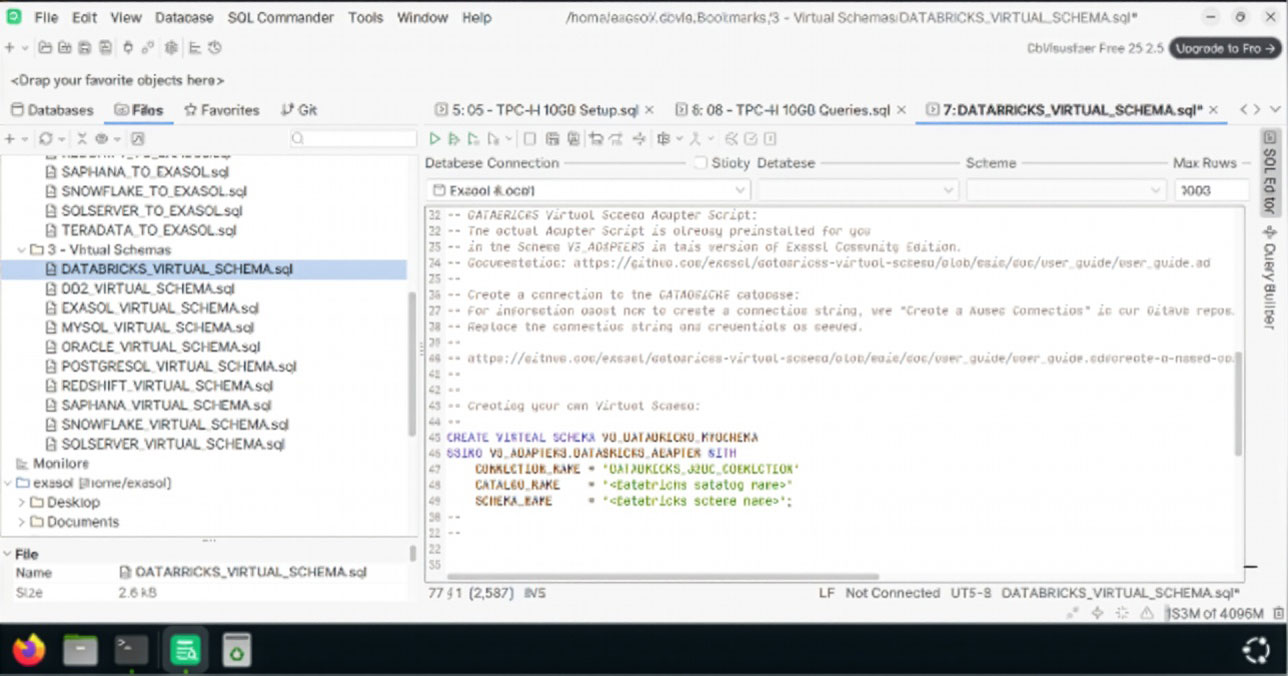
The easiest way to experience virtual schemas, is to try the Exasol community edition, which comes with pre-installed adapters and demo datasets:
https://github.com/exasol-labs/exasol-labs-community-edition/?tab=readme-ov-file#-virtual-schema-adapters–templates
Happy Exasoling!