

Custom Scripts, Right Inside Exasol: A Beginner’s Guide to Script Languages Containers (SLC)

Running a simple script on a computer can sometimes turn into a stressful ride, especially when we try to run a python file someone has sent, and suddenly the terminal is yelling, “Module not found”, “Wrong version”, “Dependency conflict” or “Permission denied”. I have been there and it took me a while to understand the core issue, the generic road that people like me usually take, installing this, update that, or may be break these other things, and before I know it, my system felt like a closet where I keep stuffing random junk hoping it won’t fall out and “boom”!
Most data pipelines hit the same wall eventually. The data in the database works exactly the way you designed it: fast queries, reliable processing, and clean data. But the moment someone asks to run a Python model directly on that data, you are stuck. The “solution” one can propose is moving millions of rows back and forth between the two. It works, technically. But the gap between them costs time, computing, and patience. What if Python, R, or Java could live inside the database, with exactly the libraries one needs, fully under control? That’s the idea behind Exasol’s Script Languages Container (SLC).
In this guide, we’ll break down what an SLC is, how it works, and how you can start using it today, from choosing container flavor to writing custom UDF for the first time. Let’s get into it.
The Basics of SLC and UDF
Exasol is a database. A really fast one. But at its core, databases speak SQL, a language built for querying and managing data. SQL is powerful, but it has limits. And, if you want to apply a machine learning model to your data, run a custom statistical function or use a library that simply doesn’t exist in SQL, it become challenging. That’s where User Defined Functions (UDFs) come in. UDFs let you write custom logic in a programming language you already know; Python, R, Java, or Lua, and run it directly inside Exasol, as if it were just another SQL function. No exporting data, no external servers, no duct tape holding two systems together.
SELECT my_schema.predict_churn(customer_id, usage_data) FROM customers;This query could be calling a Python ML model, running inside database, on data.
But here’s the thing, for Exasol to run Python (or R, or Java), it needs to know: Which version of Python? Which libraries? What’s the environment? That’s exactly what a Script Languages Container (SLC) defines. It’s built on Docker container images, which means everything the script needs to run is bundled right inside it:
- The language runtime (e.g., Python 3.10, 3.12)
- The libraries and packages (e.g., NumPy, pandas, scikit-learn)
- The system-level dependencies (the stuff you’d normally apt-get install and forget about)
When Exasol executes a UDF, it doesn’t just run your script loose on the server. It spins it up inside the SLC; isolated, controlled, and fully defined. The database knows exactly what environment it’s working with, every single time.
How SLC Works (The Architecture) and How to Use it
You don’t need to understand every technical detail under the hood to use SLC effectively. But having a basic mental model of what’s happening inside Exasol when a UDF runs will make everything else feel a lot more intuitive.
What Happens When a UDF Runs?
When you execute a UDF in Exasol, a lot happens in the background, and SLC is at the center of it. Here’s the internal flow:
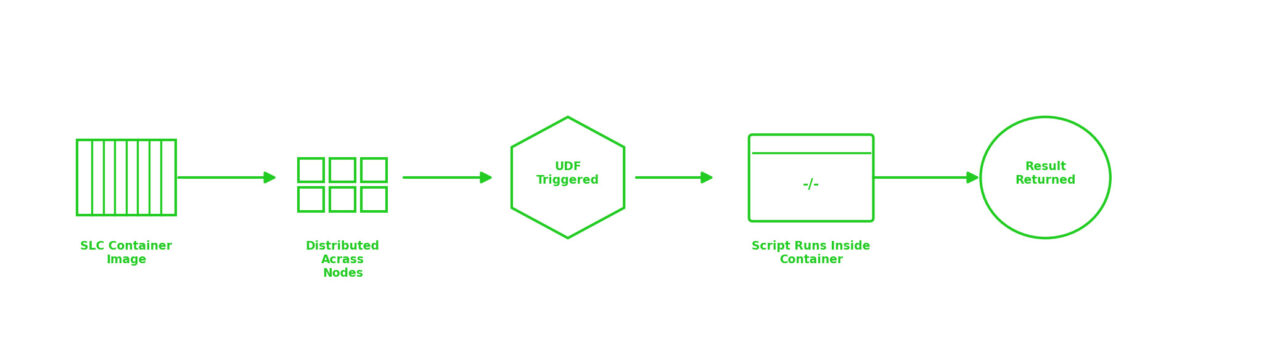
Let’s break each stage down.
Stage 1: The Container Image Exists as a Blueprint
An SLC starts as a container image, a blueprint for an environment. This blueprint defines everything:
• The language runtime (Python, R, Java)
• All installed libraries and packages
• System-level dependencies
This image is static and controlled. It doesn’t change between runs. That’s the whole point, every execution happens in an identical, predictable environment. This image is built from a flavor, ready-made container templates that Exasol provides for common setups like Python 3.10, or 3.12. Download the flavor that matches your needs from the official GitHub releases page.
Tip: New to SLC? Go with a standard Python flavor. It covers the most common use cases and has the largest community of examples to learn from. You can always customize later once you’re comfortable with the basics.
Each release contains .tar.gz files; one per flavor. That file is your SLC image, ready to upload.
Stage 2: The Image Lives in BucketFS and Spreads Across Nodes
Once a container image exists, upload it in BucketFS, Exasol’s internal distributed file system. From there, Exasol automatically distributes it to every node in the cluster.
This is important. Exasol is a massively parallel database; queries don’t run on one machine, they run across many. So when your UDF executes, it might run on multiple nodes simultaneously. Because the SLC is distributed everywhere in advance, every node has the environment it needs, ready and waiting.
No delays. No inconsistency. Same container, every node, every time.
However, uploading isn’t enough; we also need to tell Exasol to actually use this container when a UDF runs. That’s done by registering a script alias (Think of aliases as “nicknames” for environments) via the SCRIPT_LANGUAGES parameter.
First, check what’s currently active:
SELECT session_value
FROM EXA_PARAMETERS
WHERE parameter_name='SCRIPT_LANGUAGES';
Then activate your SLC by adding a new alias:
ALTER SESSION SET SCRIPT_LANGUAGES =

  'PYTHON3=builtin_python3 R=builtin_r JAVA=builtin_java
   MY_PYTHON=localzmq+protobuf:///bfsdefault/default/path/in/bucket/container/?lang=python#buckets/bfsdefault/default/path/in/bucket/container/exaudf/exaudfclient';
Note: Always test session-first and don’t overwrite built-in aliases.
Stage 3: The UDF Runs Inside the Container
This is where everything comes together. You write a UDF in SQL; pointing to the language defined by your SLC and Exasol takes care of the rest.
When the query runs, Exasol:
- Spins up the script inside the SLC environment
- Passes the data in
- Executes your custom logic
- Returns the result, right back into your query
From your perspective as the user, it feels like calling any other SQL function. Under the hood, your Python (or R, or Java) code is running in a fully isolated, fully controlled container, right next to the data.
-- A UDF that runs inside the SLC

SELECT my_schema.predict_churn(customer_id, usage_data)
FROM customers
WHERE region = 'EMEA';
Public vs. Internal Packages: A Quick but Important Distinction
When an SLC image is built, not every package ends up in the final environment your UDFs can access. There are two types:
Public packages: these make it into the final container image. These are the libraries your scripts can use when running inside Exasol.
Internal packages: these are only present during the building process (think: tools needed to compile or install things). They don’t end up in the final image.
This matter, because when you’re checking “is NumPy available in my SLC?”, you want to be looking at the public packages list, not the full build manifest.
Starting from the latest release, Exasol now provides clean, clearly formatted package reports that separate public and internal packages, making it much easier to know exactly what’s inside your container.
Now that we understand what’s happening inside Exasol, let’s map it to what actually a user does. Remember, those three internal stages? the container existing, living in BucketFS, and running your UDF; translate directly into five practical steps. Here’s the full picture in one simple flow:
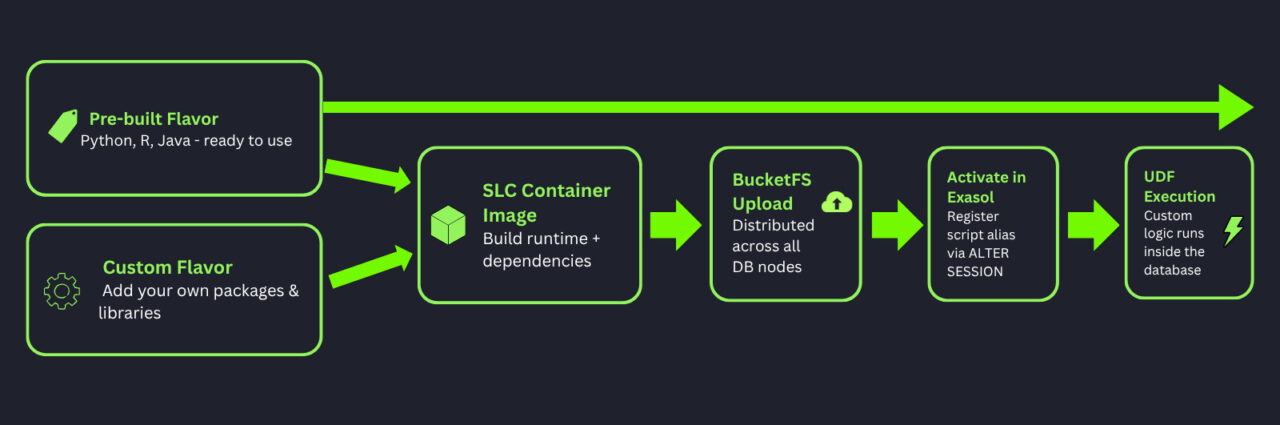
Note: If the pre-built flavor already has everything you need, great, skip this and move on. A common reason to customize an SLC is simply to use a newer version of a package on an older Exasol database version, so you’re not limited to what shipped with your current DB release.
But if you need a specific library that isn’t included by default, you can extend an existing flavor using Exasol’s exaslct tool, without writing Dockerfiles from scratch. For customization purposes, Exasol also provides dedicated ‘template’ flavors, separate from the ‘standard’ flavors that ship with the database. If you’re building your own container, template flavors are your starting point, not the standard ones. For the full customization guide.
Tip: Want a beginner-friendly way to customize SLCs without setting up a local environment? Exasol AI Lab is a pre-configured virtual machine with a Jupyter Notebook tutorial that walks you through downloading, customizing, building, and testing an SLC; step by step.
In the End: You’ve Come a Long Way From “Module Not Found”
Remember where we started? The angry terminal. The dependency conflicts. The closet full of junk we were afraid to open. The classic “works on my machine” standoff.
That’s the world without SLC.
With SLC, your scripts get their own clean space, isolated, pre-configured, and living right inside the database where your data already is. No shuttling data back and forth, no broken environments, no compromises. Just your logic, your libraries, and Exasol’s speed; working together exactly as they should.
It’s not magic. It’s just a better way of doing things. And now you know how it works, why it matters, and how to get started. The only thing left? Actually trying it.
Happy Exasoling!