
Can AI Really Build Your Analytics Pipeline?What dbt, Exasol, and the human review loop actually look like

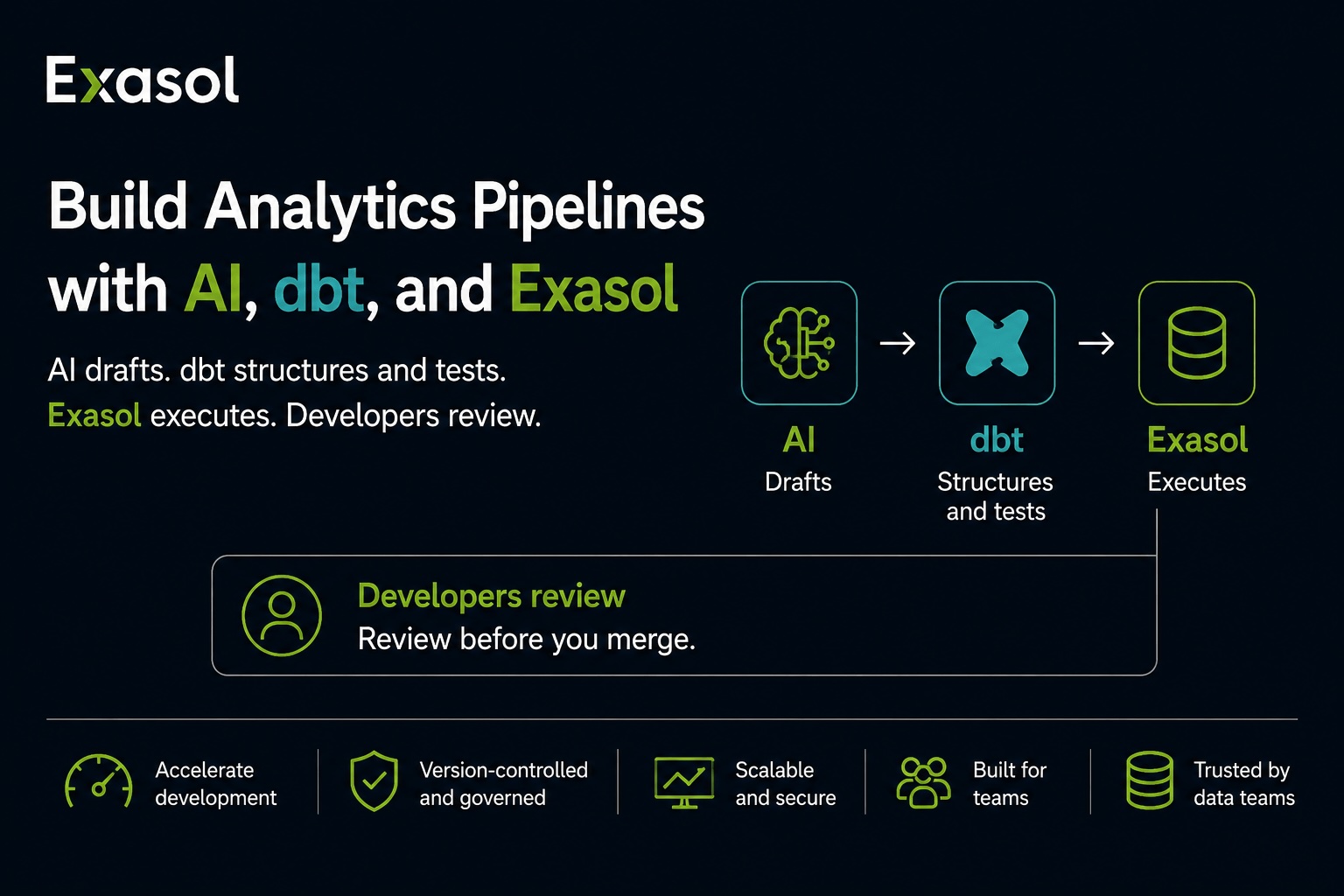
AI can help draft analytics pipelines, but it shouldn’t own them. With a well-structured dbt project, an AI coding assistant can draft models, documentation, and tests, while developers still review the logic before anything is merged.
What dbt Actually Does
dbt manages SQL transformations as software. Models live in version control, dependencies between them are explicit, tests validate assumptions about the data, and YAML files document what each model and column means. A model is a file. A test is a file. Documentation is a file.
Where Exasol Fits
dbt compiles models into SQL. Exasol executes that SQL. To connect the two, install dbt-core and the dbt-exasol adapter, then configure the database connection in your dbt profile.
yaml

my_exasol_project:
  target: dev
  outputs:
    dev:
      type: exasol
      threads: 4
      dsn: HOST:PORT
      user: USERNAME
      password: PASSWORD
      dbname: db
      schema: MY_SCHEMA
A model itself is plain SQL with a config block on top:
sql

{{ config(materialized='table') }}

SELECT
    order_id,
    customer_id,
    order_date,
    total_amount
FROM {{ ref('stg_orders') }}
This file-based structure gives an AI coding assistant concrete artifacts to inspect, modify, and validate.
Where AI Fits In
With access to the dbt project and appropriate database permissions, an AI coding assistant can help with tasks such as:
- Reading a raw source table’s schema and drafting a staging model for it
- Drafting YAML descriptions and tests based on available schema and data context
- Checking a new model against naming conventions already used elsewhere in the project
- Running dbt build and reporting test failures for review
What That Looks Like End to End
Suppose a new raw table, RAW.ORDERS, has landed and needs a staging model.
1. Inspect the source. Through Exasol’s MCP Server, the assistant inspects the table’s columns, data types, and existing comments. With appropriate query access, it can also inspect relevant values in the source data.
2. Draft the model. The assistant writes models/staging/stg_orders.sql using patterns from existing staging models: the same naming conventions and materialization, a numeric cast for amount, and a timestamp alias consistent with existing date fields.
3. Draft the documentation and tests. It drafts an entry in schema.yml, including column descriptions and candidate tests based on the available metadata and data context.
Yaml
models:
    - name: stg_orders
       description: One row per order, cleaned from RAW.ORDERS
      columns:
      	- name: order_id
        	  description: Primary key from the source system.
              tests:
     - unique
     - not_null
            - name: status
               tests:
       - accepted_values:
              values: ['pending', 'shipped', 'cancelled']
4. Build and report. The assistant runs dbt build, and the accepted_values test fails. A fourth status, returned, exists in the data but appeared nowhere in the sample the assistant inspected.
5. Review. This is the step that matters. A developer looks at the failure and has to decide what it means. Perhaps returned is legitimate and the test needs widening. Perhaps returned orders are excluded from downstream revenue reporting and the model needs a filter the assistant had no way of knowing about. The test surfaced the question. It could not answer it.
That’s the realistic version of “AI builds your pipeline”: it produces a draft, and a developer reviews and merges it. The review step doesn’t disappear, and it shouldn’t.
The Metadata Connection
persist_docs creates a direct connection between dbt documentation and database metadata. When enabled, model and column descriptions written in YAML get persisted as comments on the corresponding Exasol tables and columns:
yaml
models:
  +persist_docs:
    relation: true
    columns: true
This makes the connection to AI tooling concrete. Exasol’s MCP Server can expose table and column comments when describing database objects. For example, its describe_exasol_table_or_view tool returns comment metadata for both tables and columns. So when an assistant explores a table through Exasol’s MCP Server, it can use the description your team wrote in YAML instead of relying only on a name such as cust_lt_val.
Two MCP Paths, Two Types of Context
These integrations solve different problems and should be treated separately.
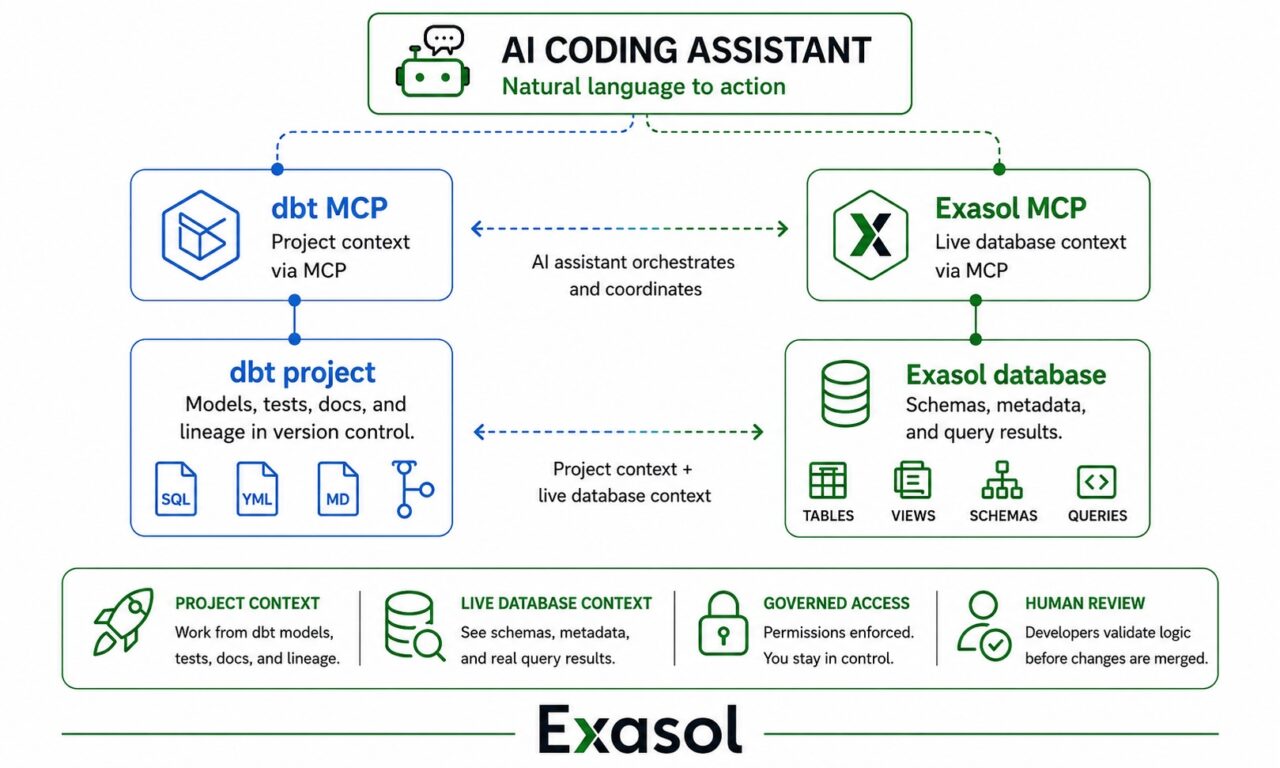
dbt’s MCP server provides project context. It answers questions about what the project contains and how it is built: which models exist, how they depend on each other, what the lineage looks like, what a given model compiles to. This is knowledge about the code.
Exasol’s MCP Server provides live database context. It answers questions about the state of the data right now: which schemas and tables exist, what columns and types they have, what the comments say, and what a query actually returns. This is knowledge about the data.
The distinction matters because neither one substitutes for the other. Project context tells an assistant that stg_orders depends on a source called raw_orders and materializes as a table. It does not tell the assistant that the source table gained a column last week, or that status contains a value the tests don’t allow for. Database context can reveal those changes, but it doesn’t provide the transformation logic, dependency graph, or your team’s conventions.
An assistant with access to both can draft in the dbt project through one path and check its work against real data through the other. That combination is what makes the end-to-end walkthrough above possible: step one and step four need the database, steps two and three need the project
Database Execution Is Part of the Feedback Loop
Every drafted change still has to be compiled, executed against the database, and tested before it is ready for review. Database execution therefore becomes part of the feedback loop. Exasol executes the SQL generated by dbt, including workloads involving joins, aggregations, and window functions.
Where AI Stops
- Review is still required. An AI-drafted model can be syntactically correct and still encode the wrong business logic. Tests catch some of those problems; human review provides another essential check on the logic.
- Metadata quality sets the ceiling. persist_docs propagates whatever descriptions your team wrote. It doesn’t improve them. Thin YAML descriptions mean thin context for the assistant too.
- Permissions still apply. Exasol’s MCP Server executes read queries directly through one tool. DML and DDL operations use a separate tool that requires the user to review, modify if necessary, and approve the query before execution.
- Adapter capabilities vary. Check the current dbt-exasol release notes for up-to-date support status before planning a project around a specific feature.
Try it
- dbt-exasol on GitHub
- Official Exasol setup docs for dbt Core
- Exasol MCP Server
- Exasol MCP Server tool reference
- dbt MCP Server
Takeaway
AI doesn’t replace the analytics engineer in this workflow. It shortens the path from an idea to a tested draft. dbt provides the structure, tests, documentation, and version control. Exasol executes the resulting SQL. With the right project and database context, an AI coding assistant can reduce the manual work involved in that loop, while the review step stays where it belongs: with the team responsible for the data.