

Inside the Agentic Database: Bringing Everything Together

How Exasol brings database access, external data, JSON, model inference, and dbt into one workflow
A support lead asks a straightforward question: which customers are likely to churn this month, and why.
Answering it touches three kinds of data that don’t normally sit together. Billing and subscription history live in Exasol. Support ticket history lives in a separate ticketing system. Product usage, including downgrade-page views and changes in activity, arrives as raw JSON events from a checkout and activity API.
The conventional path to an answer often starts with a project: export the tickets, write a script to flatten the JSON events into columns, land everything next to the billing data, then run the analysis. Here’s how those steps can be reduced when the required capabilities are already available around the database.
The challenge is giving the assistant the database access, context, and execution capabilities needed to turn the question into a useful result.
Start With Governed Database Access
The support lead is working in an AI assistant connected to Exasol through the Exasol MCP Server. The MCP Server gives the assistant governed access to database metadata and query tools, subject to the configured permissions. It can list schemas, inspect table structures, and run queries, without requiring the user to describe the database schema manually in every prompt.
Agent Skills provide Exasol-specific syntax, conventions, and supporting guidance for tasks such as SQL and UDF development.
Query External Data With Virtual Schemas
The support tickets live in an external system. A Virtual Schema can expose supported external data through Exasol’s SQL interface without first copying that data into a local Exasol table:
SELECT customer_id, COUNT(*) AS open_tickets, MAX(created_at) AS last_ticket
FROM support_vs.tickets
WHERE status = 'open'
GROUP BY customer_id;
Depending on the adapter and the query, supported operations can be pushed down to the source system. This example assumes the Virtual Schema for the ticketing system is already configured.
Work With Raw JSON Events
Usage events land in Exasol as raw JSON, one event per row:
CREATE OR REPLACE TABLE usage_events(id INT, json VARCHAR(2000000));A row might look like {“customer_id”: 4021, “event”: “downgrade_viewed”, “plan”: “pro”, “event_timestamp”: “2026-09-01T14:32:00”}. The event_timestamp field lets the team measure how recently each customer was active.
Use JSON_VALUE when the query needs one field:
SELECT id, JSON_VALUE(json, '$.customer_id' RETURNING INT) AS customer_id
FROM usage_events;
Use JSON_EXTRACT when it needs several, each mapped to a typed column:
SELECT id, e.customer_id, e.event, e.plan
FROM usage_events,
     JSON_EXTRACT(json, '$.customer_id', '$.event', '$.plan')
       EMITS (customer_id INT, event VARCHAR(50), plan VARCHAR(50)) e;
The extracted fields can then participate in SQL joins with relational data:
sql
SELECT
    b.customer_id,
    b.plan_value,
    e.event
FROM billing b
JOIN (
    SELECT
        x.customer_id,
        x.event
    FROM usage_events u,
         JSON_EXTRACT(u.json, '$.customer_id', '$.event')
           EMITS (customer_id INT, event VARCHAR(50)) x
) e
    ON b.customer_id = e.customer_id
WHERE e.event = 'downgrade_viewed';
Keeping the raw event available means a new optional field doesn’t require changing a flattened table before the field can be queried.
Move From Signals to Model Inference
Open tickets and downgrade-page views provide signals that a trained model can combine into a churn-risk score.
Suppose the churn model was developed earlier in Exasol AI Lab, using data available through its Exasol connection. For a suitable workload, the trained model can be packaged for UDF-based inference so its logic can be invoked from SQL.
In the example below, churn_score() represents a project-specific UDF wrapping a trained model. It is not a built-in Exasol function. The customer_features table is also illustrative.
SELECT customer_id,
       churn_score(open_tickets, days_since_last_event, downgrade_viewed, plan_value) AS risk
FROM customer_features
ORDER BY risk DESC;
Turn the Analysis Into a Repeatable dbt Model
The ranked list answers the immediate question. To keep the analysis useful as billing, support, and product usage data change, the team needs a repeatable way to prepare the model inputs.
dbt provides that next step. The team can organize the supporting transformations into models that can be tested, documented, and run as part of an existing scheduled workflow.
The Virtual Schema ticket query becomes a staging model, while the JSON event extraction becomes another staging model that summarizes activity per customer:
-- models/staging/support_tickets.sql
SELECT customer_id, COUNT(*) AS open_tickets, MAX(created_at) AS last_ticket
FROM {{ source('support_vs', 'tickets') }}
WHERE status = 'open'
GROUP BY customer_id
-- models/staging/usage_summary.sql
SELECT
e.customer_id,
MAX(e.event_timestamp) AS last_event_at,
DAYS_BETWEEN(CURRENT_DATE, MAX(e.event_timestamp)) AS days_since_last_event,
MAX(CASE WHEN e.event = 'downgrade_viewed' THEN 1 ELSE 0 END) AS downgrade_viewed
FROM {{ source('raw', 'usage_events') }} u,
JSON_EXTRACT(u.json, '$.customer_id', '$.event', '$.event_timestamp')
EMITS (customer_id INT, event VARCHAR(50), event_timestamp TIMESTAMP) e
GROUP BY e.customer_idusage_summary now holds one row per customer, with the fields the final model actually needs: when they were last active, how many days that was, and whether they viewed the downgrade page. The final model joins the billing data with both staging models.
For this illustrative workflow, missing ticket counts and downgrade-view indicators are treated as zero. Customers without recorded activity retain a NULL days_since_last_event, which the project-specific churn_score() UDF must be designed to handle:
-- models/marts/churn_risk.sql
SELECT
    b.customer_id,
    COALESCE(t.open_tickets, 0) AS open_tickets,
    u.days_since_last_event,
    COALESCE(u.downgrade_viewed, 0) AS downgrade_viewed,
    churn_score(
        COALESCE(t.open_tickets, 0),
        u.days_since_last_event,
        COALESCE(u.downgrade_viewed, 0),
        b.plan_value
    ) AS risk
FROM {{ ref('billing') }} b
LEFT JOIN {{ ref('support_tickets') }} t ON b.customer_id = t.customer_id
LEFT JOIN {{ ref('usage_summary') }} u ON b.customer_id = u.customer_id
With the dbt-exasol adapter, these models can become part of the team’s existing scheduled analytics workflow.
How the Pieces Fit Together
The churn question crosses several data and workflow boundaries. Each capability addresses a different part of the analysis.
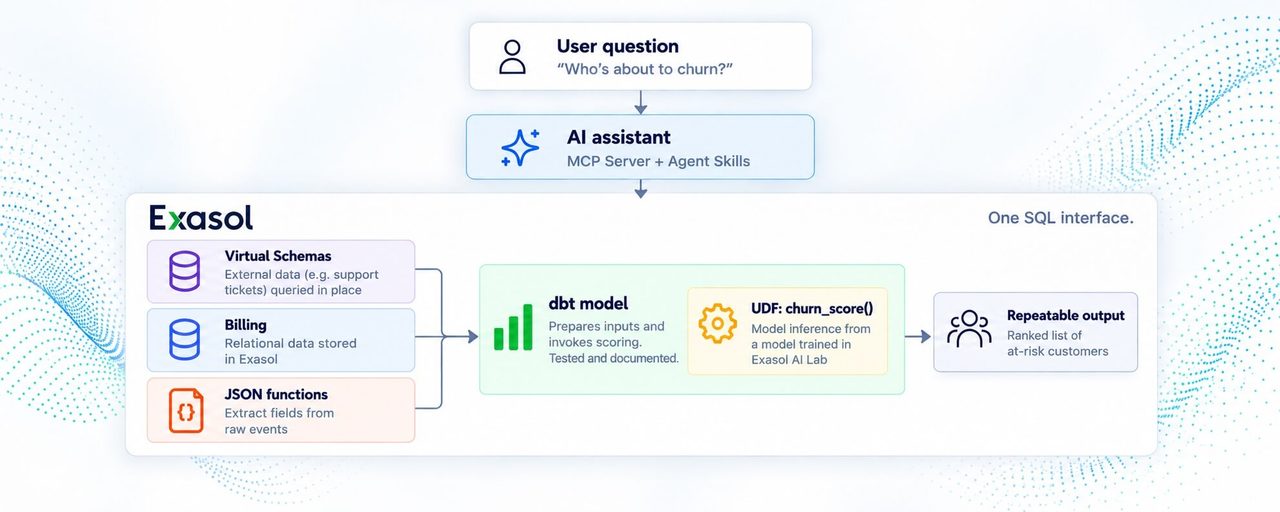
- MCP Server provides governed access to Exasol metadata and query tools.
- Agent Skills provide Exasol-specific guidance for working with SQL, UDFs, and related database features.
- Virtual Schemas expose supported external sources through Exasol’s SQL interface without requiring the analysis to begin with a separate copy of that data.
- JSON functions extract the fields needed from semi-structured events: JSON_VALUE for one field, JSON_EXTRACT for several.
- UDFs provide a path to model inference from SQL for suitable models developed through workflows such as Exasol AI Lab.
- dbt turns the resulting transformation into a tested, documented model that can become part of the team’s repeatable analytics workflow.
Together, MCP Server, Agent Skills, Virtual Schemas, JSON functions, AI Lab, UDFs, and dbt connect governed database access, external and semi-structured data, model inference, and repeatable transformations.
An agentic database brings these capabilities together, giving an agent a path from a business question to a governed, repeatable analytical workflow.