
Database Types Explained: Models, Categories, and Use Cases

Database types are categories of database systems defined by how they structure, store, and process data. Each type uses a different data model and access pattern, which makes it suitable for specific workloads, query styles, and scalability requirements.
Understanding these differences helps teams select the right database approach for analytics, transactions, applications, and large-scale data processing.
Databases can be classified along multiple dimensions, not just one. The most common classification is by data model (such as relational, document, key–value, or graph), but databases are also grouped by workload (transactional vs analytical), architecture (centralized vs distributed), and deployment model (cloud, hybrid, or on-premises). Because of these overlapping dimensions, a single database system can belong to more than one category at the same time. One example of a high-performance analytical database is the Exasol Analytics Engine, which is designed for large-scale analytical queries and high concurrency workloads.
In database management system (DBMS) terminology, a database type describes the logical structure and behavior of the data layer, while the DBMS is the software that implements and operates that model. This distinction matters when comparing database types, because two systems may share a model (for example, relational) but differ significantly in performance characteristics, concurrency handling, and scaling strategy.
This guide explains the main database types, how they differ structurally, where they are typically used, and how the classification frameworks fit together.
Quick Reference: Main Database Types at a Glance
The table below summarizes the most common database types, how they organize data, and where they are typically used. This overview provides a structural reference before going into detailed explanations in later sections.
| Database type | Classification axis | Best suited for | Typical use cases | Common examples |
|---|---|---|---|---|
| Relational database | Data model | Structured data, strong consistency, complex queries | Business transactions, ERP, CRM, financial systems | Exasol, PostgreSQL, MySQL, Oracle |
| Key–value database | Data model | Fast lookups, simple access patterns | Caching, session storage, feature flags | Redis, Amazon DynamoDB |
| Document database | Data model | Semi-structured data, flexible schemas | Content management, APIs, user profiles | MongoDB, CouchDB |
| Column-family database | Data model | Large-scale reads and writes across distributed systems | Time-series data, event logging, analytics at scale | Apache Cassandra, HBase |
| Graph database | Data model | Relationship-heavy data and traversals | Social networks, recommendation engines, fraud detection | Neo4j, JanusGraph |
| Object-oriented database | Data model | Object persistence without impedance mismatch | Specialized applications, embedded systems | ObjectDB, db4o |
| Analytical (OLAP) database | Workload model | High-performance analytical queries | Reporting, BI, large-scale analytics | Exasol, Snowflake, BigQuery |
| Embedded database | Deployment model | Local storage with minimal overhead | Mobile apps, desktop software, edge devices | SQLite, DuckDB |
| Cloud database | Deployment model | Elastic scaling and reduced operations | SaaS platforms, cloud-native applications | Amazon Aurora, Azure SQL, Exasol |
How Databases Are Classified
Database types are not defined by a single rule. A database system can be classified along several independent dimensions, each describing a different technical property. This is why one database can correctly belong to multiple categories at the same time, for example, relational, columnar, and analytical.
Using multiple classification axes avoids confusion and makes comparisons more precise. These classification dimensions build on core database concepts such as data models, schemas, and query patterns.
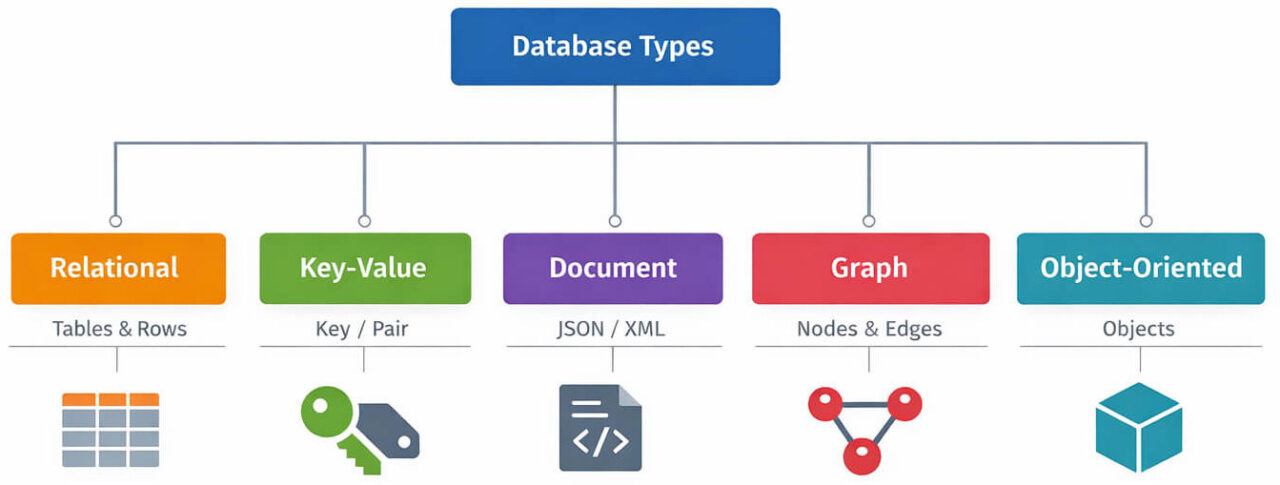
Classification by Data Model
The data model describes how data is logically structured and related.
Common data model categories include:
- Relational: data stored in tables with rows and columns and accessed with SQL
- Key–value: data stored as simple key–value pairs
- Document: data stored as structured documents (such as JSON)
- Graph: data stored as nodes and relationships
- Object-oriented: data stored as persistent objects
This is the most widely used classification when people refer to “database types.”
Database Types by Data Model
Classification by Workload Pattern
The workload model describes how the database is primarily used.
Main workload categories:
- OLTP (online transaction processing): optimized for frequent, small, write-heavy transactions
- OLAP (online analytical processing): optimized for large, read-heavy analytical queries
- Hybrid: supports both transactional and analytical workloads
This classification explains performance behavior better than the data model alone.

Test Real Analytical Workloads with Exasol Personal
Unlimited data. Full analytics performance.
Classification by Storage Format
The storage model describes how data is physically organized on disk or in memory.
Common storage formats:
- Row-oriented: stores complete rows together
- Columnar: stores values column by column for faster analytical scans
- Wide-column / column-family: stores grouped columns with flexible row structure
Storage format strongly affects query speed and compression efficiency, especially for analytics.
Classification by Architecture and Deployment
Databases are also classified by how they are deployed and scaled:
- Centralized: runs on a single node
- Distributed: runs across multiple nodes
- Embedded: bundled inside an application
- Cloud-managed: provided as a managed service
These categories describe operational design, not the logical data model.
Because these dimensions are independent, a single system can be described across all of them. A database can be relational by model, columnar by storage, analytical by workload, and distributed by architecture at the same time. This multi-axis view is necessary for accurate database type comparisons.
Types of Databases by Data Model
The most common way to describe database types is by data model. The data model defines how information is structured, how relationships are represented, and how queries interact with the data. Each model is optimized for different query patterns and application needs. Selecting a model should be part of a structured database design step-by-step process, that evaluates schema shape, query patterns, and growth expectations.
The categories below cover the core data models used in modern database systems.
Relational Databases
A relational database stores data in tables made of rows and columns, with a fixed schema and defined relationships between tables. Data is queried using SQL and joined across tables through keys.
Key characteristics:
- Table-based structure
- Predefined schema
- Strong consistency rules
- SQL query language
- Support for joins and constraints
Typical use cases:
- Transactional business systems
- Financial records
- ERP and CRM platforms
- Structured operational data
Common examples:
- PostgreSQL
- MySQL
- Oracle Database
- Microsoft SQL Server
- Exasol
Key-Value Databases
A key-value database stores each record as a unique key mapped to a value. The value is usually opaque to the database engine and retrieved directly by key lookup.
Key characteristics:
- Simple data model
- Very fast read/write access by key
- No joins
- Minimal schema requirements
Typical use cases:
- Caching layers
- Session storage
- User state and preferences
- Feature flags
Common examples:
- Redis
- Amazon DynamoDB (key–value mode)
Test Real Analytical Workloads with Exasol Personal
Unlimited data. Full analytics performance.
Document Databases
A document database stores data as structured documents, typically in JSON or similar formats. Each document can contain nested fields and variable structure.
Key characteristics:
- Flexible schema
- Nested attributes
- Document-level queries
- No fixed table layout
Typical use cases:
- Content platforms
- Product catalogs
- User profile storage
- API backends
Common examples:
- MongoDB
- CouchDB
Column-Family Databases
A column-family database (wide-column store) organizes data into column families rather than fixed relational tables. Rows can contain different columns, and columns are grouped for efficient distributed access.
Key characteristics:
- Wide-column model
- Flexible row structure
- Designed for horizontal scaling
- Optimized for large distributed datasets
Typical use cases:
- Event and log data
- Telemetry streams
- Large-scale write-heavy systems
Common examples:
- Apache Cassandra
- HBase
For a neutral academic treatment of column-family and document-oriented NoSQL database models, see research on ontology-based data integration over document and column-family oriented NoSQL systems.
Graph Databases
A graph database stores data as nodes and edges, where edges represent relationships between entities. Queries traverse relationships directly instead of using joins.
Key characteristics:
- Relationship-first model
- Efficient graph traversal
- Flexible schemas
- Pattern-based queries
Typical use cases:
- Social networks
- Fraud detection
- Recommendation systems
- Network analysis
Common examples:
- Neo4j
- JanusGraph
Object-Oriented Databases
An object-oriented database stores data as objects, similar to objects used in programming languages. Objects include both attributes and methods.
Key characteristics:
- Object persistence
- Class-based structure
- Reduced object–relational mapping needs
Typical use cases:
- Specialized engineering systems
- Simulation software
- Embedded object persistence
Common examples:
- ObjectDB
- db4o
Next section covers database types by workload pattern (OLTP vs OLAP) and how usage style affects database classification.
Test Real Analytical Workloads with Exasol Personal
Unlimited data. Full analytics performance.
Database Types by Workload Pattern
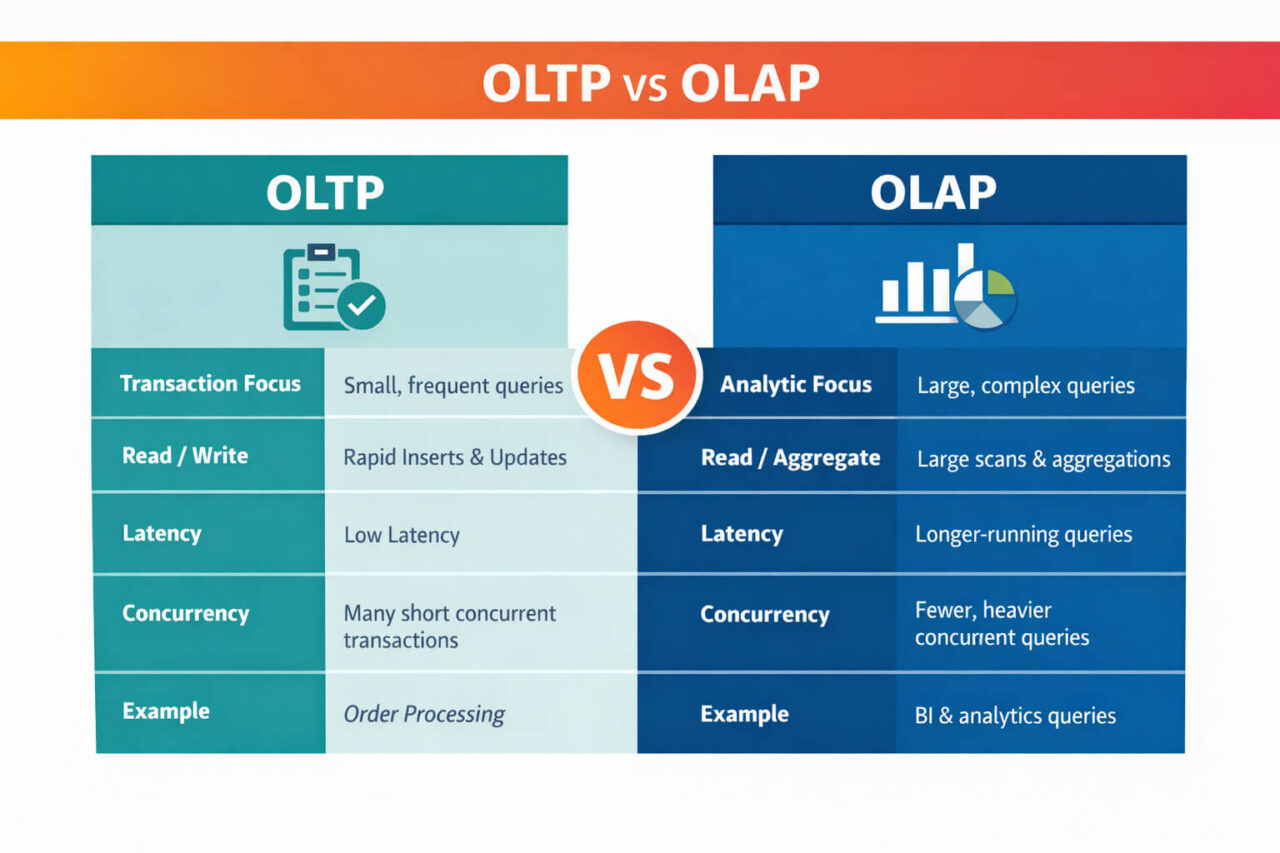
Another important way to classify database types is by workload pattern; how the system is primarily used in production. The workload model affects storage layout, indexing strategy, query optimization, and concurrency control. Two major categories dominate this classification: OLTP and OLAP.
A database can share the same data model as another system but behave very differently under load because it is optimized for a different workload pattern.
OLTP Databases (Online Transaction Processing)
An OLTP database is optimized for frequent, small, write-heavy transactions. These systems handle many concurrent operations that insert, update, or delete small amounts of data.
Key characteristics:
- High transaction throughput
- Short, predictable queries
- Row-level operations
- Strong consistency guarantees
- Strict concurrency control
Typical query pattern:
- Single-record lookups
- Small updates
- Indexed searches
- Point queries
Typical use cases:
- Order processing systems
- Banking transactions
- Inventory systems
- User account operations
Common examples:
- PostgreSQL
- MySQL
- Microsoft SQL Server
OLAP Databases (Online Analytical Processing)
An OLAP database is optimized for large, read-heavy analytical queries across many rows and columns. These systems are designed to scan, aggregate, and join large datasets efficiently.
Key characteristics:
- Optimized for large scans and aggregations
- Columnar or hybrid storage is common
- Complex multi-table queries
- High concurrency for analytical users
- Compression and vectorized execution often used
Typical query pattern:
- Aggregations over large datasets
- Multi-dimensional analysis
- Complex joins
- Long-running queries
Typical use cases:
- Business intelligence
- Reporting systems
- Data warehousing
- Large-scale analytics
Common examples:
- Snowflake
- BigQuery
- Exasol Data Warehouse
Hybrid Transactional/Analytical Databases (HTAP)
A hybrid database (HTAP: Hybrid Transactional/Analytical Processing) is designed to support both transactional and analytical queries on the same system. These systems attempt to reduce the need for separate OLTP and OLAP platforms.
Key characteristics:
- Mixed workload support
- Combined row and column techniques (in some engines)
- Real-time analytics on operational data
Typical use cases:
- Operational analytics
- Real-time dashboards
- Systems that cannot tolerate ETL delay
Examples vary by engine and configuration, and capabilities differ significantly between products.
Workload classification is independent from the data model. A database can be relational and OLTP-focused, or relational and OLAP-focused, depending on its design and optimization strategy.
Test Real Analytical Workloads with Exasol Personal
Unlimited data. Full analytics performance.
Database Types by Storage Format
Databases can also be classified by storage format, which describes how data is physically organized for reading and writing. Storage format strongly affects scan speed, compression efficiency, and query performance. This classification is independent from both data model and workload type.
Two systems can both be relational databases but use different storage formats internally.
Row-Oriented Storage
A row-oriented database stores complete rows together on disk or in memory. All column values for a record are stored next to each other.
Key characteristics:
- Efficient for single-row lookups
- Fast transactional writes
- Good for point queries
- Common in transactional systems
Typical query pattern:
- Fetch one record by key
- Update individual rows
- Small indexed lookups
Commonly associated with:
- OLTP systems
- Traditional relational engines
Columnar Storage
A columnar database stores data column by column instead of row by row. Values from the same column are stored together. This layout improves compression and large-scale scan performance.
Key characteristics:
- Efficient for large scans
- High compression ratios
- Faster aggregations
- Reduced I/O for analytical queries
Typical query pattern:
- Aggregations across many rows
- Analytical filters on few columns
- Reporting workloads
Commonly associated with:
- Analytical (OLAP) databases
- Data warehouse engines
- Columnar relational systems
Examples include columnar analytical engines such as Snowflake, BigQuery, and Exasol.
Wide-Column / Column-Family Storage
A wide-column (column-family) database stores data in column families where each row can contain a different set of columns. Despite the name, this is a different model from columnar analytical storage.
Key characteristics:
- Flexible per-row columns
- Column families as grouping units
- Designed for distributed scale
- Schema-light structure
Typical query pattern:
- Large distributed reads/writes
- Sparse datasets
- Event-style records
Commonly associated with:
- NoSQL wide-column systems
- Large distributed platforms
Examples include Cassandra and HBase.
Storage format classification explains performance behavior that is not visible from the data model alone. A database can be relational by model and columnar by storage at the same time, which is common in analytical database systems.
Next section covers database types by deployment and architecture model.
Database Types by Deployment and Architecture Model
Databases are also classified by how they are deployed and scaled at the infrastructure level. This classification describes operational design rather than the logical data model. It explains where the database runs, how it distributes data, and how it handles scale and availability.
A single database system can use any data model but still differ significantly based on its architectural and deployment pattern.
Centralized Databases
A centralized database runs on a single server or node. All data storage and query processing happen in one location.
Key characteristics:
- Single-node architecture
- Simple deployment model
- Easier administration
- Limited horizontal scalability
Typical use cases:
- Small to mid-size applications
- Internal tools
- Departmental systems
- Development environments
Centralized design simplifies operations but creates a single resource bottleneck as data volume and concurrency grow.
Distributed Databases
A distributed database stores and processes data across multiple nodes. Data may be partitioned, replicated, or both. Queries are executed across the cluster.
Key characteristics:
- Multi-node architecture
- Horizontal scalability
- Data partitioning (sharding)
- Replication for availability
- Parallel query execution
Typical use cases:
- Large-scale platforms
- High-availability systems
- Globally distributed applications
- High-concurrency analytics
Distributed architecture improves scale and resilience but increases coordination and consistency complexity.
Test Real Analytical Workloads with Exasol Personal
Unlimited data. Full analytics performance.
Embedded Databases
An embedded database runs inside an application process instead of as a separate database server. The database engine is linked directly into the application.
Key characteristics:
- No separate server process
- Low operational overhead
- Local data access
- Lightweight footprint
Typical use cases:
- Mobile applications
- Desktop software
- Edge and device software
- Developer tools
Common examples include embedded engines used for local analytics or application storage.
Cloud-Managed Databases
A cloud-managed database is delivered as a managed service. Infrastructure provisioning, backups, patching, and scaling are handled by the cloud provider.
Key characteristics:
- Managed operations
- Elastic scaling options
- Built-in backup and recovery
- Service-level availability features
Typical use cases:
- Cloud-native applications
- SaaS platforms
- Rapid deployment environments
Cloud-managed databases can be relational, analytical, key–value, or other models. The cloud model describes the operating approach, not the data structure.
Deployment and architecture classification is independent from both data model and workload pattern. A database can be relational, analytical, distributed, and cloud-managed at the same time.
Database Types in DBMS Context
In DBMS terminology, database types describe the data model and structural behavior supported by a database management system (DBMS). The DBMS is the software layer that defines how data is stored, validated, indexed, secured, and queried. The database type describes the logical model implemented inside that system.
A DBMS and a database type are not the same thing. The DBMS is the engine and control layer. The database type is the structural model it supports. One DBMS can support one or multiple database types, depending on its design.
Database vs DBMS
A database is the organized collection of data.
A DBMS is the software that:
- manages storage
- enforces schema rules
- controls access
- executes queries
- handles transactions
- maintains indexes and metadata
Example relationship:
- A relational DBMS manages relational databases.
- A document DBMS manages document databases.
- A graph DBMS manages graph databases.
Database Types by DBMS Model
When classified in DBMS context, database types are grouped by the model the DBMS implements.
Main DBMS model types:
- Relational DBMS: table-based relational model with SQL
- Key–value DBMS: key lookup model
- Document DBMS: document-oriented model
- Graph DBMS: relationship graph model
- Column-family DBMS: wide-column NoSQL model
- Object DBMS: object persistence model
Multi-Model DBMS
Some modern systems are multi-model DBMS, meaning they support more than one data model through a single engine or query layer.
Typical multi-model support combinations:
- relational + document
- relational + graph
- key–value + document
Capabilities vary by product and configuration. Multi-model support does not remove the underlying model differences; it adds multiple interfaces on top of one engine.
Database types in DBMS terms are defined by the data model implemented by the management system, such as relational, document, key–value, graph, column-family, or object-oriented. The DBMS provides the rules and mechanisms that enforce how that model behaves in practice.
Choosing the Right Database Type
Choosing the right database type depends on how the data is structured, how it is queried, and how the system must scale. There is no single best database model for all workloads. The correct choice comes from matching database characteristics to access patterns and operational requirements.
This section maps database types to practical selection criteria and common use cases.
Choose by Data Structure
Start with how your data is shaped and how stable the schema is.
Use a relational database when:
- data is highly structured
- relationships are well defined
- joins are common
- schema stability is expected
Use a document database when:
- records vary in structure
- nested attributes are common
- schema changes frequently
Use a key–value database when:
- access is always by key
- objects are simple
- ultra-low latency is required
Use a graph database when:
- relationships are the primary query focus
- deep traversal queries are required
Test Real Analytical Workloads with Exasol Personal
Unlimited data. Full analytics performance.
Choose by Query Pattern
Match the database to how queries behave.
Choose an OLTP-oriented system when:
- queries are short and frequent
- writes are continuous
- transactions must be consistent
- records are accessed individually
Choose an analytical (OLAP) system when:
- queries scan large datasets
- aggregations are common
- concurrency is analytical-user driven
- reporting and BI are primary workloads
Hybrid systems are appropriate when operational and analytical queries must run on the same fresh dataset, but performance tradeoffs should be evaluated.
Choose by Scale and Distribution Needs
Consider expected data volume and concurrency.
Use a distributed database architecture when:
- horizontal scaling is required
- high availability is mandatory
- workload is globally distributed
Use a centralized database when:
- workload is moderate
- operational simplicity is preferred
- scaling requirements are limited
Choose by Storage and Performance Profile
Storage format affects performance behavior.
Choose row-oriented storage when:
- point lookups dominate
- write latency matters
Choose columnar storage when:
- analytical scans dominate
- aggregations run over many rows
- compression and scan speed matter
Do not confuse columnar analytical storage with column-family NoSQL models, they solve different problems.
Practical Selection Checklist
Use this short checklist during evaluation:
- Is the schema fixed or evolving?
- Are queries transactional or analytical?
- Do queries read single records or large ranges?
- Are relationships central to the workload?
- Is horizontal scale required?
- Is low-latency lookup required?
The answers narrow the suitable database types quickly and prevent model mismatch.
Bonus: Types of SQL Databases
A SQL database is any database system that uses Structured Query Language (SQL) as its primary query interface. Most SQL databases follow the relational model, but SQL support and relational storage are not strictly identical concepts.
SQL defines how data is queried and manipulated. The underlying storage engine can still differ in architecture and optimization strategy.
Relational SQL Databases
Most SQL databases are relational. They store data in tables with predefined schemas and support joins, constraints, and transactions.
Key characteristics:
- Table-based model
- Schema enforcement
- ACID transaction properties
- Join operations
- Standard SQL queries
Common examples:
- PostgreSQL
- MySQL
- Microsoft SQL Server
- Oracle Database
- Exasol
Analytical SQL Databases
Some SQL databases are optimized primarily for analytics rather than transactions. They still use SQL but rely on columnar storage and analytical execution engines.
Key characteristics:
- SQL interface
- Columnar or hybrid storage
- Analytical query optimization
- High aggregation performance
Common examples:
- Snowflake
- BigQuery
- Exasol
Test Real Analytical Workloads with Exasol Personal
Unlimited data. Full analytics performance.
Embedded SQL Databases
Embedded databases can also support SQL while running inside an application process rather than as a separate server.
Key characteristics:
- In-process engine
- Lightweight footprint
- Local analytics and storage
Common examples:
- SQLite
- DuckDB
SQL describes the query language layer, while database type describes the data model and engine behavior. Many different database categories can expose an SQL interface while using different storage and execution strategies underneath.
FAQs
The four commonly cited database types are relational, key–value, document, and graph databases. These categories are based on the data model used to store and relate information. Relational databases use tables, key–value databases use simple pairs, document databases store structured documents, and graph databases model relationships as nodes and edges.
Five widely used database systems are PostgreSQL, MySQL, Oracle Database, MongoDB, and Cassandra. These represent different database models, including relational, document, and column-family systems. Each is designed for different workloads, query patterns, and scaling requirements rather than serving the same purpose.
Examples of databases include PostgreSQL, MySQL, Oracle Database, SQL Server, MongoDB, Cassandra, Redis, Neo4j, Snowflake, and Exasol. These systems cover multiple database types such as relational, document, key–value, graph, and analytical databases, each optimized for different storage models and workloads.
Five common database models are relational, document, key–value, graph, and column-family. A database model defines how data is structured and accessed. Each model supports different relationship patterns and query styles, which is why multiple models exist instead of a single universal structure.
Five common data types used inside databases are integer, decimal, text (string), date/time, and boolean. These describe the format of stored values at the column level, not the database model itself. Data types control validation, indexing behavior, and storage rules within tables or documents.
Top databases by adoption and usage commonly include PostgreSQL, MySQL, Oracle Database, SQL Server, MongoDB, Redis, Cassandra, Snowflake, BigQuery, and Exasol. Rankings vary by methodology and workload category, since transactional, analytical, and NoSQL systems are measured differently.
1NF, 2NF, and 3NF are the first three relational database normal forms. They define rules for structuring tables to reduce redundancy and dependency. 1NF requires atomic values, 2NF removes partial key dependencies, and 3NF removes transitive dependencies. These rules improve consistency and update reliability.
The three commonly referenced main database categories are relational, NoSQL, and graph. Relational databases use tables and SQL, NoSQL databases use non-tabular models such as document or key–value, and graph databases focus on relationship traversal. This is a simplified high-level grouping.
The seven normal forms in DBMS are 1NF, 2NF, 3NF, BCNF, 4NF, 5NF, and 6NF. Each normal form adds stricter rules to reduce redundancy and dependency anomalies in relational schema design. In practice, most production schemas are normalized to 3NF or BCNF.
The four commonly taught DBMS data type groups are numeric, character/string, date/time, and boolean. Some classifications also include binary types. These categories define how individual field values are stored and validated inside database tables.