
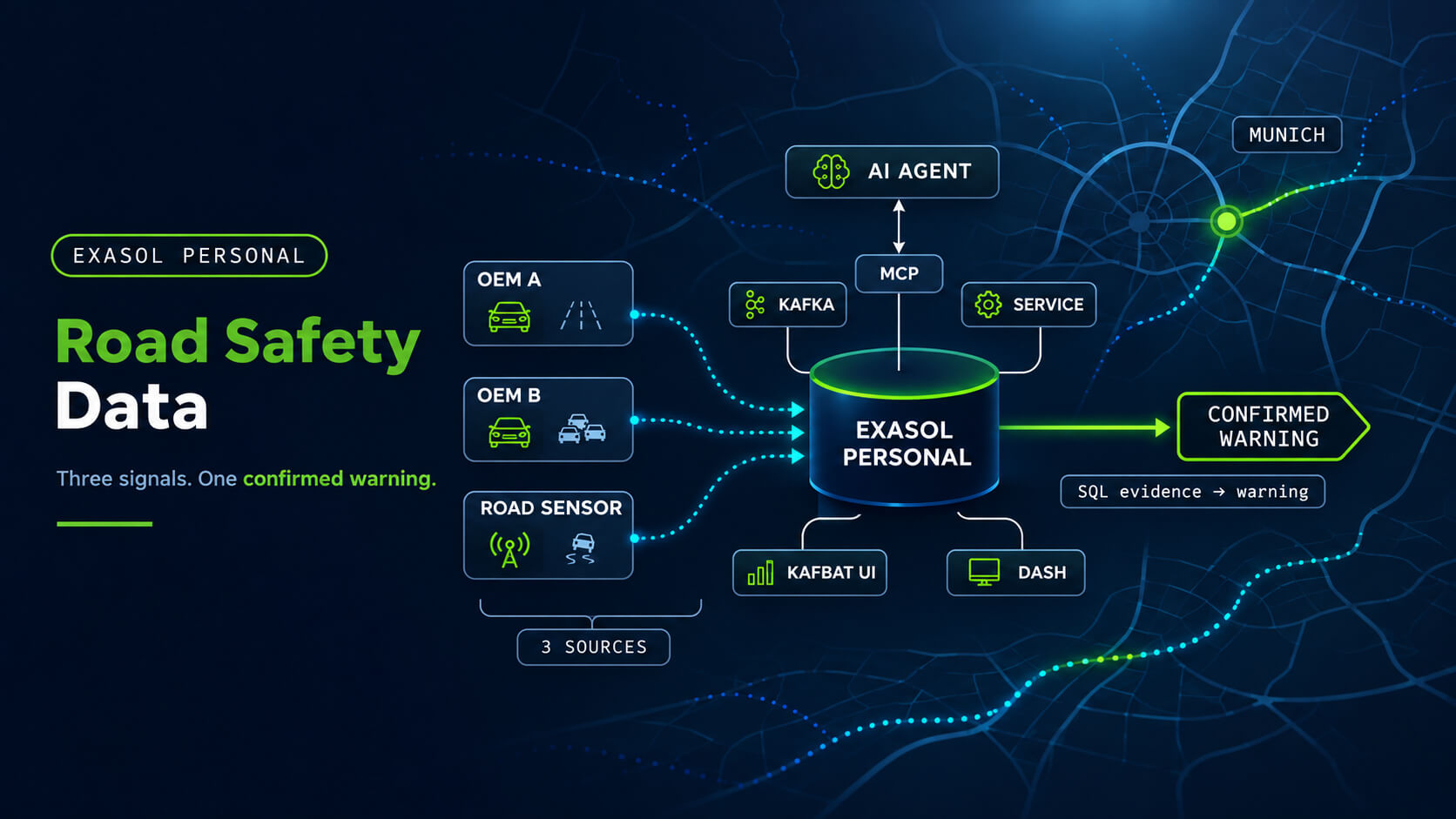
Road Safety Data on Exasol Personal: Sidecars and an Agent

We built a road safety service that runs completely inside one Exasol Personal deployment, and that you operate by talking to an AI agent.
The Use Case: Data for Road Safety
The Mobility Data Space (MDS) is a German data space for mobility data: its members exchange data directly, each through its own connector, without a central store. One of its use cases is Data for Road Safety (DFRS). Carmakers, navigation services and road operators share safety-related traffic information (SRTI), as defined by an EU regulation: eight categories such as wrong-way driver, accident, slippery road or reduced visibility.
The value is in the combination. A single car reporting ice may be wrong. Two independent carmakers, or one carmaker plus a road weather sensor, reporting the same hazard at the same place make it credible enough to warn every vehicle approaching it. A DFRS partner needs a backend that receives these event streams, confirms hazards and publishes warnings. Our demo is a reference implementation of that backend, set in Munich.
Exasol Personal and its Sidecars
Exasol Personal is the free edition of Exasol for individual use. A single launcher, exasol, installs the database on a laptop (macOS, Linux or Windows) or in your own cloud account, and starts and stops it.
A sidecar is a container that the launcher runs next to the database, declared in the deployment’s sidecars.yaml. exasol start brings the sidecars up with the database, exasol stop takes them down. Each one gets the database connection from the launcher, so no password is written to a file.
For the demo this means: the only thing a user installs is the launcher. Kafka, the service and the dashboards are sidecars.
Architecture
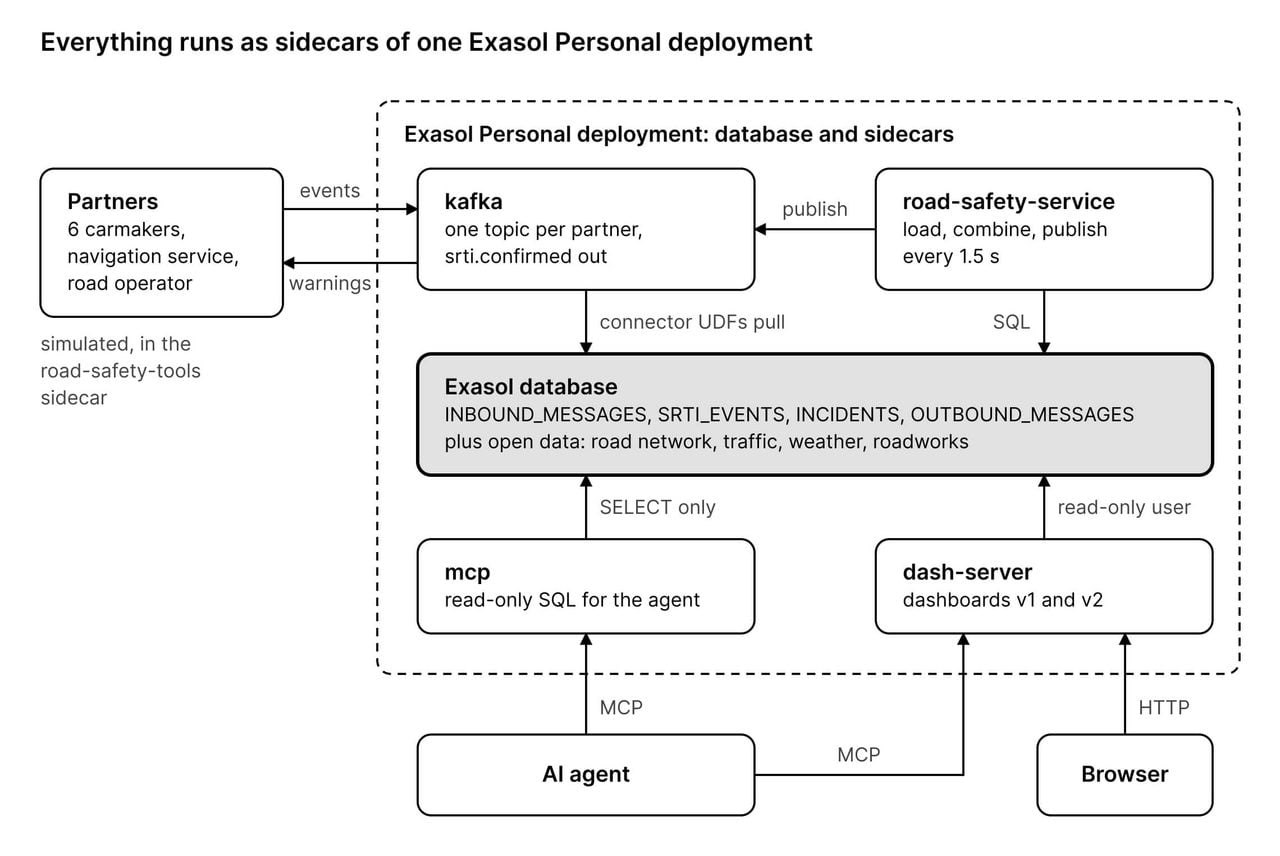
The database pulls the partners’ Kafka topics itself, through the Exasol Kafka connector (Java UDFs). The service only drives the loop; the combination is SQL inside Exasol. A sixth sidecar, Kafbat UI, shows the topics in a browser.
From Reports to Warnings
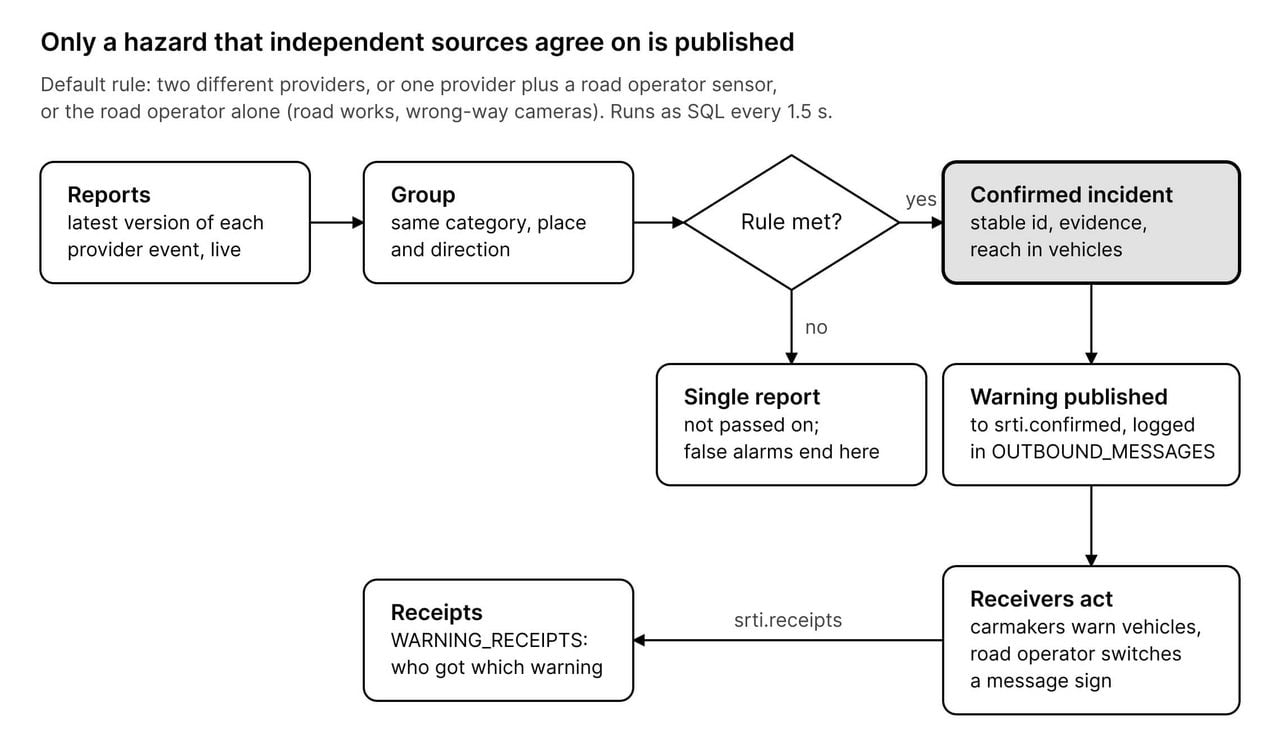
The combination is one SQL statement with the rule as parameters. It never reads which hazards the simulator started; it finds them only from what the partners send. Every step leaves rows in Exasol, so “why was this confirmed?” and “who was warned?” are SQL questions.
Operated by an Agent
The demo is meant to be driven from an AI coding agent such as Claude Code or Codex, started in the repo folder. Two things make that work:
- Two MCP servers, both sidecars.
exasol-personalis the Exasol MCP server; it gives the agent read-only SQL on the database.dash-serveris Dash Server; it lets the agent create, deploy and inspect dashboards. AGENTS.md, the agent’s standing instructions: how to set the demo up, how to map a request to a simulator command, and the ground rules. Analysis SQL is read-only and shown before any interpretation; every hazard is announced as a simulation; the agent never reads a password.
A session runs from a first, simple dashboard of what arrives to the prebuilt one that shows what Exasol makes of it. The requests are in plain words; the agent turns them into commands and SQL.
1. Set up. “Set up the demo.” The agent runs ./setup.sh and reports each step: database, sidecars, Kafka connector, open data. Then the simulated partners start sending: SRTI events from the carmakers and the navigation service, sensor readings from the road operator.
2. A simple dashboard. “Build a simple dashboard, v1, that shows the road events coming in.” The agent explores the tables through exasol-personal, writes three SQL queries and one Dash page, and deploys it through dash-server. Dash Server validates the page, tests the SQL and serves it; the page reads the database as a read-only user.
3. Single reports. “Oil on the A9 near Freimann, southbound; only OEM A sees it.” “Debris on Leopoldstraße; only the navigation service.” “Ice on the Reichenbachbrücke; only OEM B.” The agent announces each as a simulation and runs the trigger. Each hazard has one source, so it stays a single report: it shows up on v1, nothing is confirmed.
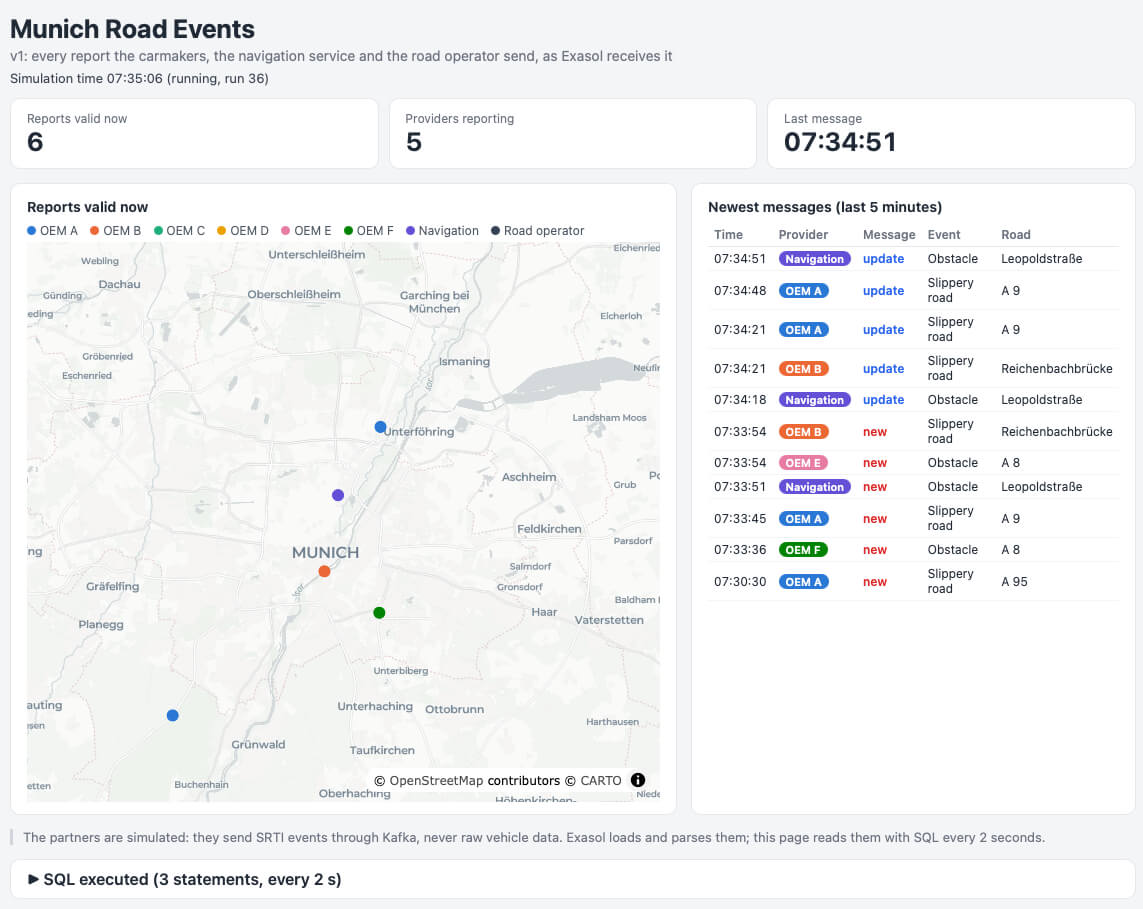
v1, as the agent built it: one dot per report that is valid now, coloured by provider, and the raw message stream (new, update, cancel). The A9, Leopoldstraße and Reichenbachbrücke reports are the ones just triggered; the A8 obstacles are false alarms the simulator adds by itself, about one per simulated minute.
4. A confirmed incident. v1 shows what arrives. Dashboard v2, munich-road-conditions, shows what Exasol makes of it; it is prebuilt and deploys itself when the sidecar starts. “An accident on Fürstenrieder Straße near Laimer Platz, reported by OEM A, B and C.” The second report meets the rule: Exasol confirms the incident, publishes a warning, and the simulated receivers act on it.
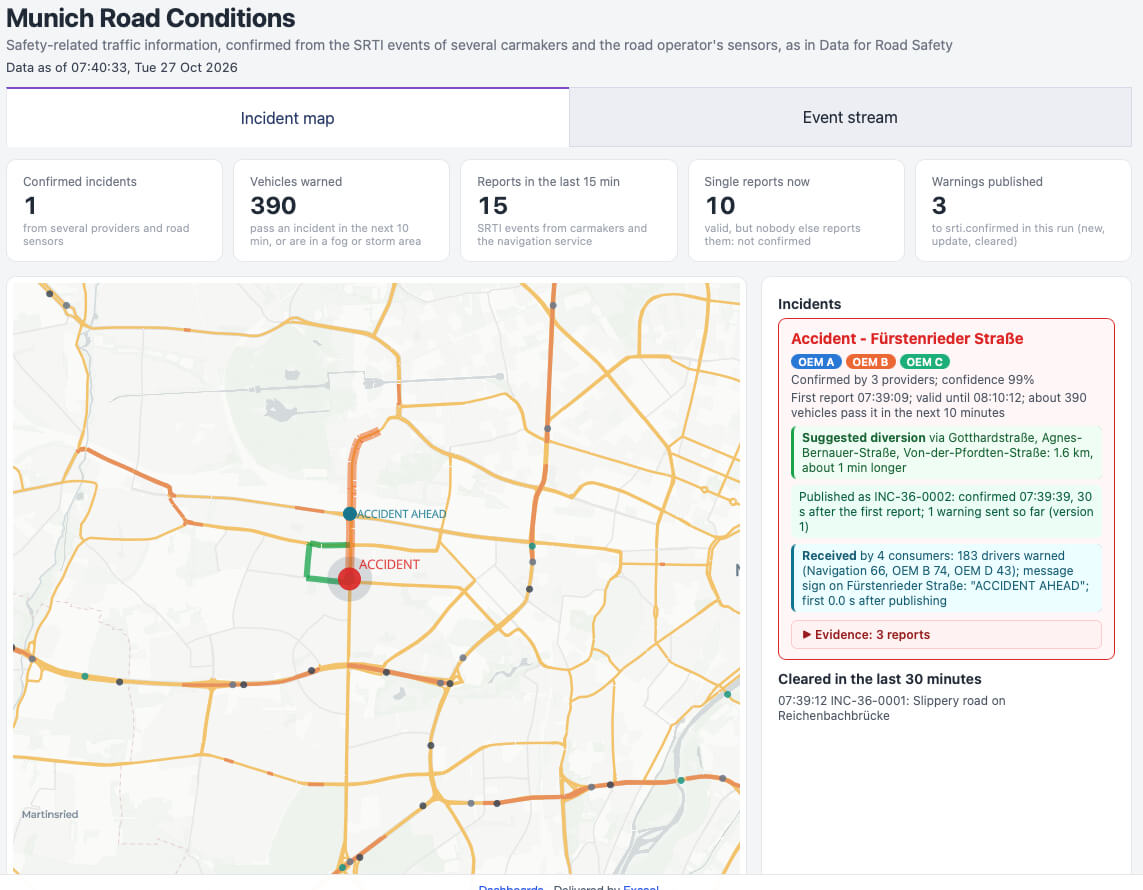
The accident in v2, confirmed by three carmakers 30 s after the first report. The card shows the suggested diversion (green on the map), the published warning, and who received it: 183 drivers through three providers, and a road operator message sign reading “ACCIDENT AHEAD”.
5. Why, and who was told. “Why was it confirmed, and who got the warning?” The agent queries the evidence and receipt tables, shows the SQL, and answers. “What did we publish?” comes from OUTBOUND_MESSAGES.
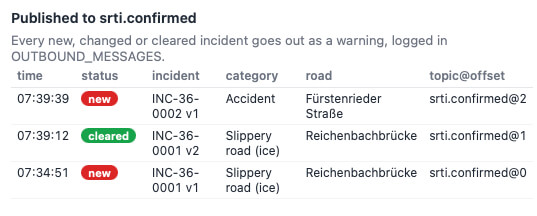
Every new, changed or cleared incident goes out to the Kafka topic srti.confirmed. The ice on the Reichenbachbrücke was confirmed after all, by OEM B together with a road weather sensor, and cleared once OEM B withdrew its report. The accident follows as a new warning.
Limits and How To Try It
The road network, traffic counts, roadworks, weather and accident history are real open data. The partners, their events and the sensor readings are simulated, because DFRS data is not openly licensed. The MDS connector (EDC), identity and enforced usage policies are not part of this iteration; the demo starts where events reach the partner’s node.
To try it you need Exasol Personal and about 12 GB of disk: clone the repo, run ./setup.sh, then ./demo sim run --start 07:30 --speed 3, and open your agent in the repo folder.