

What If Your Database Was Your AI Lab?

A retailer wants to train a model to identify potentially fraudulent transactions. The data already lives in Exasol: transaction history, customer attributes, and account activity.
A conventional workflow may export part of that data into a separate development environment for model training. Once exported, that dataset becomes another copy to maintain as the source data changes.
Serving the model introduces another component. Applications need a way to send transaction attributes to the model and consume its predictions, often through a separate serving endpoint. The workflow now spans the database, development environment, and serving infrastructure, each with its own dependencies.
Exasol AI Lab takes a different approach: connect the model development environment to data in Exasol, and use SQL as a path to suitable inference workloads.
Following Fraud Detection Through AI Lab
AI Lab is a Jupyter-based development environment that connects to Exasol. The notebook can query the data in Exasol directly rather than relying on a separately maintained export.
From there, the workflow has four stages:
Develop. In the notebook, explore the transaction data and identify features that may help distinguish fraudulent transactions from legitimate ones, such as transaction amount, account age, and time-of-day patterns.
Train. Use those features to train a classification model with a library such as scikit-learn. You can then evaluate the model, refine the features, and iterate against data available through the Exasol connection without maintaining a separate exported training dataset.
Deploy. For suitable workloads, a trained model can be packaged for UDF-based inference so Exasol can invoke the deployed logic from SQL.
Infer. With the model packaged as a UDF, fraud scoring can become part of a SQL query. For example, an illustrative query might look like this:
SELECT
      transaction_id,
      amount,
      account_age_days,
      fraud_score(amount, account_age_days, hour_of_day) AS risk_score
FROM transactions
WHERE transaction_date = CURRENT_DATE;
Here, fraud_score() is illustrative rather than a built-in Exasol function; it represents a UDF wrapping a trained model. To the application calling it, the model looks like another function in the SQL query. Dashboards, applications, and scheduled jobs that query Exasol can consume the fraud score alongside the transaction data.
Why the UDF Step Matters
A UDF is a function written in Python, Java, Lua, or R that Exasol can invoke from SQL. It processes the supplied inputs and returns a result, which can include model inference.
This is what enables SQL-based inference: the query invokes the UDF, and the UDF applies the deployed model logic to its inputs.
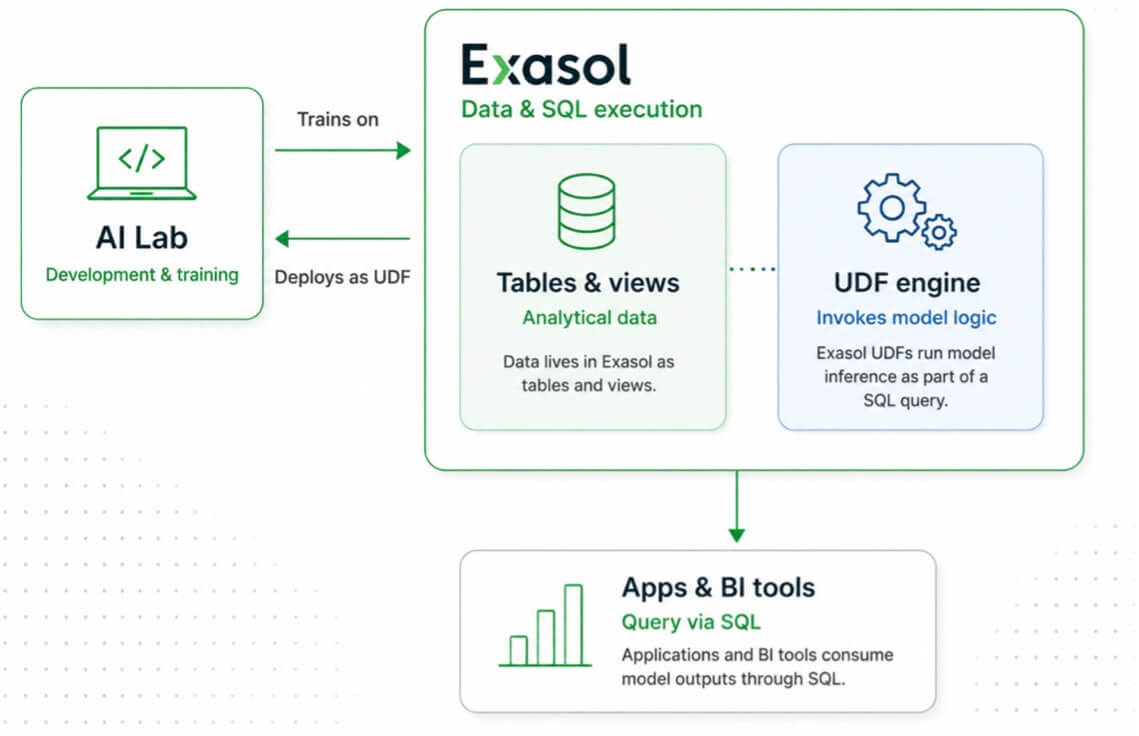
Three Pieces, One Workflow
The architecture has three distinct components:
AI Lab provides the development and training environment. Data scientists use the notebook environment to explore data, develop features, and train models.
Exasol provides the data and SQL execution. The analytical data remains available in Exasol for the development and inference workflows.
UDFs provide the path to SQL-based inference. For suitable models, deployed model logic can be invoked from a SQL query.
Getting It Running
Start with the Exasol AI Lab GitHub repository.
- Open the AI Lab interface and log in.
- Work through
main_config.ipynbto configure your Exasol connection. - Run
first_steps.ipynbfor a guided introduction to the environment. - Move into the example notebooks and the User Guide for additional features and deployment options.
Before upgrading an existing installation, check the current AI Lab release notes for changes to extensions, model storage, or deployment requirements.
The Takeaway
The fraud-detection example illustrates the core idea. AI Lab keeps model development connected to data in Exasol rather than requiring a separately maintained export for the development workflow. For suitable models packaged for UDF-based inference, applications can then invoke the deployed logic through SQL without adding a separate model-serving endpoint for that workflow.
AI Lab provides the development environment. Exasol provides the data and SQL execution. UDFs provide the path from a trained model to SQL-based inference.
The core idea is simple: keep model development close to the data and use SQL as the interface for suitable inference workloads.